Fake CAPTCHA Installer Deploys a Signed Updater That Can Run Remote Programs
Summary
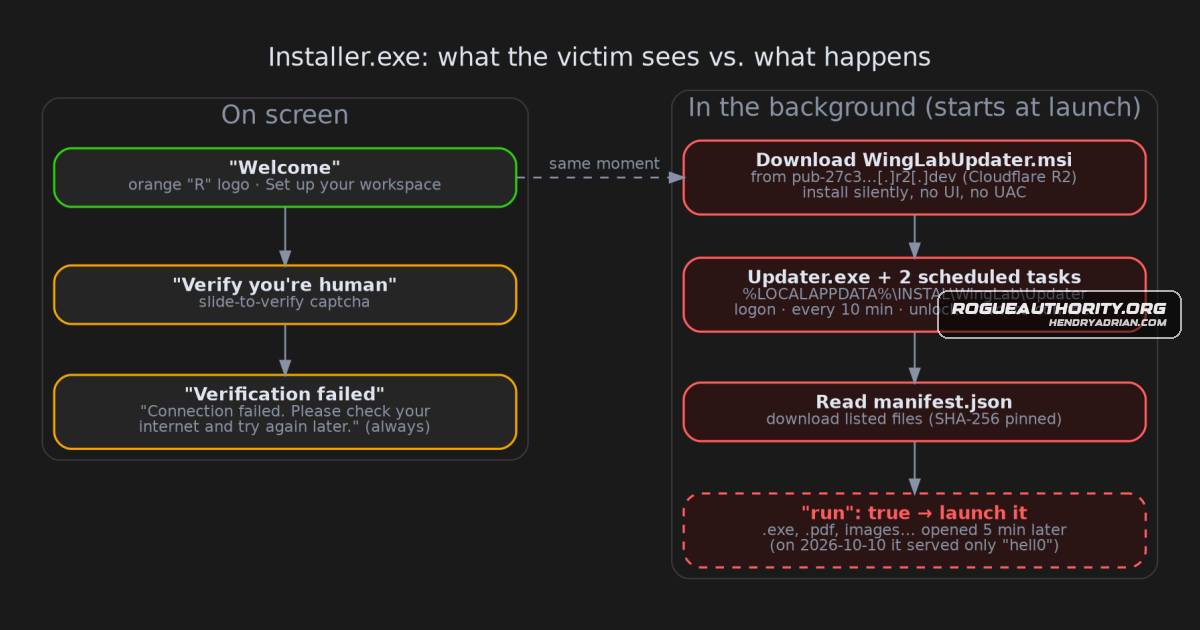
Analysis found a signed installer that displays an unwinnable CAPTCHA while silently installing an updater with recurring scheduled tasks. It can download and run files from a Cloudflare R2 bucket; at analysis time, the bucket served only a test file.
Key points
- The installer begins its background activity as soon as its window opens; the CAPTCHA always fails, according to code analysis.
- It silently downloads and installs a second signed package in the user's profile, without requiring administrator permission.
- The updater creates scheduled tasks that run at logon, every 10 minutes, on unlock, and on Remote Desktop connection.
- A manifest from the same R2 bucket can direct the updater to download and open files, including executables; downloads are checked against SHA-256 hashes.
- At the time of analysis, the manifest directed the updater to a test text file containing “hell0”; no real payload was being served.
- The researchers report confirming the installation through code review and sandbox runs. They did not contact the bucket themselves or identify who was behind the activity.
- Users who ran a similar installer are advised to check for the named scheduled tasks and folder, remove them, and run a full scan; defenders are given task, registry, user-agent, and network indicators.
Article Details
- Attack Vectors
- A deceptive Installer.exe presents a CAPTCHA designed to fail while downloading and silently installing WingLabUpdater.msi in the background.
- The MSI installs Updater.exe in the user's profile and creates scheduled tasks that run at logon, every ten minutes, on unlock, and on Remote Desktop connection.
- Updater.exe retrieves manifest.json from a Cloudflare R2 bucket; the manifest can direct it to download and launch files, including executables.
- Defensive Notes
- Hunt for scheduled tasks named INSTAL WingLab Update Check and INSTAL WingLab Apply Pending Update; older builds may use Installer Update Check and Installer Run Pending.
- Check for %LOCALAPPDATA%\INSTAL\WingLab and the registry key HKCU\Software\INSTAL\WingLab\UpdaterInfrastructure.
- Block the identified R2 bucket host and consider alerting on *.r2.dev downloads initiated by programs in user-profile folders.
- If affected, remove the WingLab Update Infrastructure application, its folder and scheduled tasks, and run a full scan.
Indicators of compromise
| Type | Indicator | Context |
|---|---|---|
| HOSTNAME | pub-27c3bfa2dbc541f9917174d45462cd0e[.]r2[.]dev | R2 bucket host used by the updater to retrieve its manifest and installer package. |
| SHA256 | 164b98f315ba8ed9fcd011843c3f55ead965f199e79c692b085da2a5a731566d | SHA-256 hash of the updater that retrieves instructions and can download and launch files. |
| SHA256 | 560f576d60dfb1e61eed758e06910b32a42145ecb8271f97fdc76789f6a27659 | SHA-256 hash of the deceptive Installer.exe. |
| SHA256 | b50aedc0305444d6b3a2e71ae71bcb99f415af72570b099b7c025b7e4363d42c | SHA-256 hash of the silently installed WingLabUpdater.msi. |
| SHA256 | f09f121d8a8116a6f875702224b12b242d65523ce1099eabc857db9ced4b0c2d | SHA-256 hash of UpdaterTaskCA.dll, listed as an artifact associated with the installer. |
MITRE ATT&CK
T1036 · MasqueradingThe installer uses a deceptive, always-failing CAPTCHA and WingLab application presentation to disguise its background installation activity.T1053.005 · Scheduled TaskThe MSI creates Windows scheduled tasks that run periodically and on logon, unlock, and Remote Desktop connection.T1105 · Ingress Tool TransferInstaller.exe downloads WingLabUpdater.msi, and Updater.exe can download files listed in the remote manifest.T1218.007 · MsiexecThe MSI is installed silently using Windows Installer, according to the article's description of the installation.T1547.001 · Registry Run Keys / Startup FolderThe updater creates scheduled tasks configured to run at user logon.
People
Vendors
Products
Tools
ANY.RUNin public sandbox runs on ANY.RUN and Triage, which both saw the MSI being fetched and installed.capaTools used: Malcat, capa, objdump, msitools, tshark, a sandboxed Wine environment, ANY.RUN and Recorded Future Triage.MalcatTools used: Malcat, capa, objdump, msitools, tshark, a sandboxed Wine environment, ANY.RUN and Recorded Future Triage.msitoolsTools used: Malcat, capa, objdump, msitools, tshark, a sandboxed Wine environment, ANY.RUN and Recorded Future Triage.objdumpTools used: Malcat, capa, objdump, msitools, tshark, a sandboxed Wine environment, ANY.RUN and Recorded Future Triage.Recorded Future TriageTools used: Malcat, capa, objdump, msitools, tshark, a sandboxed Wine environment, ANY.RUN and Recorded Future Triage.tsharkTools used: Malcat, capa, objdump, msitools, tshark, a sandboxed Wine environment, ANY.RUN and Recorded Future Triage.