Fake Windows Update Steals Passwords and Logs Every Attempt
Summary
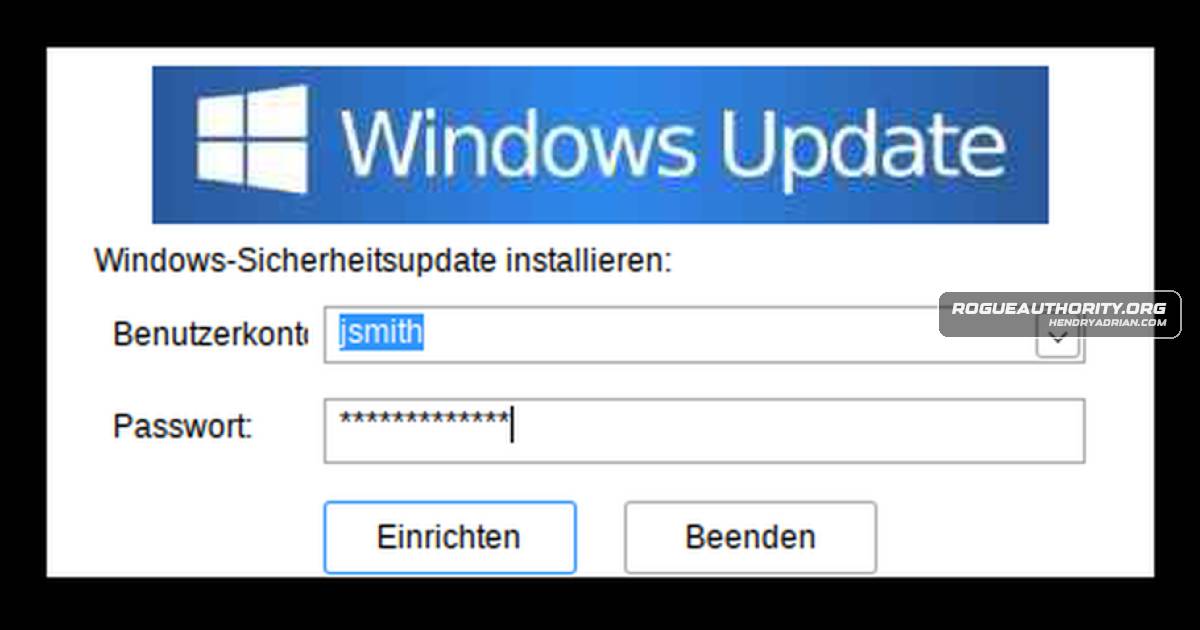
PolicyMgr.exe impersonates a German Windows Update prompt, saves every entered password in a local text file before checking it, and has no built-in upload capability. Researchers link it to another tool signed with the same certificate.
Key points
- The fake update prompt pre-fills account names from the computer and, on domain-connected systems, queries the domain controller for user accounts.
- Each password attempt, including wrong guesses and typos, is written in plain text to %APPDATA%\PolicyMgr\policyMgr.log before Windows checks it.
- The program repeats the prompt until a password works, then displays a fake successful-installation message and exits.
- The analyzed sample has no code to upload the log; the article says someone would need to retrieve it by another means.
- The sample is signed with a valid EV certificate also used to sign a DLL containing an Xray proxy tunnel; the article links it to an earlier PolicyMgr.exe build through identical resources.
- Automated sandboxes gave the file low threat scores because it waits for a person to enter a password; the researchers demonstrated that interaction was needed to trigger credential logging.
- The article advises users to close password-requesting update pop-ups and change any passwords entered; defenders are given file paths, certificate serials, and behavioral indicators to hunt.
Article Details
- Attack Vectors
- PolicyMgr.exe presents a fake German-language Windows Update dialog and uses account names gathered from the computer or domain controller to prompt the user for a password.
- It records each submitted account and password in plain text at %APPDATA%\PolicyMgr\policyMgr.log before checking the password with LogonUserW; failed attempts are recorded too.
- The program saves network details to %APPDATA%\PolicyMgr\policyMgr.cfg on the first attempt. The article reports no code to upload or otherwise transmit the captured passwords.
- Defensive Notes
- Windows Update does not ask users to select an account and enter a password in a pop-up. Close such a prompt and notify IT.
- If a password was entered, change it and any other passwords tried in the prompt.
- Hunt for %APPDATA%\PolicyMgr\policyMgr.log and %APPDATA%\PolicyMgr\policyMgr.cfg; treat recorded credentials as compromised and inspect the entire log for leftover entries.
- Check for files signed with certificate serial 7af487b9452c297bfa92808051e5bb69 or 66096fe6… and look for the related version.dll tunnel.
- Monitor for unusual SAMR account-list requests from programs in user AppData or Temp locations, and for failed logons followed by a success shortly after a new program starts.
- Look for the strings “Windows-Sicherheitsupdate installieren:” and “PolicyDesk policy manager wurde erfolgreich installiert” in memory or on disk.
Indicators of compromise
| Type | Indicator | Context |
|---|---|---|
| MD5 | 81d861b626edab405d60d51ce67eea3c | MD5 of the analyzed malicious PolicyMgr.exe password-logging sample. |
| SHA1 | 11af2e2050f7d6619c51ec8571886e18c3c376b8 | SHA1 of the analyzed malicious PolicyMgr.exe password-logging sample. |
| SHA256 | 5b96280469074f69f4805caddae054c1bdab3dd0735e7f64d79f26f745bccee3 | SHA256 of the analyzed malicious PolicyMgr.exe password-logging sample. |
MITRE ATT&CK
T1033 · System Owner/User DiscoveryThe program gathers local account names and, on domain-joined computers, requests the domain controller's user list to populate the dialog.T1036 · MasqueradingThe executable poses as a ManageEngine/Zoho PolicyDesk product and presents a fake Windows Update prompt.T1056.003 · Web Portal CapturePolicyMgr.exe captures passwords entered into its fake Windows Update dialog and writes them to a plain-text log.
Vendors
Products
Microsoft WindowsEarlier today we observed a signed DLL that hides an Xray proxy tunnel inside Windows programs.PolicyDeskHere a Croatian company’s certificate sits on a file whose own description says it’s a ManageEngine “PolicyDesk” tool, copyright Zoho Corporation, and whose built-in settings file (the manifest) claims to be Windows’PolicyMgr.exeThe file is called PolicyMgr.exe.
Tools
ANY.RUNThe ANY.RUN sandbox for detonation, and Triage for a hash lookup (search only, no upload).capacapa, FLOSS and peframe for capability and string triage.Capstonecapstone and objdump to disassemble the obfuscated code, and a short Python script to decode its hidden strings.FLOSScapa, FLOSS and peframe for capability and string triage.MalcatMalcat for static analysis, decompilation, YARA and KesaKode similarity lookups.objdumpcapstone and objdump to disassemble the obfuscated code, and a short Python script to decode its hidden strings.peframecapa, FLOSS and peframe for capability and string triage.speakeasySpeakeasy for emulation (it stopped early; more on that below).Triagecapa, FLOSS and peframe for capability and string triage.WineA locked-down, offline Wine sandbox to run the program and type into its dialog.