
Phishing-to-RMM Attacks Exploit Trusted Brands and Legitimate Remote-Access Tools
Summary
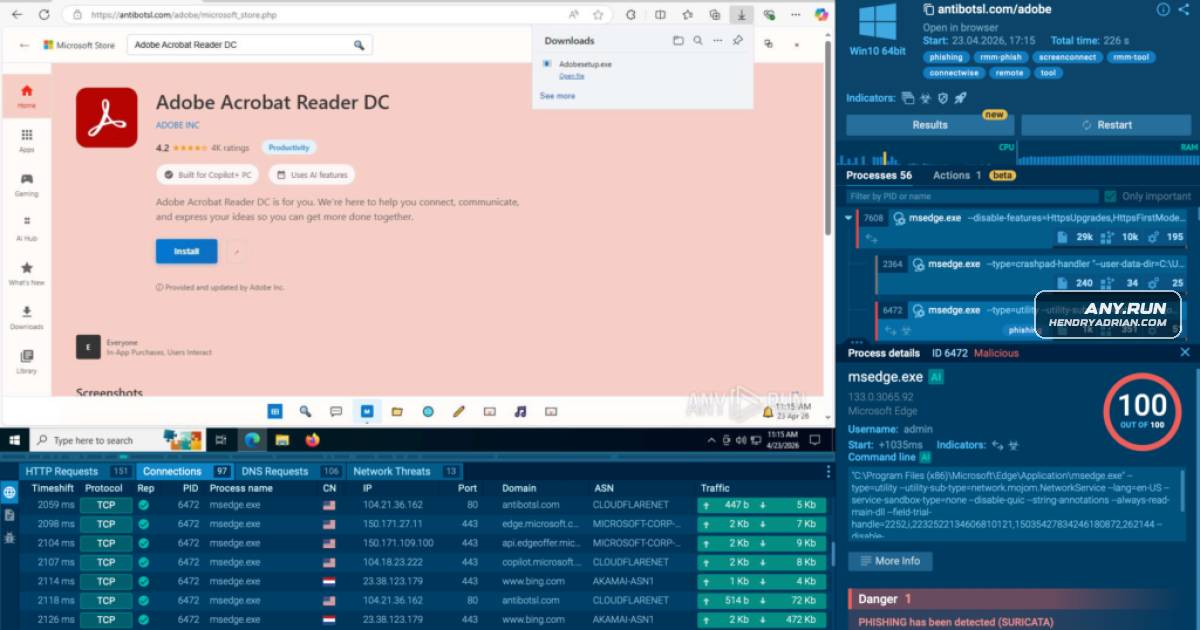
ANY.RUN describes phishing campaigns that impersonate Microsoft, Adobe, and OneDrive to deliver legitimate RMM tools. It urges SOC teams to detect the full attack chain, including execution and outbound connections, rather than rely on domain reputation.
Key points
- ANY.RUN reports attackers use fake Microsoft, Adobe, and OneDrive pages to lure users into downloading RMM tools such as ScreenConnect and LogMeIn Rescue.
- A described example delivers a VBS script that attempts to weaken SmartScreen and Microsoft Defender, then downloads LogMeIn Rescue and installs it via msiexec.
- The article says campaigns may use legitimate platforms or compromised websites, making domain reputation alone an unreliable detection signal.
- ANY.RUN reports more than 50 public analyses per week for one campaign, identified by suricataID 84002229.
- The recommended detection approach correlates the phishing page, delivered file or script, endpoint execution, security-control changes, RMM installation, and outbound connections.
- The article presents ANY.RUN's sandbox and threat-intelligence tools for examining suspicious files and URLs and tracking related activity.
Article Details
- Defense Focus
- Detect phishing-to-RMM activity by correlating the lure and download with endpoint execution, security-control changes, RMM installation, and subsequent outbound connections rather than relying on domain reputation alone.
- Detection Methods
- Correlate phishing pages and download context with the files or scripts delivered and their endpoint execution path.
- Investigate unusual RMM installation behavior, including quiet installation through msiexec.
- Look for attempts to disable SmartScreen, weaken Microsoft Defender protections, or remove Mark-of-the-Web.
- Review outbound connections following unexpected RMM execution.
- Inspect suspicious URLs and files in a controlled sandbox and use retrospective threat-intelligence searches to find related activity.
- Treat unusual URI paths on existing or compromised websites as a potential phishing signal, even when the domain has no malicious reputation.
- Data Sources
- Phishing URLs and landing-page content
- Downloaded files and scripts
- Endpoint execution flow
- Security-control changes and Mark-of-the-Web removal
- RMM installation activity
- Outbound connection activity
- Public analyses in ANY.RUN Threat Intelligence
- Rule Types
- ANY.RUN Threat Intelligence Lookup queries using threatName filters
- Platforms
- Interactive malware-analysis sandbox
- Threat-intelligence lookup
- Defensive Actions
- Analyze suspicious URLs, files, and scripts in a controlled sandbox.
- Validate whether RMM installations and outbound connections are expected for the endpoint and user.
- Use retrospective threat-intelligence searches to identify related phishing-to-RMM activity.
- Investigate the full chain rather than treating a legitimate RMM installer or trusted domain as sufficient evidence of benign activity.
Indicators of compromise
| Type | Indicator | Context |
|---|---|---|
| HOSTNAME | vmail[.]app[.]n8n[.]cloud | Host of a fake Microsoft OneDrive phishing page that prompted users to download a ScreenConnect installer. |
MITRE ATT&CK
T1036.005 · Match Legitimate Resource Name or LocationInstallers are disguised as Adobe software or a PDF document, including Adobesetup.exe concealing ScreenConnect.T1105 · Ingress Tool TransferThe VBS script silently downloads the LogMeIn Rescue installer; other campaigns deliver ScreenConnect installers.T1204.002 · Malicious FileThe described chain requires a user to execute a delivered file or VBS script for the RMM installation to proceed.T1218.005 · MshtaThe LogMeIn Rescue installer is run quietly through msiexec.T1219 · Remote Access ToolsAttackers use legitimate RMM software, including ScreenConnect and LogMeIn Rescue, to obtain remote access to victims’ devices.T1553.005 · Mark-of-the-Web BypassThe script removes Mark-of-the-Web from the downloaded installer.T1562.001 · Disable or Modify ToolsThe VBS script attempts to disable SmartScreen and weaken Microsoft Defender protections.T1566 · PhishingAttackers use phishing pages impersonating Microsoft, Adobe, and OneDrive to lure users into downloading RMM software.
Vendors
Products
Action1 RMMTools including ScreenConnect, LogMeIn Rescue, Datto RMM, ITarian, Action1 RMM, NetSupport, Syncro, MeshAgent, SimpleHelp, RustDesk, and Splashtop are seen in these chains.Datto RMMTools including ScreenConnect, LogMeIn Rescue, Datto RMM, ITarian, Action1 RMM, NetSupport, Syncro, MeshAgent, SimpleHelp, RustDesk, and Splashtop are seen in these chains.Interactive SandboxANY.RUN positions its Interactive Sandbox and Threat Intelligence as ways to analyze suspicious URLs and trace phishing-to-RMM activity retrospectively.ITarianTools including ScreenConnect, LogMeIn Rescue, Datto RMM, ITarian, Action1 RMM, NetSupport, Syncro, MeshAgent, SimpleHelp, RustDesk, and Splashtop are seen in these chains.LogMeIn RescueAdobe, and OneDrive pages to deliver legitimate remote management tools like ScreenConnect and LogMeIn Rescue, creating a visibility gap for SOC teams.MeshAgentTools including ScreenConnect, LogMeIn Rescue, Datto RMM, ITarian, Action1 RMM, NetSupport, Syncro, MeshAgent, SimpleHelp, RustDesk, and Splashtop are seen in these chains.Microsoft Defender Antimalware Platform[T1112 ] Modify Registry / System Settings – The script weakens defenses by disabling protections and changing security-related settings (‘disable SmartScreen, and weaken Microsoft Defender protections’).Microsoft Defender SmartScreen[T1112 ] Modify Registry / System Settings – The script weakens defenses by disabling protections and changing security-related settings (‘disable SmartScreen, and weaken Microsoft Defender protections’).NetSupportTools including ScreenConnect, LogMeIn Rescue, Datto RMM, ITarian, Action1 RMM, NetSupport, Syncro, MeshAgent, SimpleHelp, RustDesk, and Splashtop are seen in these chains.RustDeskTools including ScreenConnect, LogMeIn Rescue, Datto RMM, ITarian, Action1 RMM, NetSupport, Syncro, MeshAgent, SimpleHelp, RustDesk, and Splashtop are seen in these chains.ScreenConnectusing fake Microsoft, Adobe, and OneDrive pages to deliver legitimate remote management tools like ScreenConnect and LogMeIn Rescue, creating a visibility gap for SOC teams.SimpleHelpTools including ScreenConnect, LogMeIn Rescue, Datto RMM, ITarian, Action1 RMM, NetSupport, Syncro, MeshAgent, SimpleHelp, RustDesk, and Splashtop are seen in these chains.SplashtopTools including ScreenConnect, LogMeIn Rescue, Datto RMM, ITarian, Action1 RMM, NetSupport, Syncro, MeshAgent, SimpleHelp, RustDesk, and Splashtop are seen in these chains.SyncroTools including ScreenConnect, LogMeIn Rescue, Datto RMM, ITarian, Action1 RMM, NetSupport, Syncro, MeshAgent, SimpleHelp, RustDesk, and Splashtop are seen in these chains.Threat Intelligence FeedsANY.RUN solutions include Interactive Sandbox, Threat Intelligence Lookup, Threat Intelligence Feeds, and integrations for SOC workflows across SIEM, SOAR, EDR, and other security tools.Threat Intelligence LookupANY.RUN solutions include Interactive Sandbox, Threat Intelligence Lookup, Threat Intelligence Feeds, and integrations for SOC workflows across SIEM, SOAR, EDR, and other security tools.
Countries
AustraliaOrganizations in the United States, Canada, Europe, and Australia are exposed, especially in Education, Technology, Banking, Government, Manufacturing, and Finance.CanadaOrganizations in the United States, Canada, Europe, and Australia are exposed, especially in Education, Technology, Banking, Government, Manufacturing, and Finance.United StatesOrganizations in the United States, Canada, Europe, and Australia are exposed, especially in Education, Technology, Banking, Government, Manufacturing, and Finance.
Industries
BankingOrganizations in the United States, Canada, Europe, and Australia are exposed, especially in Education, Technology, Banking, Government, Manufacturing, and Finance.EducationOrganizations in the United States, Canada, Europe, and Australia are exposed, especially in Education, Technology, Banking, Government, Manufacturing, and Finance.financeOrganizations in the United States, Canada, Europe, and Australia are exposed, especially in Education, Technology, Banking, Government, Manufacturing, and Finance.GovernmentOrganizations in the United States, Canada, Europe, and Australia are exposed, especially in Education, Technology, Banking, Government, Manufacturing, and Finance.ManufacturingOrganizations in the United States, Canada, Europe, and Australia are exposed, especially in Education, Technology, Banking, Government, Manufacturing, and Finance.TechnologyOrganizations in the United States, Canada, Europe, and Australia are exposed, especially in Education, Technology, Banking, Government, Manufacturing, and Finance.