Signed Werkstatt Remote Agent Hides Operator Activity Behind Fake Lock Screen
Summary
Researchers analyzed a signed Windows remote-access toolkit whose lock screen hides the real desktop from the local user while allowing remote input. Its malicious use is suspected, but no victim or delivery method was identified.
Key points
- WerkstattAgent and its watchdog run as Windows services with SYSTEM rights and connect to v2[.]werkstattremote[.]com; the toolkit also includes MeshCentral’s remote-desktop agent.
- The agent can run commands, collect detailed system inventories, display a server-controlled lock screen, and update or uninstall itself.
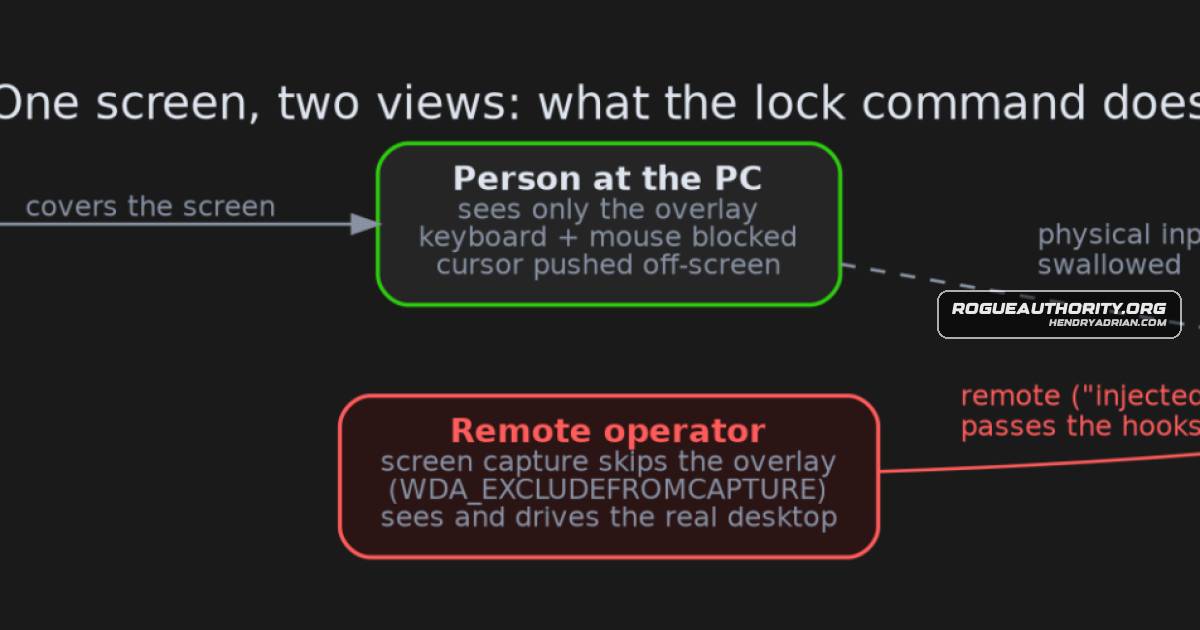
- The lock overlay is excluded from screen capture, blocks local keyboard and mouse input, and permits injected remote input—so the local user and remote operator see different desktops.
- The agent silently adds Windows Defender exclusions; its watchdog accepts updates without signature or hash checks, and uninstall leaves the exclusions behind.
- Code analysis and an isolated Wine sandbox confirmed key capabilities, including registration, command execution, and displaying the overlay.
- The command server was offline during testing, and researchers had no victim or installer evidence; suspected remote-access fraud is an assessment, not a confirmed use.
Article Details
- Attack Vectors
- A custom remote-access agent and watchdog are installed as Windows services with SYSTEM rights; the article does not identify the installer or delivery lure.
- The agent connects to its command server over WebSocket and accepts commands to execute command lines, display or remove a lock-screen overlay, and uninstall.
- The agent silently adds Windows Defender exclusions for its installation folders and three programs.
- The watchdog retrieves and installs agent updates as SYSTEM without checking their signature or hash.
- A lock-screen overlay is hidden from screen capture, blocks local keyboard and mouse input while allowing injected remote input, and lets the operator interact with the underlying desktop.
- Defensive Notes
- Look for the WerkstattAgent and WerkstattWatchdog services and HKLM\SOFTWARE\Werkstatt.
- Inspect and remove Windows Defender exclusions for C:\Program Files\Werkstatt and C:\Program Files\Mesh Agent after cleanup; the built-in uninstall leaves the exclusions behind.
- Treat MeshAgent signed by ALI YILDIZ as hostile, as advised by the article.
- SetWindowDisplayAffinity combined with low-level input hooks in the same process is identified as a useful hunting combination.
- If an unexpected “device locked, please wait” screen appears while someone is connected, disconnect from the internet; contact the bank if logged in.
Indicators of compromise
| Type | Indicator | Context |
|---|---|---|
| DOMAIN | v2[.]werkstattremote[.]com | Command-and-control domain used by WerkstattAgent and WerkstattWatchdog. |
| DOMAIN | werkstattremote[.]com | Listed by the article as an additional domain associated with the Werkstatt toolkit. |
| SHA256 | 6c9e5b2cdf0fc8a24b1158c6e37b363da8313cbc963e0e63a3289568ed991667 | SHA-256 hash of the MeshAgent.exe sample signed with the same certificate as the Werkstatt components. |
| SHA256 | 76f4053fc0d639591b809faf3d9bdc5758dcdabe8fc4a07ae87008988fbcee81 | SHA-256 hash of the WerkstattAgent.exe sample. |
| SHA256 | e0569a94501a3a97cc59cb58cacdea06f82ddf7f7a178e2a5f43b1ad4096b9c1 | SHA-256 hash of the WerkstattWatchdog.exe sample. |
MITRE ATT&CK
T1059.001 · PowerShellOn first start, the agent runs a hidden PowerShell window to add Windows Defender exclusions.T1059.003 · Windows Command ShellThe server can instruct the agent to run any command line as SYSTEM.T1082 · System Information DiscoveryThe agent collects and uploads system details including CPU, memory, disks, BIOS, Windows version, domain, network adapters, installed software, and recent updates.T1105 · Ingress Tool TransferThe watchdog downloads a replacement agent from the server and overwrites the existing one without signature or hash verification.T1543.003 · Windows ServiceWerkstattAgent and WerkstattWatchdog install and run as Windows services.T1562.001 · Disable or Modify ToolsThe agent adds Windows Defender exclusions for its install folders and all three programs.
People
Malware
Vendors
Products
Tools
ANY.RUNTools used: Malcat, capa, capstone, a sandboxed Wine run with a home-made fake command server, ANY.RUN and VirusTotal.capaTools used: Malcat, capa, capstone, a sandboxed Wine run with a home-made fake command server, ANY.RUN and VirusTotal.CapstoneTools used: Malcat, capa, capstone, a sandboxed Wine run with a home-made fake command server, ANY.RUN and VirusTotal.CertGraveyardThe certificate has been reported to the CA and added to the CertGraveyard.MalcatTools used: Malcat, capa, capstone, a sandboxed Wine run with a home-made fake command server, ANY.RUN and VirusTotal.REMnuxThis analysis and write-up were produced by Claude (Opus 5.5), working as an agent in Claude Code on a REMnux analysis VM.VirusTotalTools used: Malcat, capa, capstone, a sandboxed Wine run with a home-made fake command server, ANY.RUN and VirusTotal.