Fake Disk Manager Installer Deploys RdViewer as a SYSTEM-Level Backdoor
Summary
Analysis finds a signed fake disk-manager installer that deploys a relabelled RdViewer client and service, configured to connect to an operator-controlled relay. Delivery method and whether remote access requires a password remain unknown.
Key points
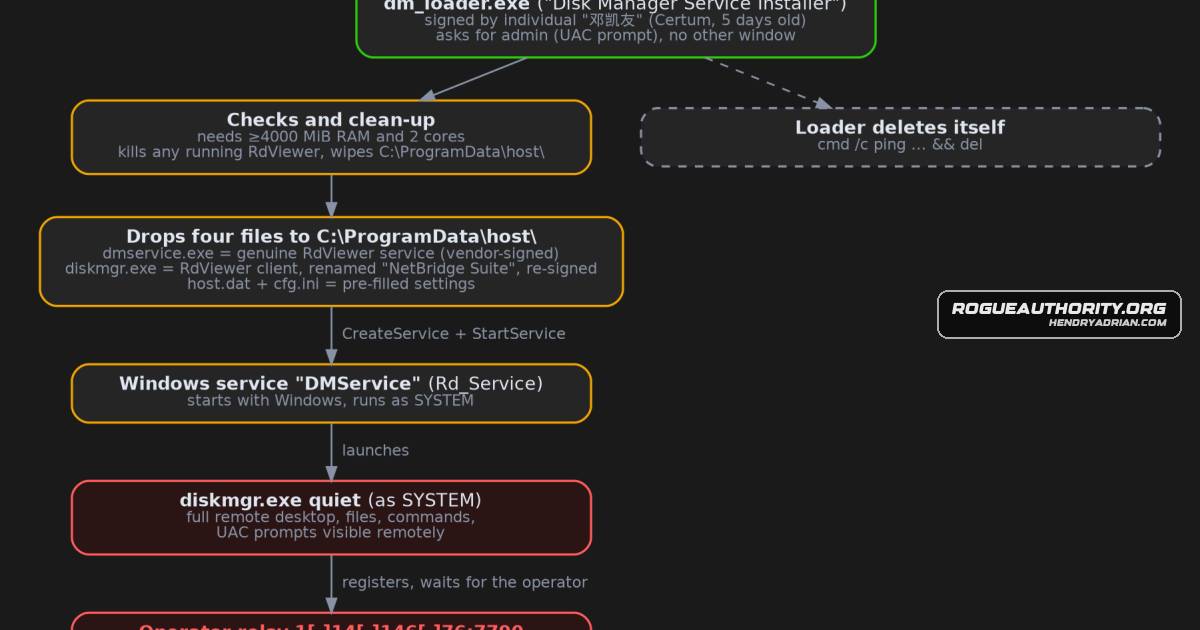
- The installer requests administrator rights, silently drops four files, creates an automatically starting Windows service, and deletes itself.
- It installs genuine RdViewer components under misleading names; the client is relabelled as Halcyon Networks NetBridge Suite and re-signed with a recently issued certificate.
- The service runs as SYSTEM, and the client is configured to connect to 1.14.146.76:7790 through an encrypted settings file.
- The loader stops existing RdViewer processes and replaces files in C:\ProgramData\host\.
- Two public sandboxes observed the client register with the relay and remain connected; no operator connection was seen during the recordings.
- The delivery method is unknown, and the analysis could not establish whether remote access requires an additional password or relay-side step.
- The article recommends checking for the DMService service and C:\ProgramData\host\ folder, and gives defenders service, process, and outbound-traffic detection guidance.
Article Details
- Attack Vectors
- A signed installer posing as a Disk Manager requests administrator rights, then silently installs and configures RdViewer for remote access.
- The installer drops a relabelled RdViewer client and a genuine RdViewer service, configures the client to connect to an operator relay, and creates an automatically starting Windows service.
- The installer terminates existing RdViewer-related processes and services, then deletes itself.
- Defensive Notes
- Check for the DMService service, the Rd_Service service with an ImagePath under C:\ProgramData\host\, and the C:\ProgramData\host\ folder.
- Investigate diskmgr.exe running quietly as SYSTEM and outbound TCP connections to 1[.]14[.]146[.]76:7790.
- If RdViewer is not approved, investigate RdViewer binaries, including rdservice.exe and rdclient.exe, and files signed by 济南快安网络科技有限公司.
- Monitor for PromptOnSecureDesktop being set to 0.
- Treat unsigned or validly signed software cautiously; the article recommends investigating a disk tool that requests administrator rights and then opens no visible window.
Indicators of compromise
| Type | Indicator | Context |
|---|---|---|
| IPV4 | 1[.]14[.]146[.]76 | Relay configured in the dropped RdViewer settings; the article reports that the client connected to it and recommends blocking or alerting on outbound TCP to port 7790. |
| SHA256 | 7ed2a077a1ce34fcb182e5135ae75ad7bd96207c3204c9f343095f967bfa109f | SHA-256 hash of the genuine RdViewer service binary dropped by the installer as part of the remote-access setup. |
| SHA256 | 9db36c4f42395b676d31bf7dad3dce15a3e6f4acf3003f7383fb326c9062c29a | SHA-256 hash of cfg.ini, an encrypted settings file included with the remote-access installation. |
| SHA256 | dcb372ff16de08fd126d9fceb866343ad03795f58427e4c78e1c837f6cd140d8 | SHA-256 hash of host.dat, the encrypted settings file containing the configured relay. |
| SHA256 | e71149d889cc558e6328ea7ce3498cd858c26ab282cda9410ccc51f6275f7da6 | SHA-256 hash of the Disk Manager loader that installs and configures RdViewer for remote access. |
| SHA256 | fb60876621b2932fa2681d81a17ce8b79952fa3fb9a7ea77d5ba177433d8d76d | SHA-256 hash of the relabelled RdViewer client dropped as diskmgr.exe and configured to connect to the operator relay. |
MITRE ATT&CK
T1027.002 · Software PackingThe loader is packed with PECompact, which the article says unpacks the program in memory when it starts.T1036.005 · Match Legitimate Resource Name or LocationThe installer poses as a Disk Manager, and the RdViewer client is relabelled as NetBridge Suite by Halcyon Networks.T1059.003 · Windows Command ShellThe loader uses cmd /c to run a delayed self-deletion command.T1070.004 · File DeletionAfter installation, the loader runs a command that deletes its own file.T1219 · Remote Access ToolsThe installer deploys RdViewer, a remote-desktop product, and configures its client to connect to an operator relay for remote control.T1543.003 · Windows ServiceThe installer creates and starts the Rd_Service Windows service, configured to start automatically with Windows and run as SYSTEM.
People
Vendors
Products
Microsoft WindowsInstead it silently installs a commercial Chinese remote-desktop product, RdViewer, as a Windows service running with the highest privileges.RdViewerInstead it silently installs a commercial Chinese remote-desktop product, RdViewer, as a Windows service running with the highest privileges.
Tools
ANY.RUNTools used: Malcat, KesaKode, a sandboxed Wine environment with gdb/gcore, Ghidra, Triage and ANY.RUN.gdbTools used: Malcat, KesaKode, a sandboxed Wine environment with gdb/gcore, Ghidra, Triage and ANY.RUN.GhidraTools used: Malcat, KesaKode, a sandboxed Wine environment with gdb/gcore, Ghidra, Triage and ANY.RUN.KesaKodeTools used: Malcat, KesaKode, a sandboxed Wine environment with gdb/gcore, Ghidra, Triage and ANY.RUN.MalcatTools used: Malcat, KesaKode, a sandboxed Wine environment with gdb/gcore, Ghidra, Triage and ANY.RUN.REMnuxThis analysis and write-up were produced by Claude (Opus 5.5), working as an agent in Claude Code on a REMnux analysis VM.TriageTools used: Malcat, KesaKode, a sandboxed Wine environment with gdb/gcore, Ghidra, Triage and ANY.RUN.