
Phishing Campaign Uses Fake Bank of America Alert to Install Hidden ScreenConnect Client
Summary
A fake Bank of America alert leads Windows users to a multi-stage script chain that bypasses UAC, installs and hides ScreenConnect, and connects to attacker infrastructure. Mac users are directed to pages harvesting banking credentials and personal data.
Key points
- The phishing email impersonates Bank of America and directs recipients through malicious sites; the campaign was observed in a Huntress spamtrap on July 28.
- Windows visitors are prompted to download AccountGuardSetup.zip, containing a VBScript that launches nested Base64-encoded PowerShell stages.
- The scripts use an ICMLuaUtil COM-interface UAC bypass to install a custom ScreenConnect client with administrator privileges and no prompt.
- Additional scripts conceal the ScreenConnect service, restrict users’ ability to modify or uninstall it, and remove the staging scripts.
- The installed client connects to 217.60.195[.]167 over TCP port 8041.
- Non-Windows visitors are instead sent to phishing pages that solicit banking credentials, identity details, Social Security numbers, and payment-card data.
Article Details
- Attack Vectors
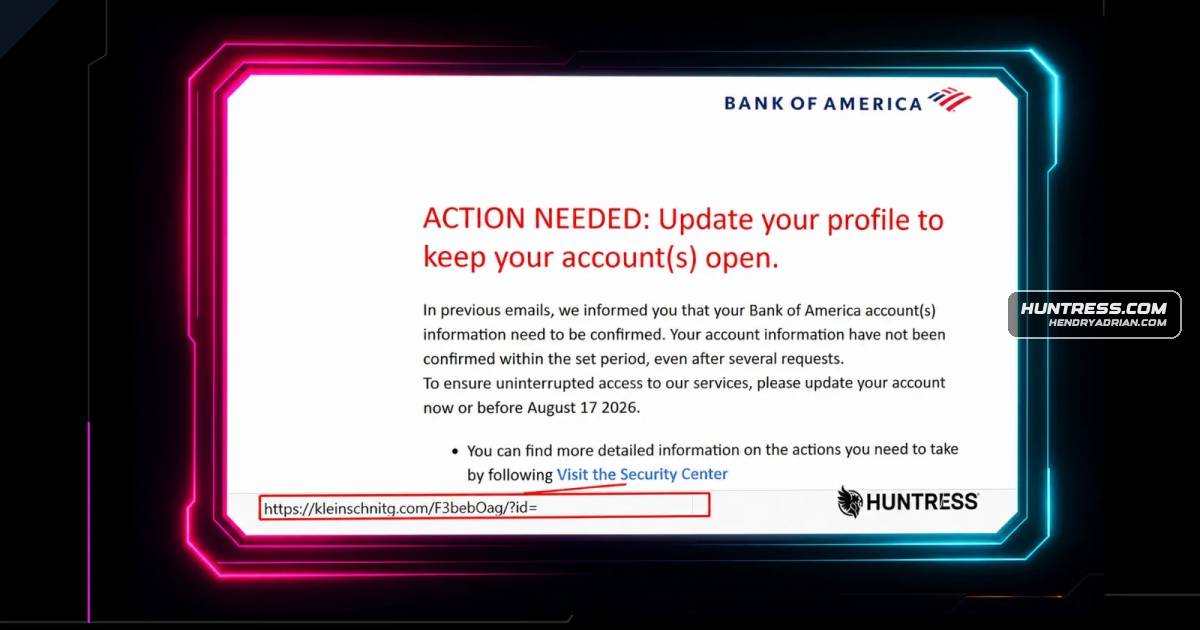
- A phishing email impersonated Bank of America and linked to a redirect that led to a fake bank webpage.
- Windows visitors were prompted to download AccountGuardSetup.zip, which contained a VBScript that launched a multi-stage, base64-encoded and AES-encrypted execution chain.
- The chain used an ICMLuaUtil COM-interface UAC bypass to run commands with Administrator privileges and install a custom ScreenConnect client.
- The installed ScreenConnect client connected to an IP address identified as command-and-control infrastructure.
- Additional scripts used registry changes and SDDL/ACL modifications to conceal the ScreenConnect installation and restrict users’ ability to modify or remove it.
- Non-Windows visitors were directed to phishing pages that solicited banking credentials and personal and payment-card information.
- Defensive Notes
- Check the sender address and inspect link destinations in the address bar; the article notes that the sender and links did not point to Bank of America’s legitimate domain.
- Do not run unexpected .vbs files or files delivered under a misleading security-product pretext.
- Investigate unexpected ScreenConnect installations, especially those installed with Administrator privileges or concealed under the service name Windows Security.
- Account for SDDL and ACL changes that may prevent users from seeing, modifying, or uninstalling the installed client.
Indicators of compromise
| Type | Indicator | Context |
|---|---|---|
| DOMAIN | bkofamerica[.]com | Domain identified in the article as malicious and used in the phishing email sender address. |
| DOMAIN | kleinschnitg[.]com | Malicious redirect domain linked from the phishing email. |
| DOMAIN | sectioncompil[.]com | Malicious domain hosting the phishing pages and malware delivery page. |
onlinebanking@ealerts[.]bkofamerica[.]com | Sender address used by the phishing email that impersonated Bank of America. | |
| IPV4 | 217[.]60[.]195[.]167 | ScreenConnect command-and-control IP address contacted by the installed client. |
| SHA256 | 3e404e542ae99eeb8827fa72e74dafeacc9b2a8af463a8e0789d7efb0a2dbfb8 | Hash of the malicious AccountGuardSetup.zip archive. |
| SHA256 | 6d1dae4794a80caac5eee48b6189e49c4146eac123bcb03d585194bf2b2a3f10 | Hash of the PowerShell script decoded from AccountGuardSetup.vbs. |
| SHA256 | bd987f9f493a234a74580eba1ab95d2178dd38d06bde7a67b991064e09cdc0ee | Hash of the decoded ScreenConnect installer. |
| SHA256 | d0913e83d10cadae7af2d737b6c5172638680dfe87d04fa67b509b9c41c0f4bf | Hash of the base64-encoded ScreenConnect installer. |
| SHA256 | ed9f4c15d2857260ce635aad8024b8abaaa010eb13bb0ac77f3a8c296a3c66f2 | Hash of the second-level decoded PowerShell script. |
| SHA256 | f580d528759829f62cba577c9126efe6478529f91609451c3a11e483b239e8a4 | Hash of the malicious AccountGuardSetup.vbs script. |
| URL | hxxps[:]//cdn[.]uploadtourl[.]com/3b154d8e-61be-4521-b3c3-75efb845a2e2_msi_base64.txt | Specific URL used to download the base64-encoded ScreenConnect installer. |
| URL | hxxps[:]//kleinschnitg[.]com/F3bebOag/?id=email | Phishing-email link that redirects visitors to the campaign’s phishing page. |
| URL | hxxps[:]//sectioncompil[.]com/wkudpl/main.php | Landing page for the Mac phishing flow. |
| URL | hxxps[:]//sectioncompil[.]com/wkudpl/notarize.php | Phishing page for visitors using a Mac or non-Windows User-Agent. |
| URL | hxxps[:]//sectioncompil[.]com/wkudpl/windows/download/AccountGuardSetup.zip | Malicious archive delivery URL. |
| URL | hxxps[:]//sectioncompil[.]com/wkudpl/windows/manage.html | Windows landing page used in the phishing campaign. |
MITRE ATT&CK
T1027 · Obfuscated Files or InformationThe scripts concealed content in nested base64-encoded data and AES-encrypted blobs.T1059.001 · PowerShellPowerShell scripts decoded embedded content, downloaded the installer, and executed commands in the attack chain.T1105 · Ingress Tool TransferThe PowerShell script downloaded the encoded ScreenConnect installer from a remote URL.T1112 · Modify RegistryA VBScript deleted the registry key pointing to the ScreenConnect installer.T1140 · Deobfuscate/Decode Files or InformationThe scripts decoded nested base64 content and decrypted AES-encrypted blobs to obtain subsequent payloads.T1219 · Remote Access ToolsThe attack installed a custom ScreenConnect remote monitoring and management client for remote access.T1548.002 · Bypass User Account ControlThe C# script used the ICMLuaUtil COM interface for a UAC bypass to run commands with Administrator privileges.T1566.002 · Spearphishing LinkThe phishing email contained a link that redirected recipients to campaign pages.
Products
Microsoft Windowsdifferent types of devices. When a target visits the webpage from a Mac (or a browser that reports a non-Windows User-Agent), they are redirected to a conventional phishing page that asks for the banking customer'sScreenConnectHomeBlogFake Bank of America "Action Needed" Phishing Email Deposits ScreenConnect Instead