
Fake Microsoft-Branded SysScan Sites Use Bogus Scans to Drive a Refund Scam
Summary
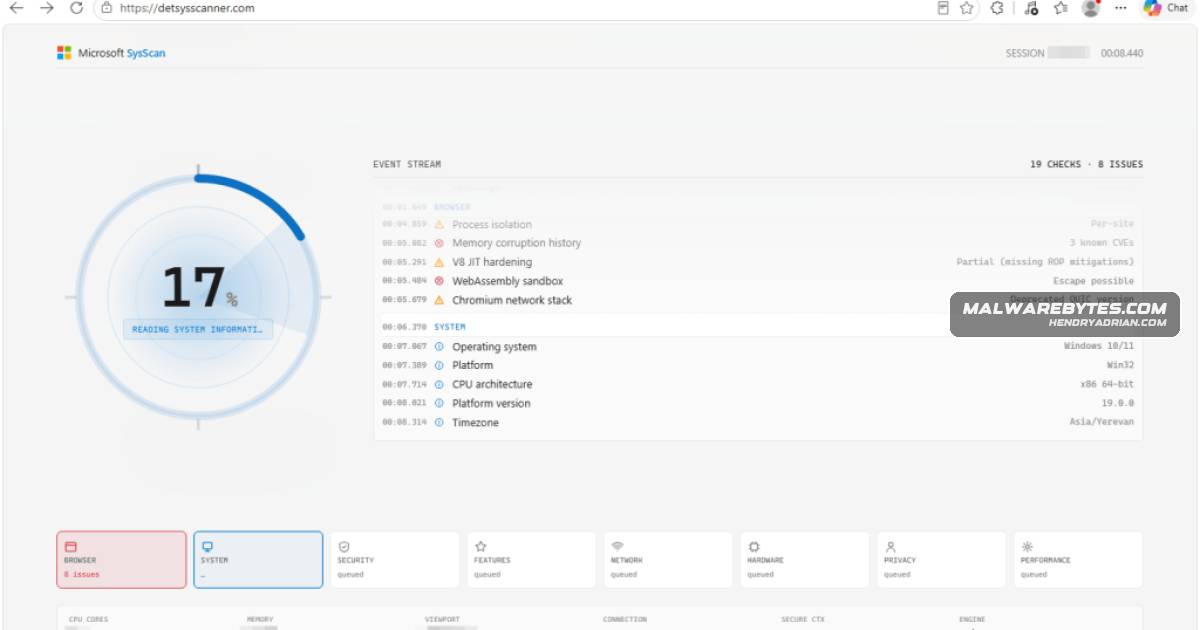
An investigation found 11 Microsoft-branded SysScan sites using fabricated security scans to pressure users to uninstall antivirus and submit personal, banking, and remote-access details, which the sites send directly to Telegram.
Key points
- Researchers found 11 related Microsoft-branded SysScan sites on one host, all claiming third-party antivirus causes serious Windows problems and urging users to uninstall it.
- The scans read browser-exposed data but pair it with fixed or random fabricated checks; their scores are capped at 30 out of 100, so passing is impossible.
- The form requests personal, banking, refund, cryptocurrency, antivirus, and remote-access details, as well as agent and company information.
- Submitted form data is bundled in the browser and sent directly to Telegram’s bot API; the sites have no application backend.
- After submission, a waiting page promises a refund-manager call within three to five minutes and plays a looping office video.
- The article advises closing the site; if remote access was granted, disconnecting the computer, removing the tool, restoring antivirus, and contacting the bank promptly.
Article Details
- Attack Vectors
- Microsoft-branded fake SysScan websites show fabricated security scan results to pressure victims into uninstalling third-party antivirus software.
- A form collects personal, banking, cryptocurrency, antivirus, and remote-access details, which the browser sends to Telegram's bot API.
- After form submission, victims are shown a waiting page that promises a refund manager will call within three to five minutes.
- Defensive Notes
- Close websites that claim to run deep security scans or insist that every scan result is dangerous; browser pages cannot inspect many of the system conditions claimed by these sites.
- Do not uninstall antivirus software or install remote-access software at the request of a website or someone claiming to arrange a refund.
- If remote access was granted, disconnect the computer from the internet, remove the remote-access tool, reinstall and update antivirus software, and run a full scan.
- If banking information was shared or online banking was accessed, contact the bank using a number obtained independently; change email and banking passwords from a trusted device.
Indicators of compromise
| Type | Indicator | Context |
|---|---|---|
| DOMAIN | detectsysscanner[.]at | Domain identified as one of the fake SysScan scam websites. |
| DOMAIN | detectsysscanner[.]com | Domain identified as one of the fake SysScan scam websites. |
| DOMAIN | detectsysscanner[.]de | Domain identified as one of the fake SysScan scam websites. |
| DOMAIN | detectsysscanner[.]in[.]net | Domain identified as one of the fake SysScan scam websites. |
| DOMAIN | detectsysscanner[.]xn--q9jyb4c | Domain identified as one of the fake SysScan scam websites. |
| DOMAIN | detsysscanner[.]com | Domain identified as one of the fake SysScan scam websites. |
| DOMAIN | detsysscanner[.]de | Domain identified as one of the fake SysScan scam websites. |
| DOMAIN | detsysscanner[.]xn--q9jyb4c | Domain identified as one of the fake SysScan scam websites. |
| DOMAIN | techsysscanner[.]com | Domain identified as one of the fake SysScan scam websites. |
| DOMAIN | techsysscanner[.]lol | Domain identified as one of the fake SysScan scam websites. |
| DOMAIN | tlcscanner[.]com | Domain identified as one of the fake SysScan scam websites. |
| IPV4 | 157[.]230[.]180[.]90 | Hosting IP for the cluster of fake SysScan scam websites. |
MITRE ATT&CK
T1056.003 · Web Portal CaptureThe fake scan site uses a web form to capture victims' personal, banking, cryptocurrency, and remote-access details.T1567 · Exfiltration Over Web ServiceThe browser sends submitted form data to Telegram's bot API, which the article identifies as the scammers' collection channel.T1656 · ImpersonationThe scam sites use Microsoft branding and present a fabricated security scan and refund process as legitimate.
Products
Microsoft Defender Antivirus[Branding/Service names ] Fake scanner branding and misleading product references – SysScan, Microsoft Defender AntivirusMicrosoft WindowsA group of Microsoft-branded SysScan websites is using fake security scans to falsely claim that third-party antivirus on Windows is causing serious problems and should be uninstalled.TelegramThe scam funnels victims into a refund call, collects personal and banking details, and sends the data to Telegram while presenting a fake handoff to a “refund manager.”