How App Domain Manager Injection Abuses Trusted .NET Applications—and How to Detect It
Summary
Huntress explains how attackers can use .NET configuration files or environment variables to load malicious assemblies through trusted applications, and recommends monitoring execution paths, configuration changes, and assembly loading.
Key points
- App Domain Manager injection abuses .NET initialization behavior; it does not exploit a software vulnerability or require a standalone payload.
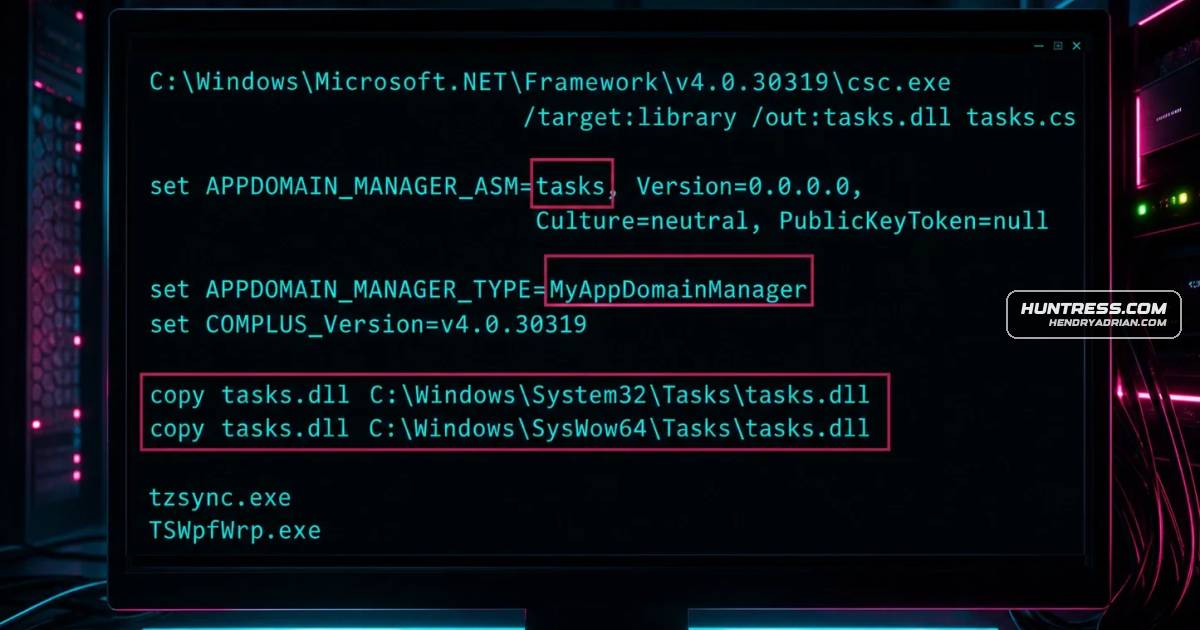
- An attacker can place a matching .exe.config file beside a trusted .NET executable to load an attacker-controlled assembly before normal execution.
- The configuration can point to a remote assembly, while APPDOMAIN_MANAGER_ASM and APPDOMAIN_MANAGER_TYPE environment variables can influence assembly loading in child processes.
- The technique can support execution or lateral movement under trusted processes and may indicate an attacker already has initial access.
- Investigate trusted .NET binaries launched from writable or unexpected locations, as well as new or modified .exe.config files.
- Huntress recommends using Fusion logging and Process Monitor to review assembly resolution and file access, and monitoring APPDOMAIN_MANAGER-related environment variables.
Article Details
- Defense Focus
- Detect App Domain Manager injection by identifying abnormal .NET assembly-loading behavior and execution from unexpected or writable locations.
- Detection Methods
- Investigate trusted .NET executables launched from writable or unexpected paths, especially when they normally reside in system directories.
- Treat newly created or modified .exe.config files as suspicious and check whether they redirect assembly loading.
- Use Fusion logging to capture .NET assembly resolution activity.
- Use Process Monitor to review file-access patterns and identify loading of suspicious assemblies.
- Monitor for modifications to APPDOMAIN_MANAGER-related environment variables.
- Review remote-loading artifacts in the WinInet cache and the .NET Assembly cache under AppData.
- Data Sources
- Executable and configuration-file paths and file-creation or modification activity
- .NET Fusion assembly-resolution logs
- Process Monitor file-access observations
- Environment variable modifications, especially APPDOMAIN_MANAGER-related variables
- WinInet cache and .NET Assembly cache under AppData
- Platforms
- Windows
- Defensive Actions
- Establish normal execution paths for trusted .NET applications and investigate launches from writable or unexpected directories.
- Review new or modified .exe.config files for assembly-loading redirection.
- Enable Fusion logging and collect telemetry on assembly resolution and configuration-file changes.
- Monitor environment-variable changes and investigate APPDOMAIN_MANAGER-related variables promptly.
- Assess whether telemetry covers configuration creation, assembly resolution, and environment-variable manipulation, particularly in environments that rely heavily on .NET-based tooling.
MITRE ATT&CK
T1059.001 · PowerShellThe article describes executing attacker-controlled assemblies under trusted .NET processes, but does not specify a particular command-line interpreter.T1105 · Ingress Tool TransferIn one described variation, the .NET runtime downloads a remote assembly from an HTTP or UNC path and executes it.T1546.009 · AppCert DLLsThe article describes setting APPDOMAIN_MANAGER_ASM and APPDOMAIN_MANAGER_TYPE to influence .NET initialization and cause child processes to load an attacker-controlled assembly.T1574.010 · Services File Permissions WeaknessThe article describes placing a matching .exe.config beside a trusted .NET executable so the runtime loads an attacker-controlled assembly before normal application logic.
People
Vendors
Products
.NET FrameworkA little-known feature of the .NET framework allows attackers to execute malicious code inside trusted, Microsoft-signed applications without exploiting a software flaw or dropping a standalone payload.Process Monitorshould enable Fusion logging to capture detailed assembly resolution activity and use tools like Process Monitor to observe file access patterns and identify when malicious assemblies are being loaded.