
Phishing Campaign Uses Tiflux RMM to Deploy Multiple Remote-Access Tools
Summary
Huntress analyzed phishing incidents using Tiflux to install additional remote-access tools, collect system information and screenshots, and establish persistence. The installer also contained outdated components and a driver previously abused for privilege escalation.
Key points
- Huntress observed an increase in Tiflux use since February, with incidents involving unauthorized access and credential theft.
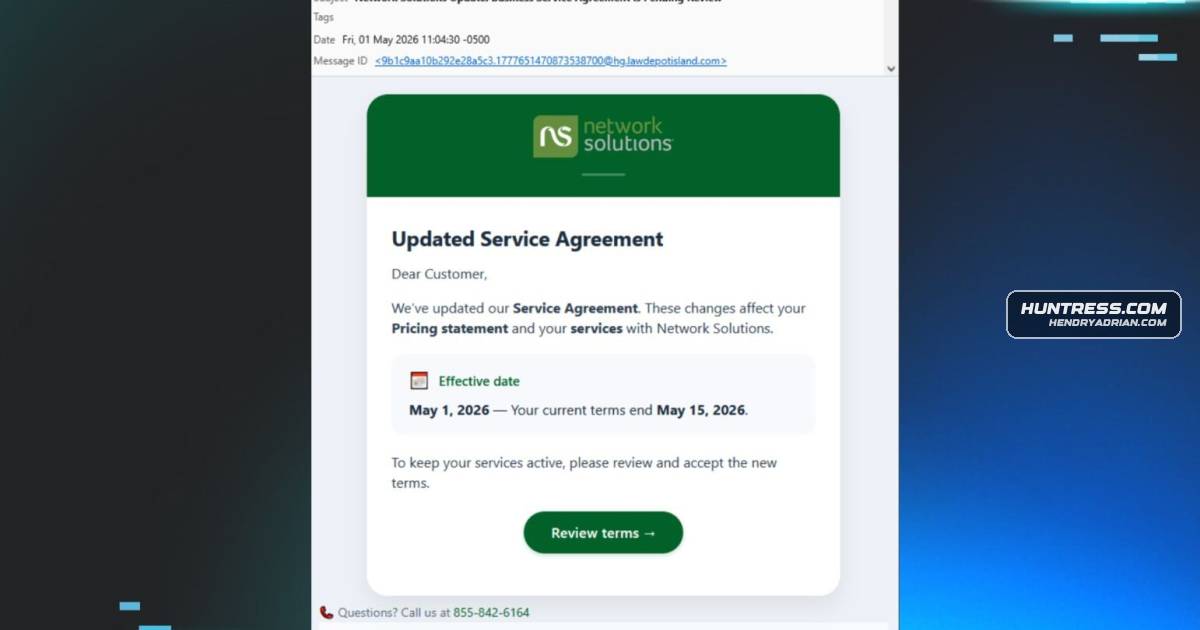
- A phishing email with a fake service-agreement lure led targets through a CAPTCHA-gated page to a Tiflux installer.
- The installer and Tiflux agent deployed or enabled UltraVNC, Splashtop, and ScreenConnect for remote access.
- Huntress observed the tools transmitting screenshots and running commands to collect system profiling information.
- The installer included outdated UltraVNC components, hardcoded credentials, suspicious registry files, and a driver previously abused for privilege escalation.
- Huntress recommends tracking installed applications, restricting unauthorized RMM software, and reviewing logs for suspicious RMM activity.
Article Details
- Attack Vectors
- A malspam email with a fake service-agreement document lure directed recipients to a CAPTCHA-gated page and then to a Tiflux installer.
- After installation, Tiflux was used to deploy additional remote management tools, including Splashtop and ScreenConnect; UltraVNC was bundled with the installer.
- The installer dropped and registered the vulnerable HwRwDrv.x64 driver. The article says it has previously been abused for privilege escalation, but its purpose in this incident was unclear.
- Defensive Notes
- Maintain an inventory of installed applications and enforce application controls, especially for unauthorized RMM software.
- Audit authorized RMMs against resources such as LOLRMM and review logs for suspicious RMM activity.
- Heed browser warnings when downloading MSI files, and contact IT support if an unexpected Tiflux system-tray icon appears.
Indicators of compromise
| Type | Indicator | Context |
|---|---|---|
| DOMAIN | anythinghere[.]woremix[.]icu | Threat-associated domain hosting a PHP download path cited in the IOC list. |
| DOMAIN | lenwillfilenetwork[.]com | Host for the CAPTCHA-gated page that directed targets to the Tiflux installer. |
| DOMAIN | shankar[.]woremix[.]icu | Domain identified by the article as threat-actor-controlled. |
businessservices@hg[.]lawdepotisland[.]com | Sender address used for the malspam email that initiated the fake service-agreement lure. | |
| IPV4 | 84[.]54[.]33[.]192 | IP identified as serving the ScreenConnect download and C2. |
| SHA256 | 0b95524e5b00688f7f5efe56a74b93985feb2152d9336d44ca7a8dd9ca25d2d5 | SHA-256 hash of the ScreenConnect installer MSI. |
| SHA256 | 87074c1bfd071fc47410a52af863e9ca62b2b85950c4cf643a220f0ea5717952 | SHA-256 hash listed for Adobeclient-33.2.msi in the campaign IOC table. |
| SHA256 | f792d82e4472c001852998a3575e492907f38daa8d58ecdb3b3604b38d7b8a07 | SHA-256 hash of the Tiflux installer MSI. |
| URL | hxxp[:]//84[.]54[.]33[.]192:8040/Bin/ScreenConnect.ClientSetup.msi | ScreenConnect installer download URL identified as part of the campaign infrastructure. |
| URL | hxxps[:]//anythinghere[.]woremix[.]icu/Viewfiles/download.php | Threat-associated download URL listed among the campaign indicators. |
| URL | hxxps[:]//lenwillfilenetwork[.]com/downloads/Network%20Solutions%20Agreement.msi | Payload URL identified as delivering the Tiflux installer. |
MITRE ATT&CK
T1068 · Exploitation for Privilege EscalationThe installer dropped and registered HwRwDrv.x64, a vulnerable driver the article says has previously been abused for privilege escalation; its use in this incident was unclear.T1082 · System Information DiscoveryThe RMM activity ran commands to collect system profiling information and interrogate the operating system.T1113 · Screen CaptureTiflux and Splashtop were observed transmitting screenshots and screenshot thumbnails.T1219 · Remote Access ToolsTiflux, UltraVNC, Splashtop, and ScreenConnect were used to establish remote access to target computers.T1543.003 · Windows ServiceThe article reports installation and starting of Splashtop services, and a registry file configured a TightVNC service to run in Safe Mode.T1546.008 · Accessibility FeaturesRegistry changes altered Windows Secure Attention Sequence behavior to suppress consent prompts and other notifications.T1547.001 · Registry Run Keys / Startup FolderRegistry files could modify the computer, including setting a VNC service to remain enabled through reboots into Safe Mode.T1552.001 · Credentials In FilesUltraVNC initialization files bundled with the installer contained hardcoded passwords.T1566.002 · Spearphishing LinkThe campaign used a malspam email with a fake service-agreement document lure and a link to the delivery page.T1574.002 · DLL Side-LoadingThe article describes Tiflux distributions installing commercial RMMs, including ScreenConnect and Splashtop, through Tiflux.
People
Products
PuTTYAnother of the .reg files adds an SSH host key for the Windows SSH client, PuTTY, which is also strange because the Tiflux installer does not install the PuTTYScreenConnectan open-source remote access tool, sideloaded other commercial RMMs, including Splashtop and ScreenConnect, and installed an outdated driver that can permit the threat actor to elevate their own privileges onSplashtopalso installed UltraVNC, an open-source remote access tool, sideloaded other commercial RMMs, including Splashtop and ScreenConnect, and installed an outdated driver that can permit the threat actor to elevate theirTifluxHomeBlog“Service Agreement” Email Kickstarts Rogue RMM Tiflux Triple ThreatTightVNCOne of the Registry changes added a Services entry for another VNC clone, named TightVNC, to the Windows Services, and set it to be enabled even if Windows was rebooted into Safe Mode. Oddly, theUltraVNCThreat actors behind the rogue Tiflux incidents also installed UltraVNC, an open-source remote access tool, sideloaded other commercial RMMs, including Splashtop and ScreenConnect, and installed an outdated driver that