Huntress Launches Read-Only MCP Server for Querying Security Data Through AI Assistants
Summary
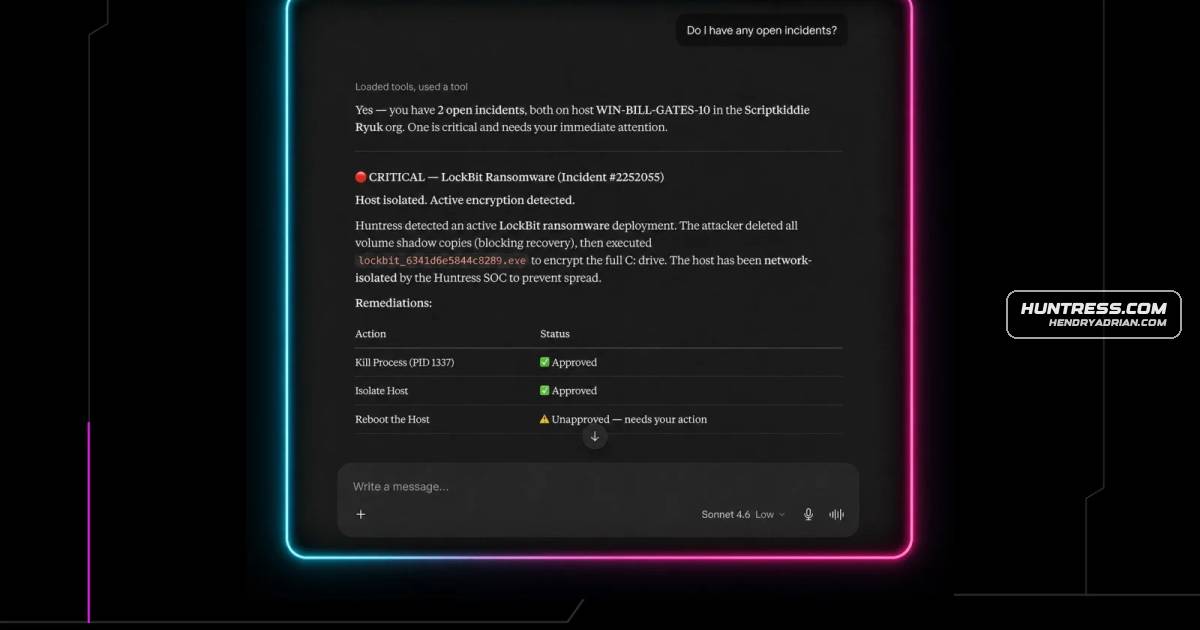
Huntress introduced a read-only MCP server that lets compatible AI assistants query account data, including incident reports, agents, escalations, and remediations, using natural-language questions.
Key points
- The MCP server connects Huntress account data to compatible AI clients such as Claude Desktop, Claude Code, and ChatGPT.
- It provides read-only access to agents, organizations, incident reports, signals, escalations, remediations, invoices, reports, and external recon.
- Users can ask natural-language questions to summarize incident activity, check escalations, review agent counts, or examine billing data.
- Setup requires Huntress API credentials; OAuth is recommended, and Base64-encoded credentials are also supported.
Article Details
- Event Type
- Huntress announced the Huntress MCP Server, a read-only integration that lets compatible AI assistants query Huntress account data.
- Impact
- Customers and partners can use natural-language queries to retrieve account information such as agents, organizations, incident reports, escalations, remediations, invoices, and reports. The server is read-only and cannot change account data. Setup supports OAuth or Base64-encoded Huntress API credentials.
People
Vendors
Products
ChatGPTMCP stands for Model Context Protocol, an open standard that lets AI assistants like Claude and ChatGPT connect directly to external data sources and tools. Think of it as a structured way for your AI to securely talkClaude CodeYou'll need your Huntress API credentials and an MCP-compatible AI client like Claude Desktop, Claude Code, or ChatGPT. Two authentication methods are supported: OAuth (recommended) and Base64-encodedClaude Desktopjust a few minutes. You'll need your Huntress API credentials and an MCP-compatible AI client like Claude Desktop, Claude Code, or ChatGPT. Two authentication methods are supported: OAuth (recommended) andHuntress APIConnecting the Huntress MCP Server takes just a few minutes. You'll need your Huntress API credentials and an MCP-compatible AI client like Claude Desktop, Claude Code, or ChatGPT. Two authentication methods areHuntress MCP ServerHomeBlogYour Huntress Data, One Conversation Away: Meet the Huntress MCP ServerHuntress WebhooksHuntress Webhooks push incidents and escalations straight to Slack, your PSA, or SIEM in real time with no polling. See how you can set them up in minutes.