
AWS Network Firewall Adds Context-Aware Traffic Rules
Summary
AWS Network Firewall can now match traffic using VPC, subnet, security group, and transit gateway attachment context instead of relying only on IP addresses. The post explains cross-account setup, rule behavior, and logging.
Key points
- Rules can match resources by VPC, subnet, security group, or transit gateway attachment, helping policies track workloads as they change.
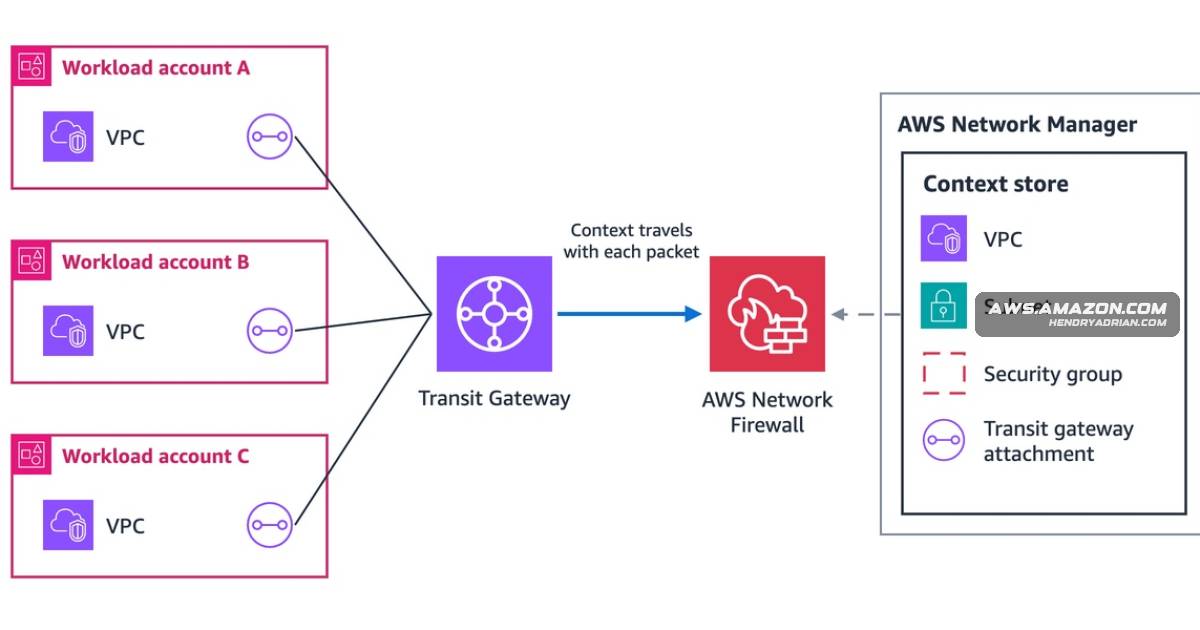
- A context store tracks resources across accounts that share a transit gateway; the transit gateway adds sender context to packets for firewall rule matching.
- Source-context rules work with every protocol. Destination-context rules require TCP because the firewall learns the receiving resource from return traffic.
- Administrators can create context sets and reference them in Classic or Next Generation firewall rules; the example blocks SSH from selected production resources to external destinations.
- Alert and flow logs can include matched context IDs and resource context for both sides of a flow, including flows that do not match a rule.
- For internet-bound traffic through a NAT gateway, destination context identifies the egress VPC, subnet, and transit gateway attachment—not the internet host.
Article Details
- Event Type
- Product feature announcement
- Impact
- AWS Network Firewall now supports context-aware rules that match traffic using AWS resource context, such as VPCs, subnets, security groups, and transit gateway attachments, rather than relying only on IP addresses. The feature is designed to keep rules aligned with changing workloads, support shared policies across accounts, and add resource context to firewall logs. It requires transit gateway-attached firewalls and is available at no additional charge; standard AWS Network Firewall and AWS Transit Gateway charges still apply.
Vendors
Products
AWS Network FirewallAWS Network Firewall now supports context-aware rules, which match traffic by the AWS resources that send and receive it instead of by IP address.AWS Network ManagerYou create it in AWS Network Manager and associate it with the transit gateway that your firewall uses.AWS Transit GatewayAWS Transit Gateway also shares context with third-party firewalls through Gateway Load Balancer.