
Cloudflare DNS Conflict Can Disable DMARC Enforcement During ESP Onboarding
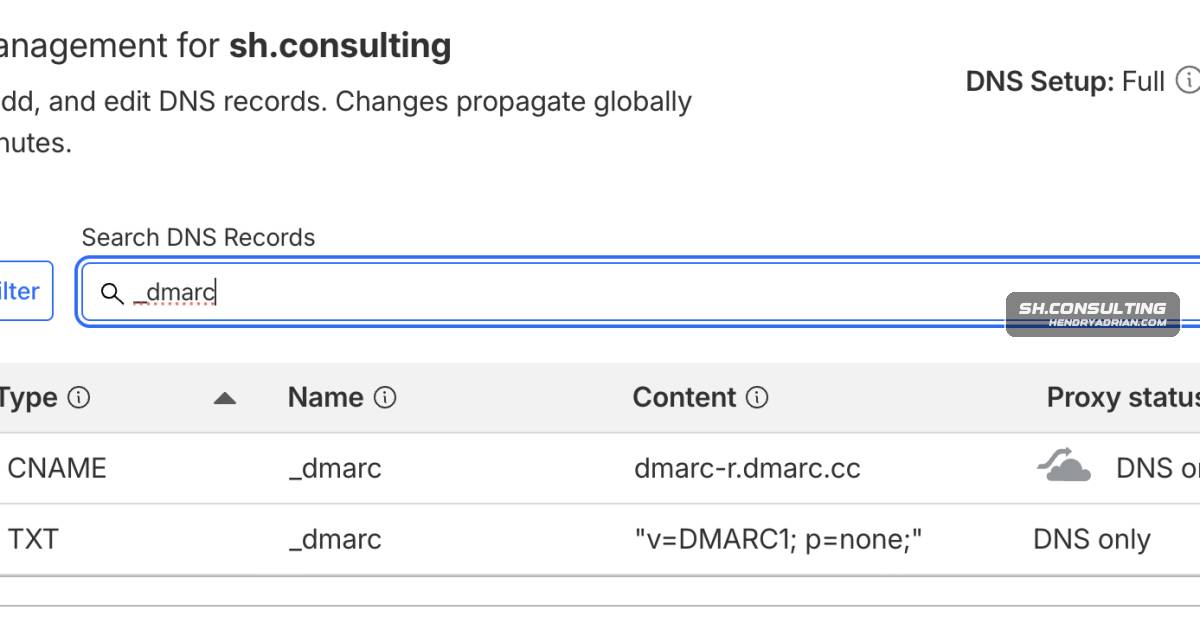
Summary
The article explains how Cloudflare may accept conflicting DMARC CNAME and TXT records written during ESP onboarding, causing receivers to ignore the policy, and offers steps to detect, fix, and monitor the issue.
Key points
- The article describes a conflict in which Cloudflare accepts a CNAME and TXT record at the same _dmarc name; it says this violates RFC 1912.
- According to the article, receivers discard multiple DMARC records under RFC 7489, so a p=reject policy may not be enforced.
- The author says ESP onboarding through Entri can write a DMARC TXT record without checking for an existing record.
- Use DNS TXT and CNAME queries or a validator that checks authoritative DNS to identify coexisting records; dashboards may not reveal the conflict.
- Choose whether the delegated CNAME or direct TXT record is authoritative, remove the other, and verify the DNS response afterward.
- Audit other domains using similar onboarding flows, prevent automated deployments from overwriting existing DMARC records, and monitor policy and aggregate reports.
Article Details
- Defense Focus
- Detect and remediate conflicting DMARC records that cause receivers to ignore the domain's DMARC policy.
- Detection Methods
- Query TXT records at _dmarc.<domain> with dig and check whether multiple answers begin with v=DMARC1.
- Query for a CNAME at the same _dmarc name; a CNAME alongside DMARC TXT records indicates the conflict described in the article.
- Use a DMARC validator that retrieves records from authoritative DNS and reports multiple DMARC records.
- Monitor DMARC aggregate reports for unexpected drops to zero or unexpected policy changes.
- Data Sources
- Authoritative DNS TXT and CNAME query responses
- DMARC aggregate reports
- DNS zone records and ESP onboarding activity
- Platforms
- Authoritative DNS providers
- DMARC monitoring platforms
- Defensive Actions
- Choose whether the delegated CNAME or the directly managed TXT record is authoritative, then remove the conflicting record.
- Verify after the change that DNS returns only the intended DMARC record configuration.
- Audit other domains in the same DNS account that use ESP onboarding or automated DNS deployment.
- Configure automated onboarding to check for an existing _dmarc record and skip deployment when one is present.
- Monitor DMARC aggregate reports and investigate missing reports or unexpected policy changes.
- Inventory email-sending sources and periodically verify that SPF, DKIM, and DMARC records remain valid and aligned.
Vendors
Products
CloudflareHow Cloudflare DNS Silently Breaks DMARC When ESPs Auto-Deploy Through EntriEntriHow Cloudflare DNS Silently Breaks DMARC When ESPs Auto-Deploy Through EntriMicrosoft 365 Apps for Enterpriseapplied a month, six months, two years after publication. The receiver side breaks the same way — Microsoft 365 silently overrides DMARC p=reject as oreject when tenants run behind third-party gateways likeMimecastoverrides DMARC p=reject as oreject when tenants run behind third-party gateways like Proofpoint or Mimecast, with no aggregate report ever capturing the override.Proofpoint365 silently overrides DMARC p=reject as oreject when tenants run behind third-party gateways like Proofpoint or Mimecast, with no aggregate report ever capturing the override.
Tools
digThe cleanest way to detect the conflict is dig from a terminal. The dashboards lie to you in this scenario, because each individual control panel only shows the records it manages.MXToolboxfetches the records from authoritative DNS rather than reading the Cloudflare dashboard. Tools like MXToolbox, dmarcian's analyzer, or any of the major DMARC monitoring platforms will report "multiple DMARC records