How to Detect Unauthorized Linux SUID and SGID Binaries with Wazuh
Summary
A Wazuh tutorial shows how to baseline Linux SUID/SGID binaries and use command monitoring and Security Configuration Assessment to alert on unauthorized additions.
Key points
- Unexpected SUID root binaries can provide a durable path to elevated access after an attacker has already compromised a system and obtained root privileges.
- The guide compares each endpoint’s SUID/SGID binaries with an approved baseline and reports binaries that are not listed.
- Wazuh command monitoring generates alerts that identify the unauthorized binary path and map the behavior to MITRE ATT&CK T1548.001.
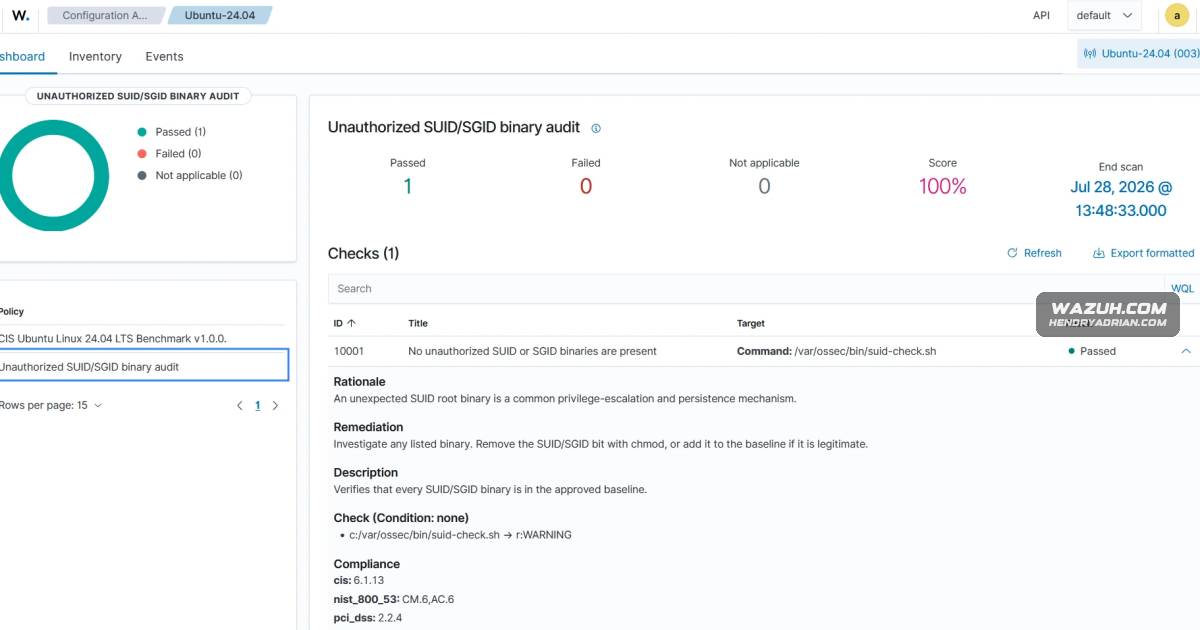
- A custom SCA policy runs the same audit as a scheduled pass/fail compliance check, with rationale and remediation guidance.
- The article recommends using both controls: SCA for recurring posture results and command monitoring for actionable binary-level alerts.
- A simulated unauthorized SUID binary demonstrates detection; the guide notes that the test does not perform actual privilege escalation.
Article Details
- Defense Focus
- Detect unauthorized SUID and SGID binaries on Linux endpoints by comparing the current inventory against an approved baseline.
- Detection Methods
- Run a command-monitoring script that enumerates SUID and SGID files, compares them with a reviewed baseline, and reports only new entries.
- Use a custom decoder and rules to extract the reported binary path and generate an alert; separately alert when the baseline file is missing.
- Run a scheduled Security Configuration Assessment check using the same comparison script to report a pass or fail result.
- Monitor the baseline file with File Integrity Monitoring so its removal or modification is detected.
- Data Sources
- Linux filesystem permissions and paths for files with SUID or SGID bits
- Output from the SUID/SGID comparison script
- The approved SUID/SGID baseline file
- Security Configuration Assessment check results
- File Integrity Monitoring events for the baseline file
- Rule Types
- Custom command-monitoring decoder and rules
- Custom Security Configuration Assessment policy
- Platforms
- Linux endpoint
- Defensive Actions
- Create and review an approved baseline of SUID and SGID binaries.
- Investigate any binary reported as absent from the baseline; remove its SUID/SGID bit with chmod or add it to the baseline if confirmed legitimate.
- Configure daily command monitoring and run the check at agent startup; adjust the timeout for large filesystems.
- Use command monitoring for binary-level alerts and SCA for recurring compliance status.
- Monitor the baseline file for removal or modification.
- Verify the comparison script's SHA256 before execution.