Huntress Shares Incident Examples and Tips for Detecting Persistent Malware
Summary
Huntress describes four customer incidents involving persistent malware or unauthorized access, highlighting endpoint monitoring, persistence checks, user training, and securing exposed remote desktop services.
Key points
- A county employee was tricked into installing a remote access tool; attackers dropped a Cobalt Strike beacon and attempted to install a rogue ScreenConnect instance.
- At a healthcare diagnostic center, malware persisted through a startup-folder LNK, suspicious Windows binaries, and attacker-controlled services; Huntress says it identified and removed it within an hour of deployment in January 2025.
- Attackers brute-forced an internet-exposed remote desktop gateway, compromised an administrator account, moved laterally with PSExec, weakened credential protections, changed firewall settings, and established persistence with a renamed Mesh Agent.
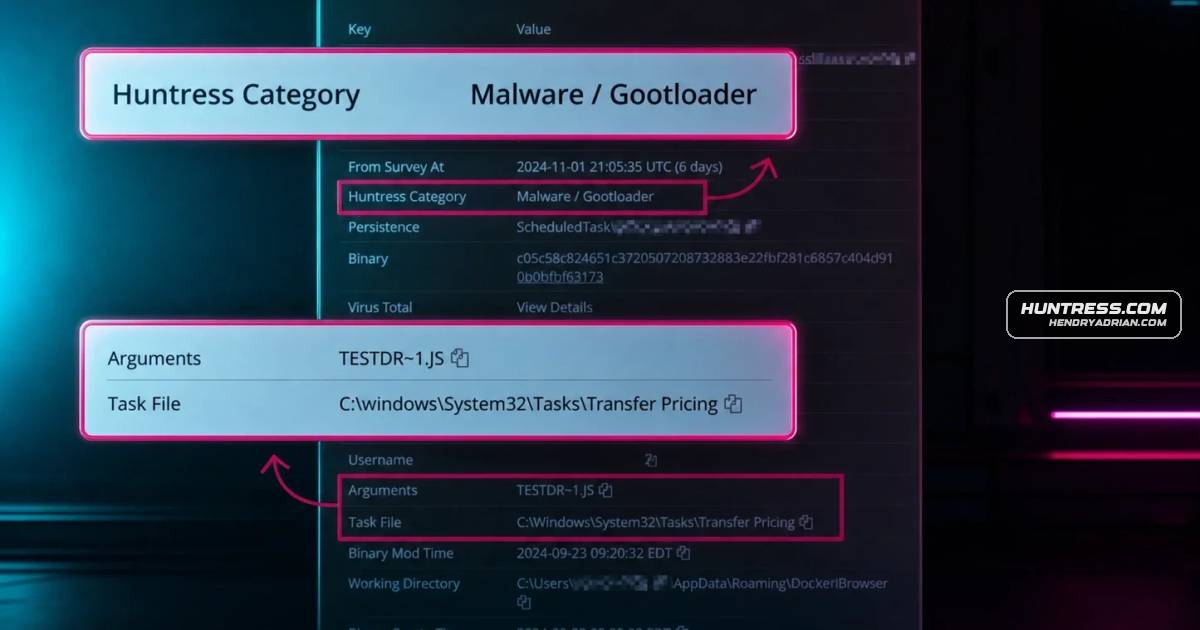
- At a manufacturer, Gootloader delivered through SEO poisoning led to anomalous domain enumeration, a newly created account, and an attempted scheduled-task persistence mechanism.
- The article recommends checking uncommon scheduled tasks, registry run keys, and the Windows Startup folder; it also advises endpoint coverage, user training, and monitoring and limiting exposed remote desktop access.
Article Details
- Defense Focus
- Detect and remove persistent malware and intrusions by monitoring endpoints for persistence, lateral movement, and credential abuse.
- Detection Methods
- Hunt for uncommon scheduled tasks, user registry Run keys, and files in the Windows Startup folder.
- Inspect suspicious binaries executing from Windows directories and Windows services running attacker-controlled code.
- Monitor endpoint alerts for anomalous domain enumeration and signs of unauthorized account creation.
- Monitor authentication attempts on exposed remote desktop gateways and investigate suspected brute-force access.
- Check for disabled Windows credential protection, firewall changes that permit additional RDP traffic, and renamed remote-access agents.
- Data Sources
- Endpoint telemetry and alerts
- Scheduled tasks
- User registry Run keys
- Windows Startup folder
- Windows services and process execution
- Authentication attempts
- Domain enumeration and account-creation activity
- Windows firewall configuration and RDP traffic
- Platforms
- Huntress Managed EDR
- Microsoft Defender
- Defensive Actions
- Secure all endpoints, including user workstations, and train users to recognize risky activity.
- Monitor authentication attempts on remote desktop gateways and avoid exposing them to the internet unless necessary.
- Investigate and remove unauthorized persistence, malicious binaries, services, scheduled tasks, and startup entries.
- Isolate affected networks and evict the threat when a compromise is detected.
MITRE ATT&CK
T1053.005 · Scheduled TaskAttackers attempted persistence with a scheduled task running JavaScript.T1087.002 · Domain AccountHuntress EDR flagged anomalous domain enumeration during the Gootloader incident.T1110.001 · Password GuessingAttackers brute-forced access to an internet-exposed remote desktop gateway.T1204.002 · Malicious FileA manufacturer employee downloaded Gootloader malware after an SEO poisoning attack.T1543.003 · Windows ServicePersistent malware ran attacker-controlled code through multiple Windows services.T1547.001 · Registry Run Keys / Startup FolderPersistent malware used a .LNK file in the Windows Startup folder.T1562.001 · Disable or Modify ToolsAttackers disabled Windows credential protection.T1562.004 · Disable or Modify System FirewallAttackers modified the Windows firewall to allow more RDP traffic.T1569.002 · Service ExecutionAttackers used PSExec for lateral movement.
Malware
Vendors
Products
Cobalt StrikeDropped a malicious Cobalt Strike beacon (x64.exe)Mesh Agent🛠 Established persistence using a renamed Mesh AgentMicrosoft Defender Antimalware PlatformHuntress—utilizing its Managed Microsoft Defender setup—shut it down before things got worse. But here's what you can do to avoid being next:Microsoft WindowsSuspicious binaries executing from Windows directoriesScreenConnectTried to install a rogue ScreenConnect instance
Tools
Industries
Healthcaredoesn’t just infect a system—it moves in, unpacks, throws on a Snuggie and gets cozy. Back in 2018, a healthcare diagnostic center found that out the hard way. A user unknowingly interacted with persistent malwarelocal governmentThreat actors don’t discriminate—they’ll go after anyone, including local government. In one case, a county employee got tricked into installing a remote access tool via email. The attacker:medical researchA medical research company exposed a remote desktop gateway (RDG) server to the internet. Predictably, attackers brute forced their way in and: