Huntress Details Reused Ransomware Playbook That Disables Microsoft Defender
Summary
Huntress describes a ransomware intrusion using a modified script based on a 2021 playbook to disable Microsoft Defender and impair monitoring. Its SOC intervened before file encryption.
Key points
- The observed actor entered via RDP, tampered with defenses, removed volume shadow copies, and moved laterally toward a domain controller.
- Huntress traced the script to a public GitHub Gist and a playbook documented in a 2021 XingLocker case.
- The script disables Defender protections and scheduled tasks, removes visible UI features, and turns off Defender-related WMI logging.
- Newer additions include setting Defender threat responses to Allow, changing the network profile to Private, and targeting Defender for Endpoint and boot-time protections.
- Huntress says its SOC detected the activity and intervened before the intended ransomware execution encrypted files.
- The article recommends detecting behaviors—such as registry changes to security services and PowerShell changes to Defender policies—rather than relying on script hashes or filenames.
Article Details
- Attack Vectors
- The threat actor entered the network via RDP.
- The actor used registry edits and PowerShell commands to disable or weaken Microsoft Defender protections, services, logging, and scheduled tasks.
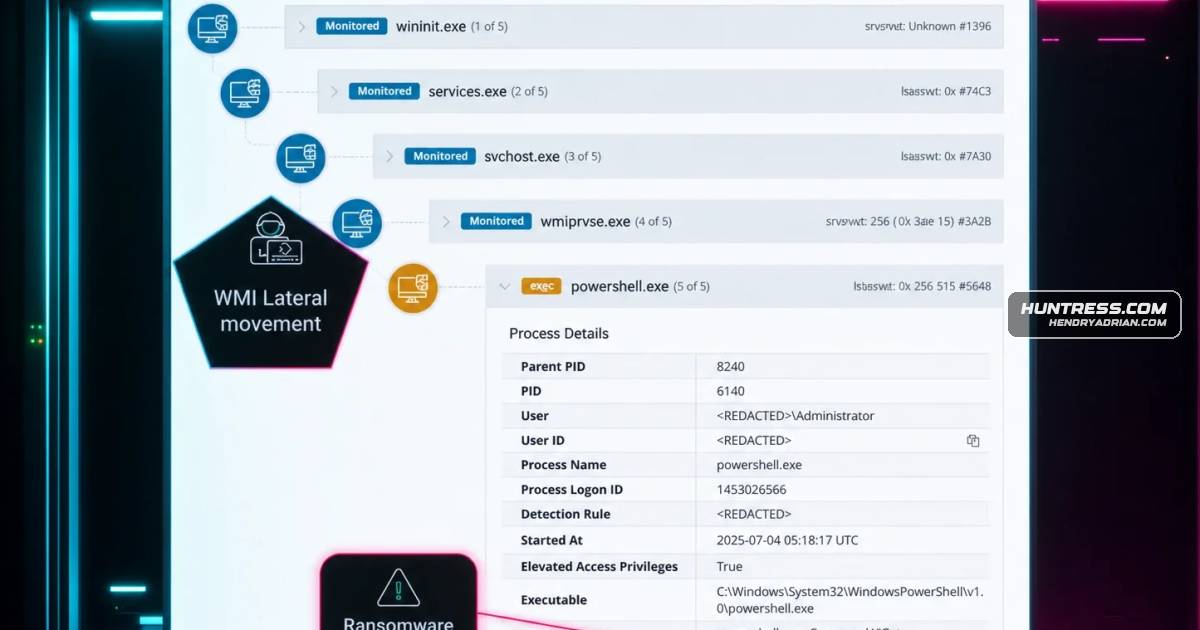
- The actor used WMI to remove volume shadow copies, then moved laterally to the domain controller.
- The playbook changed the active network profile to Private to relax firewall rules and facilitate network discovery and file sharing.
- The actor intended to execute C:\Temp\file.exe with ransomware-style arguments; Huntress intervened before file encryption.
- Defensive Notes
- Detect behavior rather than relying on script hashes or filenames, including reg.exe changes to security-service Start values and PowerShell changes to Defender policies.
- Monitor for Defender WMI autologgers being disabled, Defender scheduled tasks being disabled, and Defender services being stopped, deleted, or disabled.
- Alert on Set-MpPreference settings that allow or take no action on detected threats, and on changes that disable real-time, behavior, archive, or script scanning.
- Monitor for changes to the active network profile, ELAM boot configuration, and security-related services or drivers.
- Treat removal of Defender context-menu entries and suppression of Defender notifications as suspicious behavior.
Indicators of compromise
| Type | Indicator | Context |
|---|---|---|
| URL | hxxps[:]//gist[.]github[.]com/Dump-GUY/8daef859f382b895ac6fd0cf094555d2 | Specific GitHub Gist identified as the public origin of the adversarial Defender-disabling script reused in attacks. |
MITRE ATT&CK
T1016 · System Network Configuration DiscoveryThe appendix identifies Get-NetConnectionProfile as a command used to identify the current network profile before changing it to Private.T1021.001 · Remote Desktop ProtocolThe reported threat actor entered the network via RDP.T1047 · Windows Management InstrumentationThe article reports volume shadow copies being removed via WMI.T1059.001 · PowerShellThe playbook uses PowerShell cmdlets such as Set-MpPreference to alter Defender settings and the network profile.T1112 · Modify RegistryThe playbook modifies registry policies and service settings to disable Microsoft Defender protections, logging, and user-facing indicators.T1490 · Inhibit System RecoveryThe actor removed volume shadow copies, reducing the availability of local file recovery copies.T1562.001 · Disable or Modify ToolsThe actor disables or weakens Defender features and services, including real-time protection, scheduled tasks, and Microsoft Defender for Endpoint.
People
Vendors
Products
Tools
bcdeditThe command bcdedit /set {current} disableelamdrivers yes modifies the boot configuration to prevent any Early Launch Anti-Malware (ELAM) drivers from loading.PowerShellThe base script was augmented with newer PowerShell commands, showing that while the foundation is old, the tactics are being actively refined.reg.exeDisabling Windows Defender WMI Autologger Session via Reg.exeschtasksBy using schtasks to disable tasks for scheduled scans, cache maintenance, and cleanups, the script ensures that even if Defender wasn't fully disabled, it could no longer perform its routine, automated functions,Windows Management InstrumentationFigure 1: Shadow volumes deleted via WMI lateral movement