
How Attackers Disable AV and EDR—and How to Defend Against It
Summary
Attackers use firewall rules, agent removal, and BYOVD to disable endpoint defenses. Huntress describes detection and remediation measures and cites 2026 incidents involving EnCase and Huawei drivers.
Key points
- Attackers can block EDR telemetry with Windows Firewall or Windows Filtering Platform rules, uninstall agents, or use vulnerable signed drivers to terminate protected processes.
- BYOVD can provide kernel-mode access, allowing attackers to disable security monitoring and create a foothold for lateral movement, data theft, or ransomware.
- Huntress describes a February 2026 intrusion that began with compromised SonicWall VPN credentials and used a revoked EnCase driver to target 59 security processes.
- A March 2026 tax-themed malvertising campaign used Google Ads, a rogue ScreenConnect installation, and a vulnerable Huawei audio driver to kill security tools.
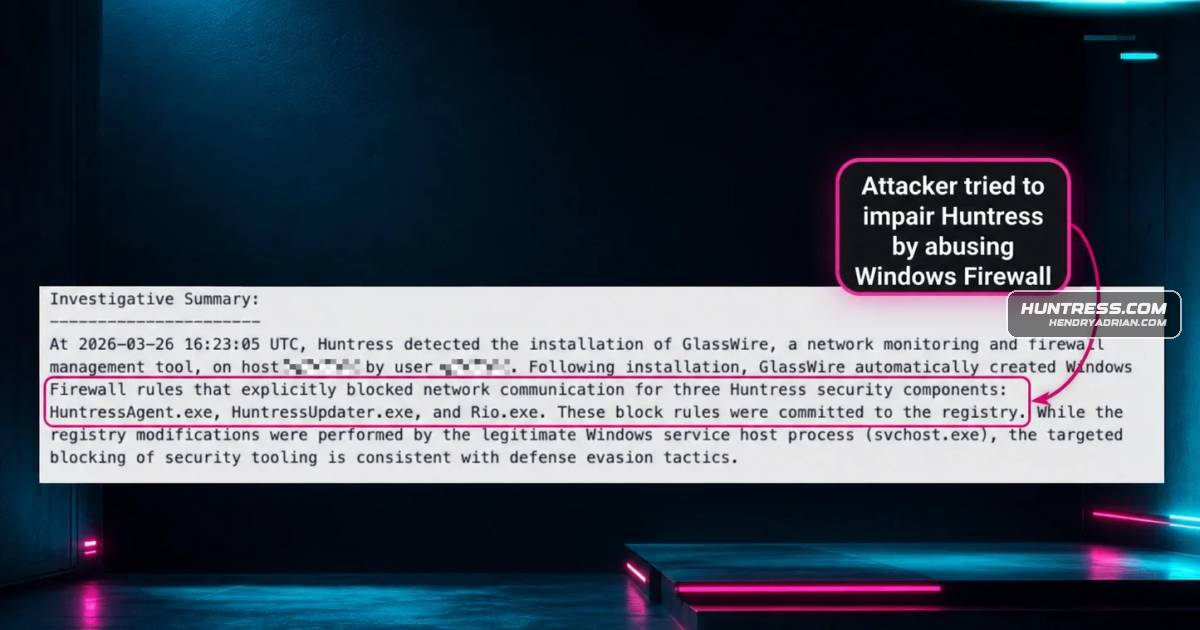
- Huntress says its Managed EDR detects vulnerable-driver abuse and firewall tampering, alerts its SOC, and can remediate blocked communications.
- Huntress Tamper Protection is designed to prevent unauthorized stopping, removal, or interference with its agent.
Article Details
- Defense Focus
- Detect and disrupt attempts to disable endpoint security, particularly abuse of vulnerable drivers and Windows Firewall rules, while protecting the EDR agent from tampering.
- Detection Methods
- Detect real-time abuse of vulnerable drivers rather than relying only on signs of impact such as antivirus stopping or the EDR agent being killed.
- Detect and alert on attempts to abuse Windows Firewall rules to block communications between the EDR agent and its platform.
- Detect attempts to impair Microsoft Defender Antivirus, including abuse of Defender exclusions.
- Data Sources
- Real-time device-driver abuse activity
- Windows Firewall rule activity affecting EDR communications
- Microsoft Defender Antivirus exclusion activity
- EDR agent stop, deletion, or uninstall activity
- Platforms
- Huntress Managed EDR
- Defensive Actions
- Investigate alerts for vulnerable-driver abuse and shut down the attack.
- Detect, remediate, and alert on Windows Firewall rules that block EDR communications.
- Use tamper protection to prevent unauthorized stopping, deletion, or interference with the EDR agent.
- If administrative activity requires an exclusion, limit it to a defined time window and ensure it is automatically removed afterward.
MITRE ATT&CK
T1068 · Exploitation for Privilege EscalationThe described BYOVD attacks exploit vulnerabilities in signed drivers to gain kernel-mode access.T1562.001 · Disable or Modify ToolsAttackers attempt to uninstall EDR agents, abuse Defender exclusions, and use vulnerable drivers to terminate security processes.T1562.004 · Disable or Modify System FirewallAttackers create or abuse Windows Firewall rules, including through WFP, to block EDR agents from communicating with their platform.T1652 · Device Driver DiscoveryThe article explicitly identifies Impair Defense and describes attackers disabling or interfering with endpoint security tools.
Vendors
Products
Huntress Managed EDRare constantly looking for ways to tamper with security tools in order to operate under the radar. Huntress Managed EDR will detect, remediate, and alert the SOC when attackers abuse Windows Firewall to blockMicrosoft Defender AntivirusHuntress frequently sees attackers try to blind Microsoft Defender Antivirus. They have several techniques to do this, like abusing Windows Firewall rules and abusing Defender exclusions. ScreenConnectThe attack begins when a user clicks a malicious ad and is redirected to a site that installs a rogue ScreenConnect instance, providing the threat actors with remote access.SonicWallIn early February 2026, during an intrusion that began with compromised SonicWall VPN credentials, threat actors deployed a sophisticated "EDR Killer" binary. In this example, the attackers used a BYOVD approach, butWindows Filtering Platformdirectly creating the firewall rules, which is a bit noisy but effective, or using the Windows Filtering Platform (WFP) to create hidden firewall rules. These rules specifically block the EDR agent from
Tools
EDRSandblastsense of security, but it's effectively "silenced" and can't send any telemetry or alerts. Tools like EDRSandblast and EDRSilencer allow attackers to easily abuse Windows Firewall as part of their defense-evasionEDRSilencerbut it's effectively "silenced" and can't send any telemetry or alerts. Tools like EDRSandblast and EDRSilencer allow attackers to easily abuse Windows Firewall as part of their defense-evasion tradecraft.