
Huntress Attack Reduction Blocks Windows Run Dialog to Disrupt ClickFix
Summary
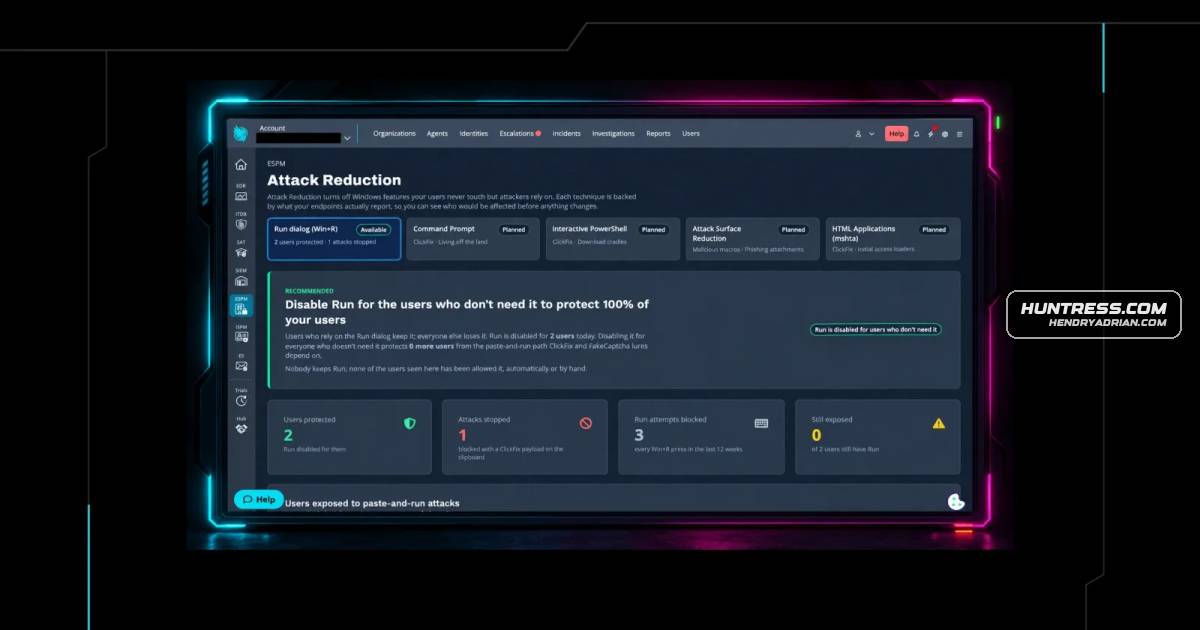
Huntress introduced an Early Access feature that baselines Windows Run dialog use and can block the shortcut for users who do not need it, disrupting a common ClickFix method. Further command-line controls are planned.
Key points
- ClickFix lures users into pressing Windows+R and pasting a webpage-copied command, which can download and run malware.
- Huntress says ClickFix and fake CAPTCHA scams accounted for over half of malware loader activity in its 2026 Cyber Threat Report; ClickFix-style Run dialog attacks made up 31% of its EDR SOC signals.
- Attack Reduction is available in Huntress Managed ESPM Early Access and can block the Run dialog for selected users while allowing it for users who need it.
- The feature builds a usage baseline, flags suspicious-looking Run history commands for investigation, and records clipboard contents when a blocked user tries to open Run.
- Blocking Run does not stop ClickFix instructions that direct users to paste commands into File Explorer, Windows Terminal, Command Prompt, or PowerShell.
- Command Prompt and interactive PowerShell restrictions, Windows ASR rules, and blocking mshta are listed as planned controls.
Article Details
- Defense Focus
- Reduce ClickFix attacks by disabling the Windows Run dialog for users who do not need it, while identifying affected users and recording blocked attempts for investigation.
- Detection Methods
- Baseline per-user Run dialog usage and review the dashboard for commands flagged as resembling ClickFix.
- Investigate suspicious commands in Run history; the source notes that Windows does not record when those commands ran, so they are not proof of an active attack.
- Review captured clipboard contents from blocked Run-dialog attempts for malicious commands and follow up with targeted users.
- Use Managed EDR to detect or disrupt ClickFix activity that bypasses Run-dialog blocking.
- Data Sources
- Per-user Windows Run dialog history and usage baseline
- Clipboard contents captured when a blocked user presses Windows key + R
- Managed EDR signals
- Platforms
- Huntress Managed ESPM
- Huntress Managed EDR
- Managed SAT
- Defensive Actions
- Use the ESPM baseline to identify users who rely on the Run dialog before enabling blocking.
- Enable Run-dialog blocking at the account or organization level for users who do not need the feature; retain access for users with legitimate workflows.
- Review flagged Run-history commands and captured clipboard contents as investigation leads, not conclusive evidence of execution.
- Use endpoint detection and security awareness training alongside blocking; remind users that legitimate CAPTCHAs do not ask them to paste commands.
- Plan additional restrictions for Command Prompt and interactive PowerShell as those controls become available.
MITRE ATT&CK
T1059.001 · PowerShellThe pasted command is described as a malicious PowerShell command that downloads and runs a file.T1105 · Ingress Tool TransferThe PowerShell command would download a file from the internet.T1204.002 · Malicious FileThe ClickFix lure instructs users to paste a webpage-supplied PowerShell command into the Run dialog and press Enter.T1547.001 · Registry Run Keys / Startup FolderThe downloaded file is described as establishing persistence through a registry key.T1555.003 · Credentials from Web BrowsersThe resulting remote access trojan is described as stealing browser-saved passwords, cookies, and credit card details.
Vendors
Products
Huntress Managed EDRstarting point for nearly a third of what our EDR SOC investigates. Detection still matters, and Huntress Managed EDR's Attack Disruption engine can kill many ClickFix chains in under a second. But when the attackHuntress Managed ESPMAttack Reduction is a new capability in Huntress Managed ESPM that turns off Windows features your users never touch, but attackers rely on, starting with "Windows key + R". That fits what ESPM is built to do: hardenManaged SATalso works best alongside the rest of your defenses: Managed EDR to catch what gets through, and Managed SAT so users know a real CAPTCHA will never ask them to paste a command.Microsoft WindowsPress and hold Windows key + R