Phishing Campaigns Abuse MSP360 and ScreenConnect for Persistent Remote Access
Summary
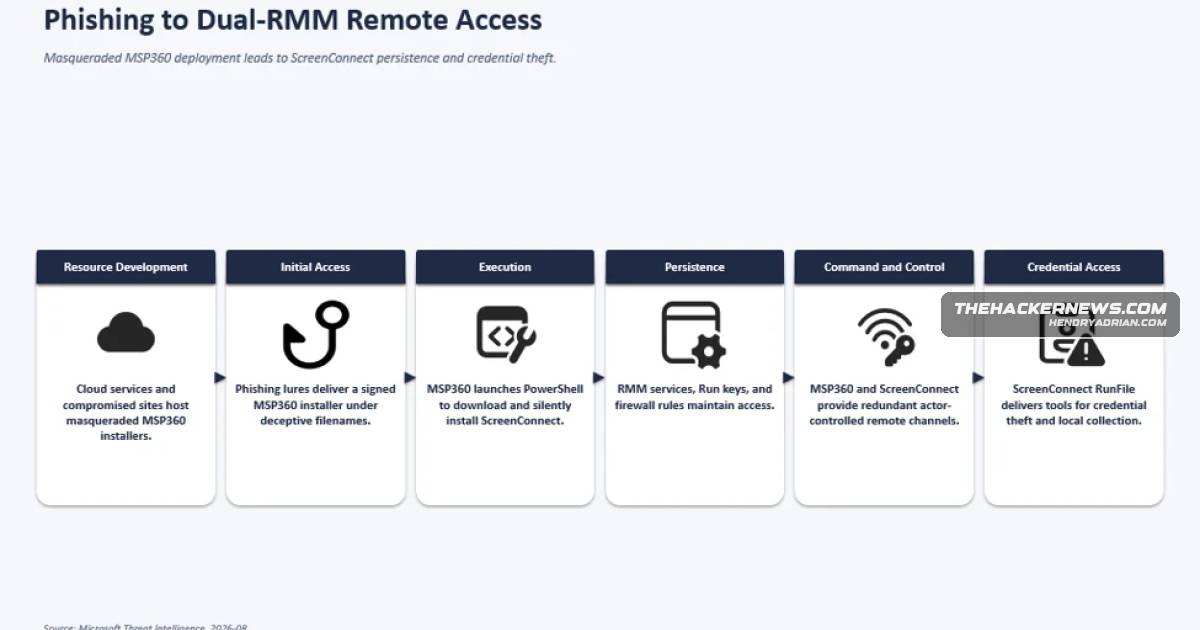
Microsoft detailed July 2026 phishing campaigns that used deceptive MSP360 or Faronics installers to deploy ScreenConnect, establish persistent remote access, and support credential collection and additional post-compromise activity.
Key points
- Phishing emails disguise a digitally signed MSP360 installer as invitations, PDF tools, or software updates.
- The MSP360 installer establishes remote access and uses PowerShell to install ScreenConnect as a second access channel.
- Attackers use DLL drops and UAC elevation, register Windows services, and create autorun entries to maintain access.
- The activity modifies Windows Firewall rules to allow inbound UDP traffic to MSP360 on port 48678.
- Attackers use ScreenConnect to transfer and run additional tools and conduct information collection and credential-access operations.
- A separate July 2026 intrusion used Faronics Deploy Agent before installing ScreenConnect; Microsoft has not attributed the activity to a known group.
Article Details
- Attack Vectors
- Phishing emails use meeting invitations, PDF-themed files, and software update prompts to deliver a digitally signed MSP360 RMM v2.5.0.67 installer under deceptive filenames.
- The installer relaunches through the Windows UAC elevation workflow, deploys MSP360, and uses it to install a ScreenConnect client.
- A separate observed intrusion used Faronics Deploy Agent to download and install ScreenConnect.
- Defensive Notes
- Monitor for deceptive MSP360 installer filenames and unexpected installations of MSP360, ScreenConnect, or Faronics Deploy Agent.
- Investigate MSP360-related Windows services, Registry autorun entries, and firewall changes allowing inbound UDP traffic on port 48678.
- Review use of remote administration software for suspicious PowerShell execution, file transfers, and ScreenConnect RunFile activity.
MITRE ATT&CK
T1021 · Remote ServicesThe article describes persistent remote access to compromised endpoints using remote administration software.T1036.007 · Double File ExtensionThe digitally signed MSP360 installer is given deceptive filenames resembling invitations, a Zoom setup, a PDF reader, or a government statement.T1059.001 · PowerShellThe attackers leverage MSP360 to execute PowerShell while installing ScreenConnect.T1105 · Ingress Tool TransferMSP360 or Faronics Deploy Agent is used to download ScreenConnect and additional executables.T1219 · Remote Access ToolsThe attackers use MSP360 and ScreenConnect as remote access channels, and a separate intrusion uses Faronics Deploy Agent before ScreenConnect.T1543.003 · Windows ServiceThe installer registers RMM.Agent.exe and RMM.Agent.Launcher.exe as Windows services.T1547.001 · Registry Run Keys / Startup FolderThe installer creates Registry-based autorun entries to launch MSP360 when users sign in.T1548.002 · Bypass User Account ControlThe installer relaunches itself through the Windows UAC elevation workflow to run in a privileged context.T1562.004 · Disable or Modify System FirewallThe installer modifies Windows Firewall configuration to allow inbound UDP traffic to RMM.Agent.exe on port 48678.T1566.001 · Spearphishing AttachmentPhishing emails deliver the MSP360 installer using meeting invitations, PDF-themed lures, and software update prompts.
Vendors
ConnectWiseThe initial foothold is then used to download and install a ConnectWise ScreenConnect client, offering threat actors a redundant remote-access channel to compromised endpoints.MicrosoftMicrosoft warned of phishing campaigns that distribute a legitimate MSP360 Remote Monitoring and Management installer under deceptive lures such as meeting invitations, PDF-themed files, and software update prompts.
Products
Faronics Deploy AgentMicrosoft also observed a related intrusion using Faronics Deploy Agent before installing ScreenConnect.MSP360 Remote Monitoring and ManagementMicrosoft warned of phishing campaigns that distribute a legitimate MSP360 Remote Monitoring and Management installer under deceptive lures such as meeting invitations, PDF-themed files, and software update prompts.ScreenConnectAfter installation, the attackers use MSP360 and then ScreenConnect to maintain persistent remote access, collect credentials, and stage additional tools.