Huntress Details Conditional Access Gaps Behind Railway and LSHIY Microsoft 365 Attacks
Summary
Huntress links two Microsoft 365 campaigns to Conditional Access gaps: device-code phishing using Railway[.]com infrastructure and ROPC password spraying via Azure CLI. It recommends blocking device code flow and applying MFA policies across users, cloud apps, and auth.
Key points
- In March 2026, a device-code phishing campaign using IPs associated with Railway[.]com affected 344 organizations, according to Huntress.
- A later LSHIY campaign generated 81 million Azure CLI login attempts and compromised 78 accounts across 64 organizations using the deprecated ROPC flow.
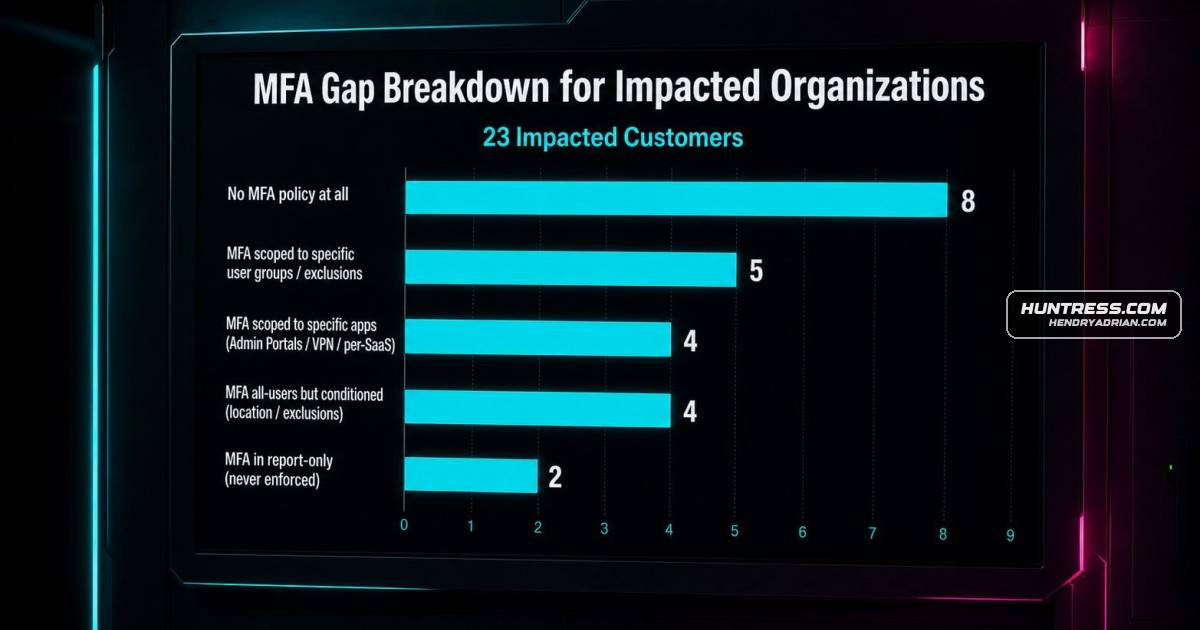
- ROPC can bypass MFA policies that do not cover the relevant Azure resources, users, or client app types. Of the 78 compromised accounts, 55 had Conditional Access policies requiring MFA, but configuration gaps left them exposed.
- Huntress recommends blocking device code flow, or restricting it to accounts that need it, and applying Conditional Access to all users, cloud apps, and client app types, including legacy authentication.
- Huntress says report-only testing can help teams assess policy impact before enforcement and identify exceptions that could otherwise disrupt users.
- Across more than 12,000 tenants reviewed during its Managed ISPM early access period, Huntress found more than half of recommended controls missing in 60% of tenants.
Article Details
- Defense Focus
- Prevent device-code phishing and ROPC-based account compromise by correctly scoping Conditional Access policies, and detect active identity compromises.
- Detection Methods
- Monitor Microsoft 365 sign-ins for anomalous login surges and activity associated with device-code or ROPC authentication flows.
- Review Conditional Access policy scope to verify coverage of all users, all cloud apps, all client app types, and legacy authentication flows.
- Use report-only Learning Mode to identify users and sign-ins that would be affected before enforcing a new policy.
- Use identity threat detection alerts and incident reports to investigate active account compromises.
- Data Sources
- Microsoft 365 sign-in and login telemetry
- Conditional Access policy configuration and report-only impact findings
- Identity threat detection alerts and incident reports
- Rule Types
- Conditional Access policies, including device-code-flow blocking and ROPC/legacy-authentication restrictions
- Platforms
- Microsoft 365
- Azure CLI
- Defensive Actions
- Block device authorization flow across the tenant, or restrict it to accounts that require it.
- Scope Conditional Access policies to all users, all cloud apps, and all client app types, including legacy authentication methods such as ROPC.
- Ensure MFA policies cover the affected users and resources, are enforced rather than report-only, and do not rely on untrusted-location conditions alone.
- Use report-only mode to assess policy impact and resolve exceptions before enforcement; regularly review deployed policies for scope gaps or drift.
- Investigate identity threat detection alerts and incident reports for compromised accounts.
MITRE ATT&CK
People
Vendors
HuntressWhat made Railway dangerous wasn't the technique, which Huntress has tracked for a while. It was the infrastructure. Railway is a legitimate developer PaaS platform. Its IP ranges are clean. Microsoft IdentityMicrosoftIn March 2026, our SOC caught a surge of anomalous Microsoft 365 logins across dozens of organizations simultaneously.
Products
Azure CLIThe LSHIY campaign arrived differently. No phishing lures or social engineering. Just attackers replaying validated credentials via the ROPC flow against Azure CLI at a massive scale.Managed ISPMTwo policies. Both already in Managed ISPM.Managed ITDRThat's what it means for prevention and detection to actually work together. Huntress Managed ITDR caught the active compromises in both campaigns and generated incident reports so organizations could respond. ISPMMicrosoft 365 Apps for EnterpriseIn March 2026, our SOC caught a surge of anomalous Microsoft 365 logins across dozens of organizations simultaneously. RailwayRailway. LSHIY. Different Auth Flows, but the Same Lesson We Keep Skipping
Countries
AustraliaBy the time we published our Railway investigation, 344 organizations had been hit across the US, Canada, Australia, New Zealand, and Germany.CanadaBy the time we published our Railway investigation, 344 organizations had been hit across the US, Canada, Australia, New Zealand, and Germany.GermanyBy the time we published our Railway investigation, 344 organizations had been hit across the US, Canada, Australia, New Zealand, and Germany.New ZealandBy the time we published our Railway investigation, 344 organizations had been hit across the US, Canada, Australia, New Zealand, and Germany.United States