
Building a Logstash Gateway for Elasticsearch Bulk Requests
Summary
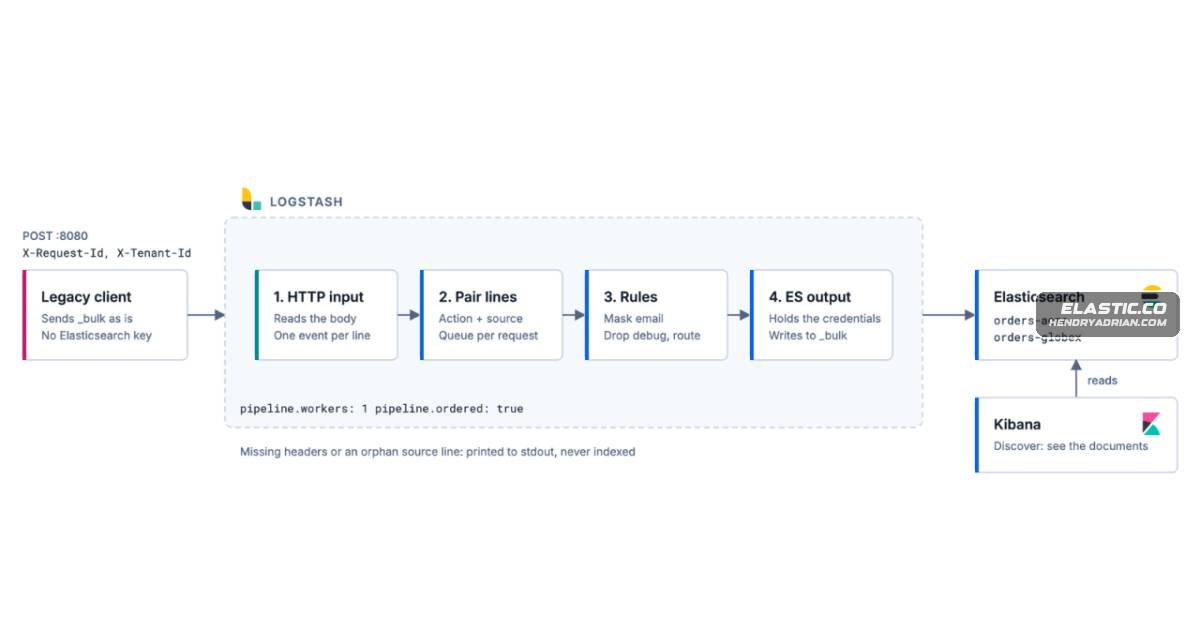
A tutorial shows how to pair NDJSON bulk actions with documents in Logstash, route data by tenant, mask top-level emails, and keep Elasticsearch credentials off clients. It also details ordering, reliability, and gateway limitations.
Key points
- Logstash’s json_lines codec splits bulk requests into separate events; the tutorial uses per-request queues and ordered processing to pair action and document lines.
- The gateway routes each tenant to its own index using proxy-supplied headers, which should be set from an authenticated identity.
- Elasticsearch credentials remain in Logstash, while the example masks top-level email fields and drops debug events.
- The email rule is not full PII redaction, and the example’s HTTP input needs authentication or TLS configured for production.
- Clients receive HTTP 200 before Elasticsearch outcomes are known; mapping errors may enter the dead letter queue, while version conflicts are logged and dropped.
- Pairing queues are in memory, so a crash can leave replayed document lines without their action lines; ordered processing also requires a single worker.
Article Details
- Topic
- Using Logstash as an Elasticsearch bulk API gateway to pair NDJSON action and document lines, mask emails, drop debug events, and route data by tenant.
Vendors
Products
ElasticsearchCheck out the different ways to ingest data into Elasticsearch and dive into practical examples to try something new.KibanaAbout 4 GB of free memory for the three containers (Elasticsearch, Logstash, and Kibana)LogstashAn Elasticsearch bulk API request is two lines per document, and Logstash reads newline-delimited JSON (NDJSON) one line at a time, so an action line and its document arrive as separate events. The gateway in this blog