
Using Elasticsearch Text Fingerprinting to Detect Copied Data in Emails and GenAI Prompts
Summary
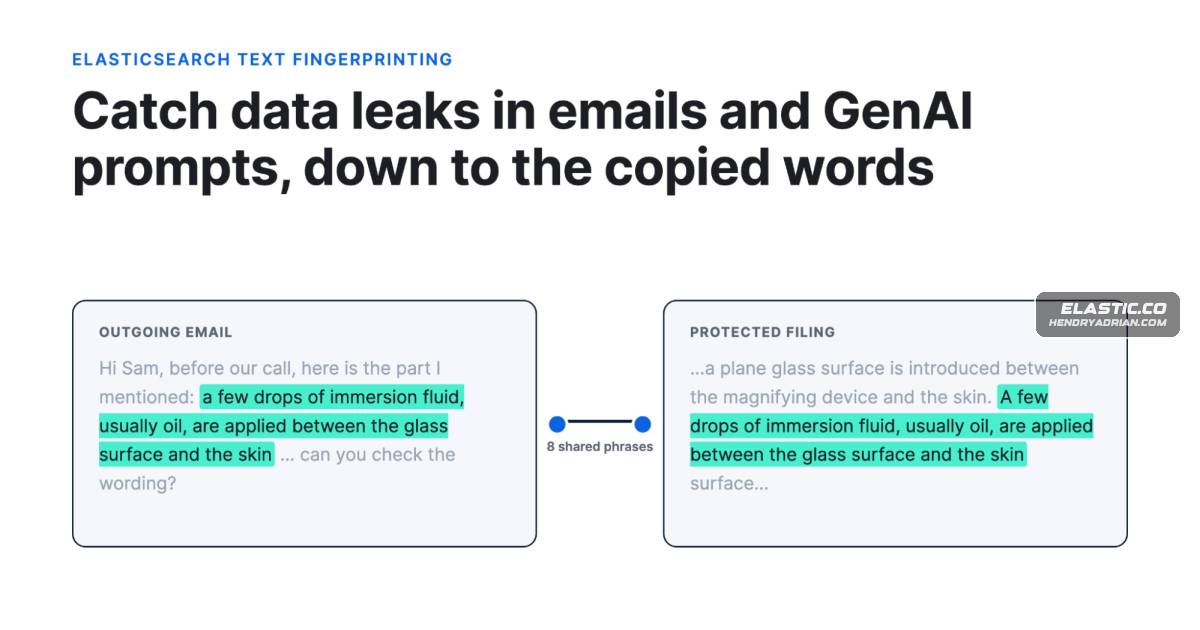
The article shows how Elasticsearch can use overlapping text fingerprints to find and highlight copied passages in emails and GenAI prompts, with tuning guidance, test results, and limitations.
Key points
- The method normalizes text, indexes overlapping eight-word phrases, and matches incoming text against protected documents to identify and highlight shared passages.
- A minimum shared-phrase threshold and a stop list for common boilerplate help balance detection of edited copies against false alarms.
- Checks can monitor email, chat, or GenAI prompts; a proxy can check prompts before forwarding them, while scheduled searches can find known text in recent messages.
- In the demo, a three-phrase rule flagged 99–100% of prompts containing copied passages of 20–80 words and none of 200 ordinary emails.
- The same test flagged 12% of patent text not in the index, mostly because of stock phrases, underscoring the need to tune and review boilerplate filters.
- Fingerprinting does not detect heavily reworded, summarized, or translated text; the article recommends combining it with other controls where evasion is a concern.
- The protected index contains sensitive text and must be secured; the article also notes storage and query-size constraints.
Article Details
- Defense Focus
- Detect and provide passage-level evidence of copied protected text in email, chat, tickets, and GenAI prompts, with optional pre-send blocking and auditing.
- Detection Methods
- Normalize text and index overlapping eight-word phrases; search incoming message text against protected documents with a match query.
- Use a threshold of at least three shared phrases for review, and an unbroken copied run of 16 words or more for higher-confidence alerts; tune thresholds against local traffic.
- Count distinct shared phrases and identify the longest unbroken copied run; use indexed offsets and highlighting to show matching words in the message and protected document.
- Exclude common boilerplate phrases with a stop list in the search analyzer; identify candidates using term vectors and document-frequency counts.
- Search recent messages for known text on a schedule using a timestamp window; use fingerprints of known templates to flag messages for review, not as definitive phishing verdicts.
- Pair text fingerprinting with percolator rules for known terms and other controls for reworded, translated, split, or image-based content.
- Data Sources
- Protected documents, such as patent drafts, contracts, source documents, or board papers.
- Email, chat, ticket, and GenAI prompt text, including full prompt history where applicable.
- Mail-gateway journal data and logs from a proxy in front of GenAI tools.
- Message timestamps and matched-document results.
- Prompt, response, decision, and matched-document audit records; OpenTelemetry prompt and response content when deliberately enabled.
- Rule Types
- Elasticsearch match queries with minimum_should_match and unified highlighting.
- ES|QL MATCH queries.
- Scheduled Kibana Elasticsearch query rules with a time window.
- Elasticsearch percolator queries for known terms or patterns.
- Filters aggregations for counting phrase frequency when building a boilerplate stop list.
- Platforms
- A proxy between users’ chat tools and a model provider for pre-send checks.
- A mail gateway or other enforcement point for checks before messages are sent.
- Separate low-latency blocking and restricted-access audit clusters.
- Defensive Actions
- For GenAI prompts, check the text before forwarding it to the model; block when a trusted match threshold is met and fail closed if the check itself fails.
- Log weaker matches for review and tune phrase length, thresholds, and stop lists using representative local data.
- Build and review stop lists on a nonproduction copy; revisit them when templates or footers change.
- Extract text before fingerprinting; apply OCR to scanned documents when needed.
- Protect the index containing sensitive documents with restricted read access, including term vectors, and include it in backups.
- Record prompts, responses, decisions, and matched documents with appropriate retention and tightly restricted access.
- Use additional controls for paraphrased or otherwise transformed content that text fingerprinting cannot match.
Vendors
Products
ElasticsearchElasticsearch is packed with new features to help you build the best search solutions for your use case.Kibanacopied words highlighted, and ignored the same template sent five hours earlier and an unrelated email. A Kibana Elasticsearch query rule can run the match part on a schedule and apply its own time window on