
GoDaddy’s Automatic DMARC Records Raise Privacy and Email-Delivery Concerns
Summary
The article says GoDaddy automatically adds DMARC records to domains, sending aggregate reports to a GoDaddy address and potentially quarantining legitimate mail. It advises owners to check the record, configure SPF or DKIM, and choose their policy.
Key points
- The article says domains purchased from GoDaddy since April 2025 receive a DMARC record by default, with older domains slated to receive one in the future.
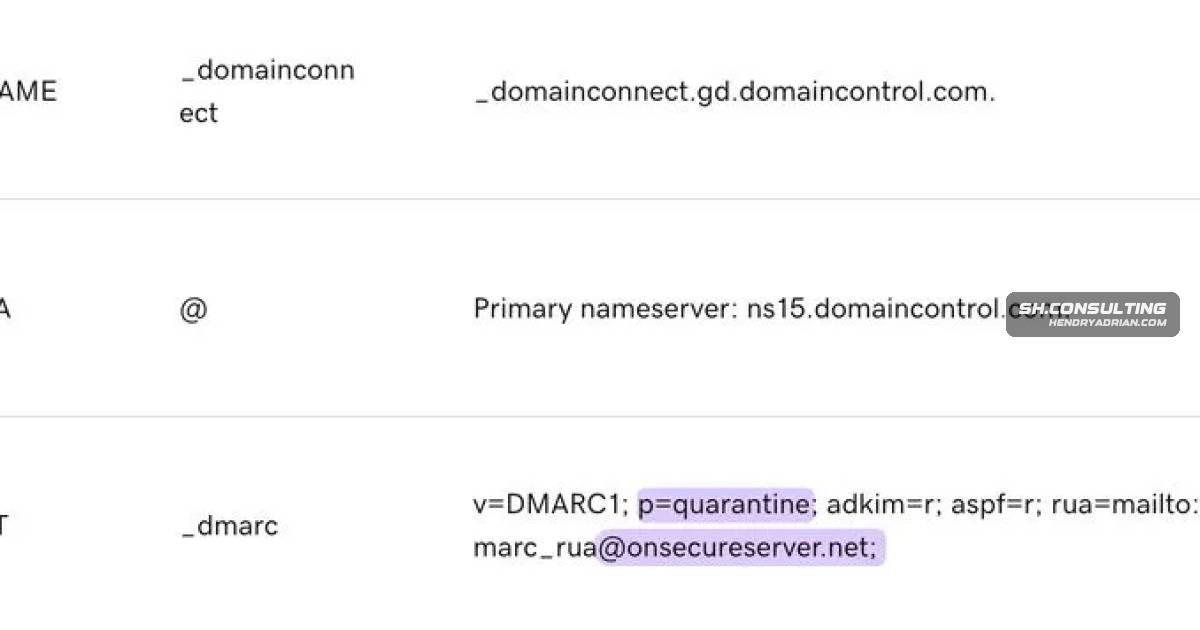
- The documented record sends aggregate reports to dmarc_rua@onsecureserver[.]net rather than directly to the domain owner.
- The article notes that aggregate reports can reveal sending sources, IP addresses, authentication results, and sometimes recipient domains.
- A quarantine policy may send legitimate messages to spam when the domain's real senders lack properly aligned SPF or DKIM.
- The article says GoDaddy used p=reject by default in June–July 2025 and changed to p=quarantine in August.
- It recommends checking the _dmarc TXT record, redirecting reports to an address the owner controls, and validating all sending services before choosing an enforcement policy.
Article Details
- Defense Focus
- Maintain control over DMARC policy and aggregate-report destinations while ensuring legitimate senders authenticate before enforcement is applied.
- Detection Methods
- Inspect the domain's _dmarc TXT record in the DNS dashboard or with a DMARC lookup tool; check whether its rua destination contains onsecureserver.net.
- Review DMARC aggregate reports for sending sources, source IPs, authentication results, and recipient domains where reported.
- Inventory services that send email for the domain and verify SPF or DKIM authentication with alignment.
- Data Sources
- DNS TXT records, including the domain's DMARC record
- DMARC aggregate reports
- SPF and DKIM configuration and results
- Inventory of services sending email as the domain
- Rule Types
- DMARC DNS TXT policy records, including p=quarantine or p=reject and the rua aggregate-report destination
- Platforms
- GoDaddy DNS dashboard
- Defensive Actions
- Change the DMARC rua destination to an address or DMARC monitoring service controlled by the domain owner.
- Identify every service sending as the domain and configure SPF or DKIM with alignment before relying on DMARC enforcement.
- After legitimate senders pass authentication, choose the DMARC policy; consider moving to p=reject when reports are clean.
- Review the DMARC record and report destination periodically to confirm they match the domain owner's intended policy.