
Microsoft 365 May Override DMARC Reject Policies Behind Third-Party Gateways
Summary
SH Consulting reports that Microsoft 365 may deliver messages despite DMARC p=reject when mail arrives through trusted third-party gateways, and recommends restricting inbound connectors; RejectDirectSend blocks only the Direct Send path.
Key points
- The article reports that Microsoft 365 may deliver messages despite a domain’s DMARC p=reject policy when mail arrives through a trusted third-party gateway.
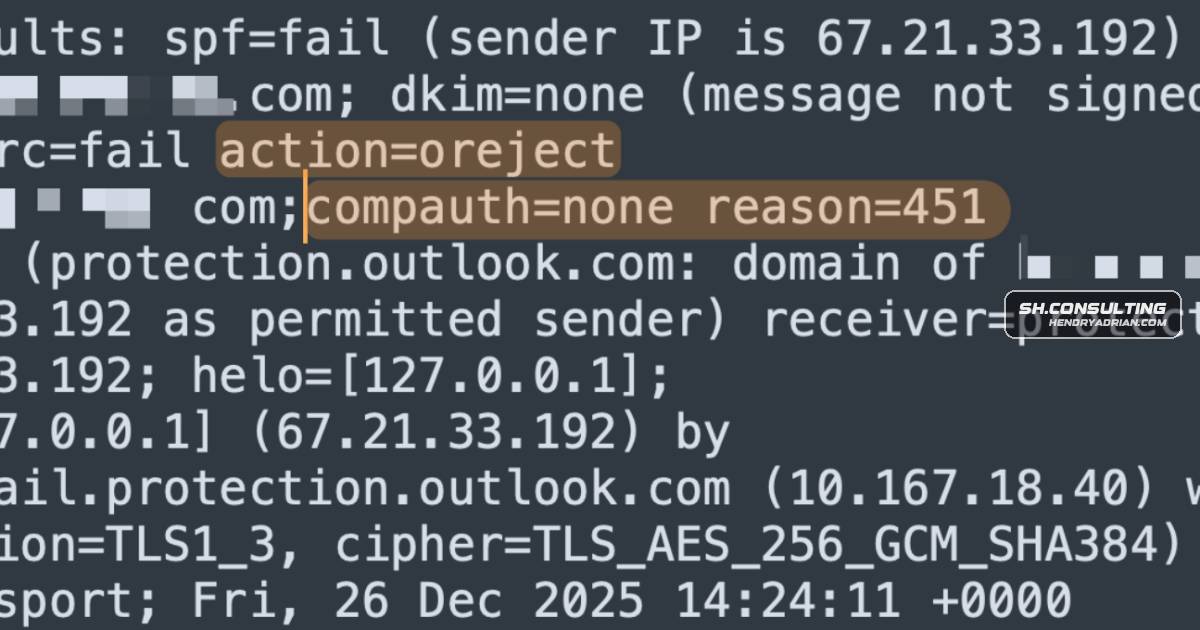
- The reported header indicators are action=oreject together with compauth=none reason=451; the article says reason 451 indicates composite authentication was bypassed.
- The author attributes the behavior to trusted-relay handling and permissive sender-intelligence logic, while noting the precise trigger can vary.
- The article says these oreject events do not appear in Microsoft’s DMARC aggregate reports, potentially leaving domain owners without visibility into delivered spoofed mail.
- The recommended workaround is to restrict inbound Exchange Online connections to the third-party gateway’s IP ranges, while inventorying legitimate services that need direct mail access.
- RejectDirectSend can block unauthenticated Direct Send, but the article cautions that it does not address messages arriving through an authorized third-party gateway connector.
- Administrators are advised to check recent message headers, test spoofing paths, and review all inbound connectors.
Article Details
- Defense Focus
- Detect and prevent Microsoft 365 from accepting spoofed mail through trusted third-party gateway paths that can result in DMARC p=reject being overridden.
- Detection Methods
- Inspect recent inbound message Authentication-Results headers for action=oreject together with compauth=none reason=451.
- Test the spoofing path by sending from outside the tenant with a From address in the tenant's domain, then check whether the gateway or Microsoft 365 rejects, quarantines, or delivers the message.
- Inventory inbound Exchange Online connectors and verify that all accepted inbound flows pass through the intended gateway.
- Check whether MX records point to a third-party gateway or directly to Microsoft.
- Data Sources
- Inbound email Authentication-Results headers
- Exchange Online inbound connector configuration
- Domain MX records
- Results of controlled external spoof-path tests
- DMARC aggregate reports, noting that the article says oreject events may not appear in Microsoft's reports
- Platforms
- Microsoft 365
- Exchange Online
- Defensive Actions
- Restrict inbound mail at Microsoft 365 to the outbound IP ranges of the authorized gateway using a partner-type receive connector, and configure the default connector to refuse other sources.
- Inventory applications, monitoring systems, printers, scanners, and Microsoft services that send mail directly to the tenant; explicitly allow or migrate required flows before enforcing the lockdown.
- Enable RejectDirectSend to block unauthenticated Direct Send, while recognizing that it does not close the trusted third-party gateway path.
- Review gateway allow-listed relationships and connector paths that could let spoofed mail reach Microsoft 365.
- Do not rely on a DMARC p=reject policy or aggregate reports alone as evidence that spoofed messages are being rejected.
MITRE ATT&CK
People
Aaron H.Provided an explanation of oreject and the Spoof Intelligence override behavior cited in the analysis.Ash MorinReproduced spoof scenarios in a direct-to-Microsoft 365 configuration and identified the third-party gateway as the structural difference in the bypass case.Christian SchindlerRan reproductions that helped establish that Microsoft 365 Groups alone were not the cause and that the gateway configuration mattered.Cory LesovskyConfirmed the third-party gateway dependency based on an earlier disclosure to Microsoft.Ivan KovachevProvided input on composite-authentication mechanics relevant to the analysis.Levon VardumyanProvided input on composite-authentication mechanics and the same-tenant trust pattern relevant to the analysis.Sarkis KamberianIdentified the receive-connector lockdown described as the effective workaround.
Vendors
Barracudathe title Connect Process – Microsoft 365 Mail Lockdown. The mechanics are identical for Proofpoint, Barracuda, or any other gateway: identify the IPs your gateway uses for outbound delivery to Microsoft, create aMicrosoftHow Microsoft 365 Silently Overrides DMARC p=reject as orejectMimecastMimecast publishes the procedure for their customers under the title Connect Process – Microsoft 365 Mail Lockdown. The mechanics are identical for Proofpoint, Barracuda, or any other gateway: identify the IPs yourProofpointclient environment where the bypass had occurred, MX records didn't point to Microsoft. They pointed to Proofpoint. Microsoft never accepted that traffic at the public edge. It received it from Proofpoint as an
Products
Defenderedge. The full filtering stack — SPF, DKIM, DMARC, composite authentication, Spoof Intelligence, Defender — runs against an external connection from an arbitrary sender on the open internet. That's theExchange OnlineMicrosoft's Exchange Online has a result code that doesn't appear in any DMARC RFC: oreject, short for override reject. It means the receiving system saw a p=reject policy, evaluated the message against it, and chose toMicrosoft 365 Apps for EnterpriseHow Microsoft 365 Silently Overrides DMARC p=reject as oreject