
Microsoft Details Storm-2372’s AI-Enabled OAuth Device-Code Phishing Campaign
Summary
Microsoft describes Storm-2372’s device-code phishing campaign, detailing how dynamic code generation enabled token theft and how attackers used compromised accounts for reconnaissance, persistence and email exfiltration.
Key points
- Microsoft reports that Storm-2372 generated OAuth device codes when victims clicked phishing links, avoiding the expiration problem of codes sent in advance.
- Role-targeted lures, reportedly created with generative AI, led victims through redirect chains to attacker-controlled pages.
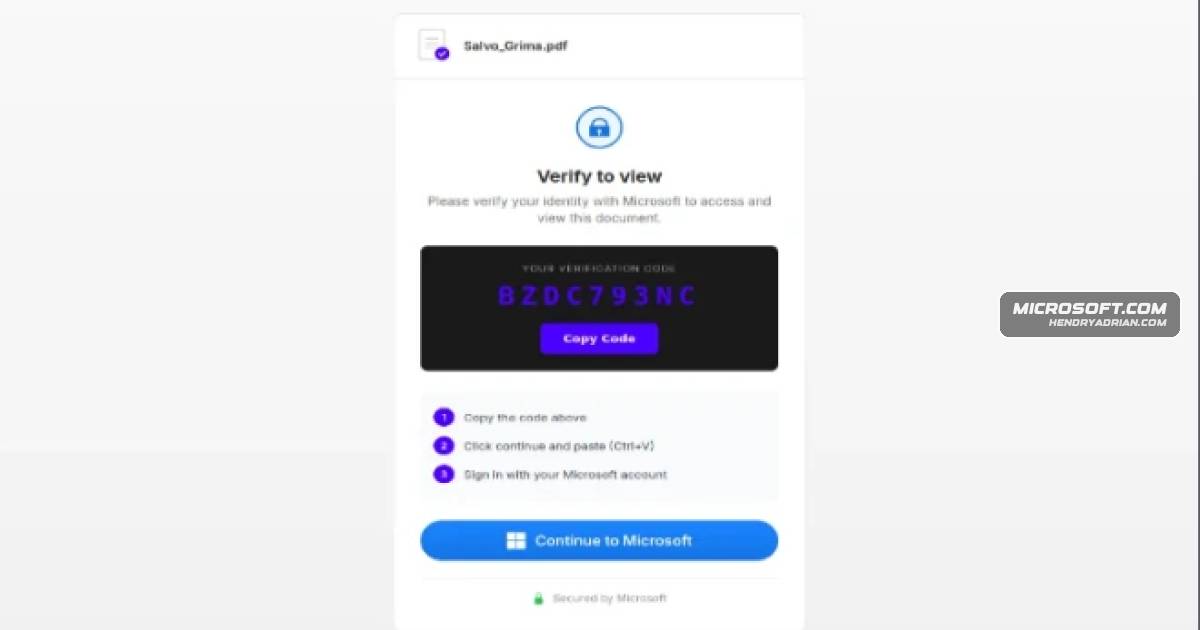
- Scripts copied device codes to victims’ clipboards and polled attacker infrastructure; when victims completed sign-in, attackers obtained access tokens without stealing passwords.
- After gaining access, attackers used Microsoft Graph for reconnaissance and, in some cases, registered devices or created inbox rules to maintain access and collect or conceal email.
- Microsoft recommends restricting device-code authentication where possible, using Conditional Access and sign-in risk policies, and revoking refresh tokens if compromise is suspected.
- Defenders can monitor for suspicious device-code sign-ins, including error code 50199 followed by successful authentication, and investigate related device-registration and inbox-rule activity.
Article Details
- Attack Vectors
- Role-targeted phishing emails used invoice, RFP, document-access, and voicemail lures with links or PDF and HTML attachments.
- Redirect chains through compromised legitimate domains and serverless platforms led victims to attacker-controlled device-code phishing pages.
- Page scripts generated live OAuth device codes on demand, copied them to victims’ clipboards, and directed users to complete authentication at the legitimate Microsoft device-login portal.
- Polling of the attacker backend detected successful authentication and provided access to live tokens; the actors then used Microsoft Graph for reconnaissance and created inbox rules or registered devices for persistence and email collection.
- Defensive Notes
- Block device-code flow where possible; where it is needed, control it through Conditional Access policies.
- Use anti-phishing policies and Safe Links, and educate users to scrutinize unexpected sign-in requests and suspicious links.
- Monitor for anomalous device-code sign-ins, suspicious IP ranges, and error code 50199 followed by a successful sign-in.
- If compromise is suspected, revoke refresh tokens and consider requiring re-authentication through Conditional Access.
- Use sign-in risk policies and reports, monitor device registrations and inbox-rule creation, and apply least privilege to privileged accounts.
Indicators of compromise
| Type | Indicator | Context |
|---|---|---|
| DOMAIN | graph-microsoft[.]com | Attacker-used impersonation domain described as part of the phishing infrastructure. |
| DOMAIN | office365-login[.]com | Attacker-used impersonation domain used in phishing redirects or landing pages. |
| DOMAIN | portal-azure[.]com | Attacker-used impersonation domain described as part of the phishing infrastructure. |
| HOSTNAME | a7b2-c9d4[.]office-verify[.]net | Randomized attacker-used subdomain observed in the phishing infrastructure. |
| IPV4 | 160[.]220[.]232[.]0 | Part of a Railway.com threat-actor infrastructure range observed in sign-ins. |
| IPV4 | 160[.]220[.]234[.]0 | Part of a Railway.com threat-actor infrastructure range observed in sign-ins. |
| IPV4 | 185[.]81[.]113[.]0 | Part of an HZ Hosting threat-actor infrastructure range observed in sign-ins. |
| IPV4 | 8[.]228[.]105[.]0 | Listed in the article’s detection query as part of a suspicious IP range for device-code authentication. |
| IPV4 | 89[.]150[.]45[.]0 | Part of an HZ Hosting threat-actor infrastructure range observed in sign-ins. |
MITRE ATT&CK
T1036 · MasqueradingThe campaign used domain shadowing and brand-impersonating domains, including graph-microsoft[.]com and office365-login[.]com.T1059 · Command and Scripting InterpreterJavaScript and Node.js scripts generated device codes, polled the backend for authentication status, and manipulated the clipboard.T1078 · Valid AccountsAfter device-code authentication, the actors obtained and used valid access tokens for targeted user accounts.T1087 · Account DiscoveryThe actors used Microsoft Graph reconnaissance to map organizational structures and identify sensitive permissions.T1098 · Account ManipulationThe actors registered devices to obtain Primary Refresh Tokens and created malicious inbox rules to maintain access.T1114 · Email CollectionThe actors collected email data and used inbox rules to redirect or conceal communications.T1204 · User ExecutionVictims had to click phishing links and enter or paste the displayed device code to complete the authentication handoff.T1566 · PhishingStorm-2372 distributed deceptive emails using role-targeted themes such as invoices, RFPs, and shared files.T1566.002 · Spearphishing LinkPhishing links used multi-stage redirects through compromised domains and serverless platforms to reach attacker-controlled pages.T1583 · Acquire InfrastructureThe actors used Railway.com and serverless platforms to run short-lived infrastructure for device-code generation and polling.
People
Bharat VaghelaNamed as a contributor to Microsoft Defender Security Research’s analysis of the campaign.Krithika RamakrishnanNamed as a contributor to Microsoft Defender Security Research’s analysis of the campaign.Ofir MastorNamed as a contributor to Microsoft Defender Security Research’s analysis of the campaign.Shivas RainaNamed as a contributor to Microsoft Defender Security Research’s analysis of the campaign.
Threat Actors
Vendors
Amazon Web ServicesThe campaign used automation platforms (e.g., Railway.com), cloud hosting (Vercel, Cloudflare Workers, AWS Lambda), clipboard hijacking, Microsoft Graph reconnaissance, and malicious inbox rules to maintain persistenceCloudflareThe campaign used automation platforms (e.g., Railway.com), cloud hosting (Vercel, Cloudflare Workers, AWS Lambda), clipboard hijacking, Microsoft Graph reconnaissance, and malicious inbox rules to maintain persistenceDigitalOceantrusted services like Railway.com (a popular Platform-as-a-Service (PaaS)), Cloudflare, and DigitalOcean. By using these platforms, these malicious scripts can blend in with benign Device codeHZ Hosting[IP Range ] Additional hosting infrastructure observed – 89.150.45.0 (HZ Hosting), 185.81.113.0 (HZ Hosting).MicrosoftMicrosoft Defender observed the Storm-2372 device code phishing campaign that abused the OAuth device code flow, dynamic on-demand code generation, and short-lived cloud infrastructure to bypass MFA and evade signature-Railway.comThe campaign used automation platforms (e.g., Railway.com), cloud hosting (Vercel, Cloudflare Workers, AWS Lambda), clipboard hijacking, Microsoft Graph reconnaissance, and malicious inbox rules to maintain persistenceVercelThe campaign used automation platforms (e.g., Railway.com), cloud hosting (Vercel, Cloudflare Workers, AWS Lambda), clipboard hijacking, Microsoft Graph reconnaissance, and malicious inbox rules to maintain persistence
Products
AWS LambdaThe campaign used automation platforms (e.g., Railway.com), cloud hosting (Vercel, Cloudflare Workers, AWS Lambda), clipboard hijacking, Microsoft Graph reconnaissance, and malicious inbox rules to maintain persistenceCloudflare WorkersThe campaign used automation platforms (e.g., Railway.com), cloud hosting (Vercel, Cloudflare Workers, AWS Lambda), clipboard hijacking, Microsoft Graph reconnaissance, and malicious inbox rules to maintain persistenceMicrosoft Defender XDRMicrosoft Defender XDR detectionsMicrosoft Entra IDWhere necessary, configure Microsoft Entra ID’s device code flow in your Conditional Access policies.Microsoft Graph(e.g., Railway.com), cloud hosting (Vercel, Cloudflare Workers, AWS Lambda), clipboard hijacking, Microsoft Graph reconnaissance, and malicious inbox rules to maintain persistence and exfiltrate high-value emailMicrosoft Security CopilotCustomers with provisioned access can also use Microsoft Security Copilot in Microsoft Defender to investigate and respond to incidents, hunt for threats, and protect their organization with relevant threat intelligence.Microsoft SentinelMicrosoft Sentinel customers can use the TI Mapping analytics (a series of analytics all prefixed with ‘TI map’) to automatically match the malicious indicators mentioned in this blog post with data in their workspace.Node.jsand PaaS platforms (notably Railway.com) to spin up thousands of short-lived backend nodes running Node.js, enabling on-demand device code generation and polling while blending in with legitimate cloud traffic.