Malicious Facebook Ads Promote a Fake Bitwarden Extension to Steal User and Business Data
Summary
Bitdefender researchers describe Facebook ads promoting a fake Bitwarden update that leads users to sideload a malicious Chrome extension. It harvests Facebook cookies and account data, including business and billing information, and sends it to an attacker-controlled C
Key points
- The campaign, launched November 3, 2024, used Facebook ads targeting consumers aged 18–65 across Europe.
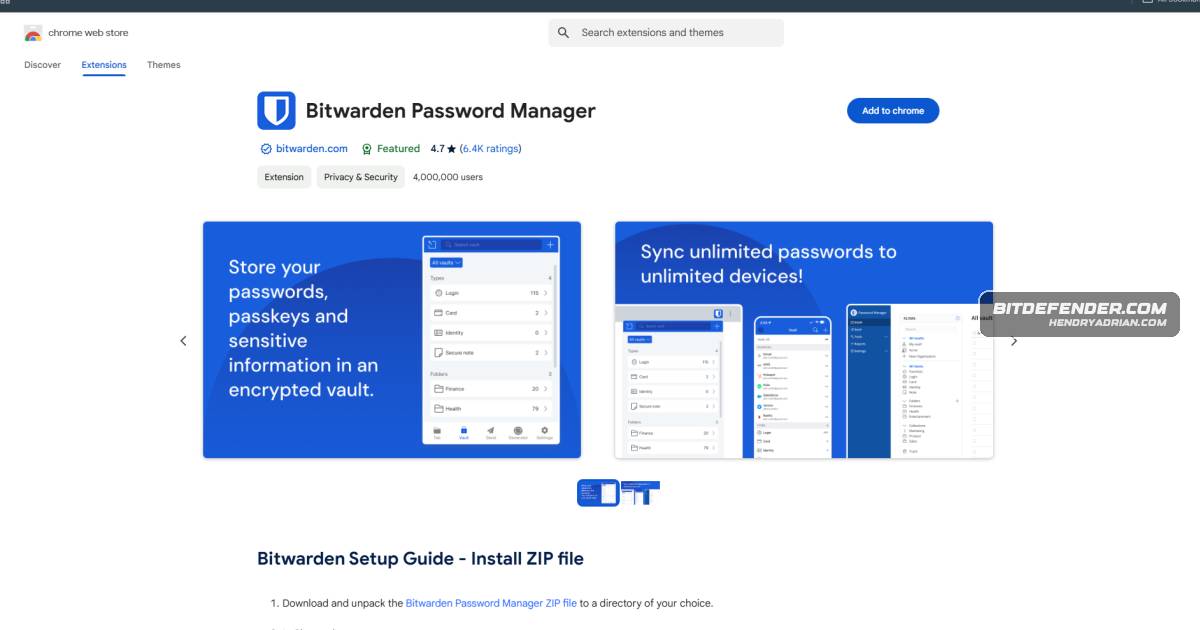
- Ads impersonated Bitwarden and directed users through redirects to a fake Chrome Web Store page, then a Google Drive ZIP download.
- Victims were instructed to enable Developer Mode and manually sideload the extension, bypassing normal store installation checks.
- The extension requested broad permissions, including access to cookies, tabs, storage, and network requests across websites.
- It sought Facebook's c_user cookie and used the Graph API to collect personal details, business and ad-account information, and associated billing data.
- The extension also collected IP and geolocation data, then exfiltrated the information to a Google Script URL.
- Bitdefender recommends installing extensions through official stores, checking permissions, and disabling Developer Mode when not needed.
Article Details
- Attack Vectors
- Malicious Facebook ads impersonated Bitwarden and urged users to install a fake browser-extension security update.
- The ads redirected users through multiple sites to a phishing page mimicking the Chrome Web Store, then to a Google Drive ZIP download.
- Users were instructed to unzip and manually sideload the extension by enabling Developer Mode in Chrome.
- The extension accessed Facebook cookies and account data, including business and ad-account information, and transmitted collected data to a Google Script URL described as the attackers’ C2 server.
- Defensive Notes
- Install or update browser extensions only through official browser stores, not advertisements or third-party links.
- Review extension permissions, especially requests involving cookies, network requests, or access to all websites.
- Disable browser Developer Mode when it is not needed and report suspicious social-media ads.
MITRE ATT&CK
T1176 · Software ExtensionsThe malicious browser extension was manually sideloaded after users enabled Developer Mode.T1539 · Steal Web Session CookieThe extension searched Facebook cookies for the c_user session cookie.T1567 · Exfiltration Over Web ServiceThe extension transmitted collected data to a Google Script URL described in the article as the attackers’ C2 server.
People
Vendors
Products
Bitdefender ScamioPro tip: Use Bitdefender Scamio to deter scams and malicious ads.Bitdefender Total Securityyourself from malvertising and phishing attacks by using a reliable security solution like Bitdefender Total Security. A comprehensive security solution detects and blocks malicious links, phishing attempts, andBitwarden Password Manager "name": "Bitwarden Password Manager",Chrome Web StoreUse of Redirect Chains: Users who click on these ads are redirected through multiple sites, ultimately landing on a phishing page that mimics the official Chrome Web Store to obscure the ad’s malicious intent.FacebookInside Bitdefender Labs’ Investigation of a Malicious Facebook Ad Campaign Targeting Bitwarden UsersGoogle Driveto mimic the official Chrome Web Store. When users click "Add to Chrome," they are redirected to a Google Drive link containing a zip file with the malicious extension. Attackers guide users through a process toScam CopilotAdditionally, with the launch of our new Scam Copilot, you can get comprehensive scam protection across all of your devices with access to your personal scam adviser chatbot, scam wave alerts in your area, real-time