Researcher Demonstrates OAuth Token Theft Through a Sideloaded Windows AppX Host
Summary
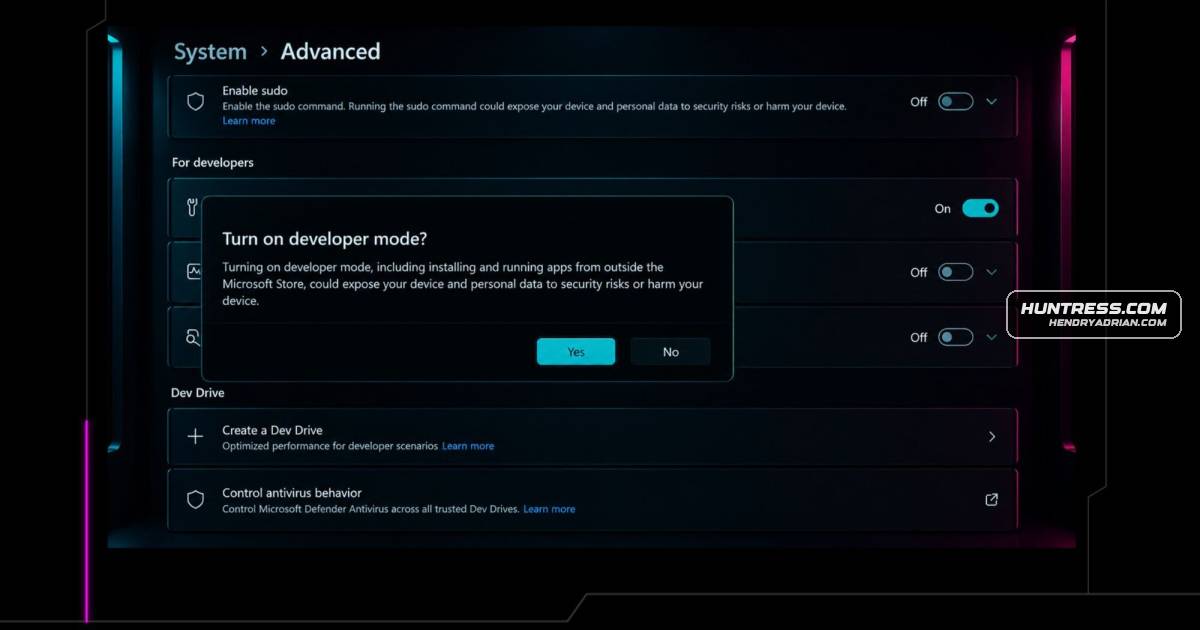
A researcher demonstrated stealing Microsoft 365 OAuth tokens through a sideloaded AppX package on Windows 11. The technique requires Developer Mode or an enterprise sideloading policy; the article also describes network detection and defensive controls.
Key points
- On Windows 11 24H2, a sideloaded AppX package used WWAHost.exe and WindowsRuntimeAccess="all" to run attacker-controlled JavaScript and invoke Microsoft’s legitimate OAuth sign-in flow.
- The demonstrated attack requires Developer Mode or an enterprise AllowAllTrustedApps policy, plus code execution in the user’s session; registering the package then requires no further administrator privileges.
- The researcher captured access and refresh tokens after the user completed a real Microsoft sign-in and MFA. The delegated token’s effective access depends on the victim’s privileges, and the refresh token can persist until revoked or otherwise invalidated.
- The recommended network detection looks for the MSAppHost/3.0 user agent connecting to non-Microsoft destinations; AppX registration and related endpoint or identity events can provide corroborating signals.
- Defenders are advised to audit and restrict Developer Mode and sideloading, tune the Microsoft-domain allow-list, and use Conditional Access, Token Protection where available, and Continuous Access Evaluation.
- Only the WWAHost OAuth token-theft path was demonstrated end-to-end on 24H2. Other described WinRT capabilities were not re-confirmed on that build, and silent token acquisition was unverified.
Article Details
- Attack Vectors
- After code execution in a user session, an attacker registers a sideloaded AppX package when Developer Mode or the enterprise AllowAllTrustedApps policy is enabled.
- The package grants remote JavaScript WindowsRuntimeAccess="all" and loads it in the Microsoft-signed WWAHost.exe process.
- The JavaScript invokes WebAuthenticationBroker to present Microsoft's real sign-in and MFA flow, then captures the returned authorization code and exchanges it for access and refresh tokens.
- The captured refresh token can be used from another machine and network to obtain new access tokens without further user interaction, until revoked or otherwise invalidated.
- On Windows 11 22H2, the article reports additional lab demonstrations involving CredentialPicker plaintext credential capture, user-scoped DPAPI decryption, and protocol-handler launching; these were not all re-confirmed end-to-end on 24H2.
- Defensive Notes
- Deploy a proxy, SIEM, or firewall rule to alert on the MSAppHost/3.0 user agent reaching destinations outside an appropriately tuned Microsoft-owned-domain allow-list.
- Audit and restrict Developer Mode and the enterprise AllowAllTrustedApps sideloading policy; the article identifies these settings as the package-registration gate.
- Investigate Add-AppxPackage -Register activity, especially registrations from outside C:\Program Files\WindowsApps, and AppX manifests in user-writable paths that grant WindowsRuntimeAccess="all" to external URLs.
- Monitor outbound connections from AppX host binaries to non-Microsoft IPs, including with Windows Filtering Platform auditing or Sysmon Event ID 3.
- Require compliant or managed devices for token issuance, consider Token Protection where available, and shorten refresh-token lifetimes or enable Continuous Access Evaluation to limit persistence.
MITRE ATT&CK
T1056.002 · GUI Input CaptureIn a Windows 11 22H2 lab demonstration, CredentialPicker displayed a native credential dialog and returned the entered plaintext credentials to the calling JavaScript; the article says this was not re-confirmed on 24H2.T1059.001 · PowerShellThe article describes registering the sideloaded package with Add-AppxPackage -Register from PowerShell.T1059.007 · JavaScriptAttacker JavaScript loaded by the sideloaded AppX package runs in WWAHost.exe and invokes WebAuthenticationBroker.T1528 · Steal Application Access TokenThe JavaScript captures OAuth authorization codes and obtains access and refresh tokens through WebAuthenticationBroker.T1550.001 · Application Access TokenThe attacker uses the captured refresh token from another machine to mint new access tokens without re-authentication.
People
Aaron MargosisNamed by the article as a reviewer.Andrew SchwartzHuntress author who tested and documented the AppX-host OAuth token theft technique.Dirk-jan MollemaReferenced in connection with askWAM and silent WAM/PRT token-request tooling.Lindsey O'Donnell-WelchNamed by the article as a reviewer, formatter, and publisher.Nick PowersNamed by the article as a reviewer and as the speaker of a DEF CON 34 talk on the AppX and MSIX surface.
Vendors
Products
AppXA sideloaded AppX package abuses Microsoft-signed AppX web hosts to present a legitimate Microsoft sign-in and capture the resulting OAuth tokens. Every component is trusted and Microsoft-signed, so there's nothing forDefenderon any host name, so it catches the whole class whether or not the individual binaries are listed, and a defender who wants to measure their own exposure can do it directly: they can sweep the signed AppX host binariesEntra IDThis was tested end-to-end against a live Entra ID (Azure AD) tenant with MFA enabled and default security configuration.Microsoft 365Stolen refresh tokens give durable access to the victim's Microsoft 365 data from any machine, and the blast radius scales with the compromised user's privileges.Microsoft GraphStep 5. The code is exchanged for tokens and exfiltrated. Access token plus refresh token with a broad set of Microsoft Graph scopes. The refresh token provides persistent access without further MFA.Microsoft Officesideloaded package, a page hosted on my Kali box, and a call to WebAuthenticationBroker using Microsoft Office's own client ID. I ran it and watched a real Microsoft login dialog open on the desktop. Real,Windows 11I tested this on Windows 11 24H2 (build 26100) with Developer Mode enabled. It needs no admin beyond the toggle for that one setting. Once that toggle is set, every component in the chain is a trusted, signed Microsoft
Tools
askWAMtoken paths. If the victim is already signed in, silent WAM token requests (Dirk-jan Mollema's askWAM, and the broader WAM/PRT tooling) get tokens without a dialog, inheriting device state and defeatingexchange_token.pycode. register_appx.ps1 runs on Windows to create and register the package. Once the code lands, exchange_token.py handles the token exchange and Graph API validation.kali_listener.pyThe PoC is a two-part setup. kali_listener.py runs on Kali and serves the payload and captures the auth code. register_appx.ps1 runs on Windows to create and register the package. Once the code lands, exchange_token.pyPowerShellProtocol Handler Launching. Launcher.launchUriAsync invoked powershell:, cmd:, ms-msdt:, search-ms:, ms-officecmd:, and others. Some payloads are blocked by Defender, but the launch mechanism itself succeeds from withinregister_appx.ps1a two-part setup. kali_listener.py runs on Kali and serves the payload and captures the auth code. register_appx.ps1 runs on Windows to create and register the package. Once the code lands, exchange_token.py handlesSysmonAdd-AppxPackage -Register invocations with paths outside C:\Program Files\WindowsApps. Sysmon Event ID 1 / Windows 4688. Natively, without Sysmon: AppXDeploymentServer/Operational Event ID 400 records the register, and