
How Port Scanning Works—and Why an Open Port Isn’t Automatically a Vulnerability
Summary
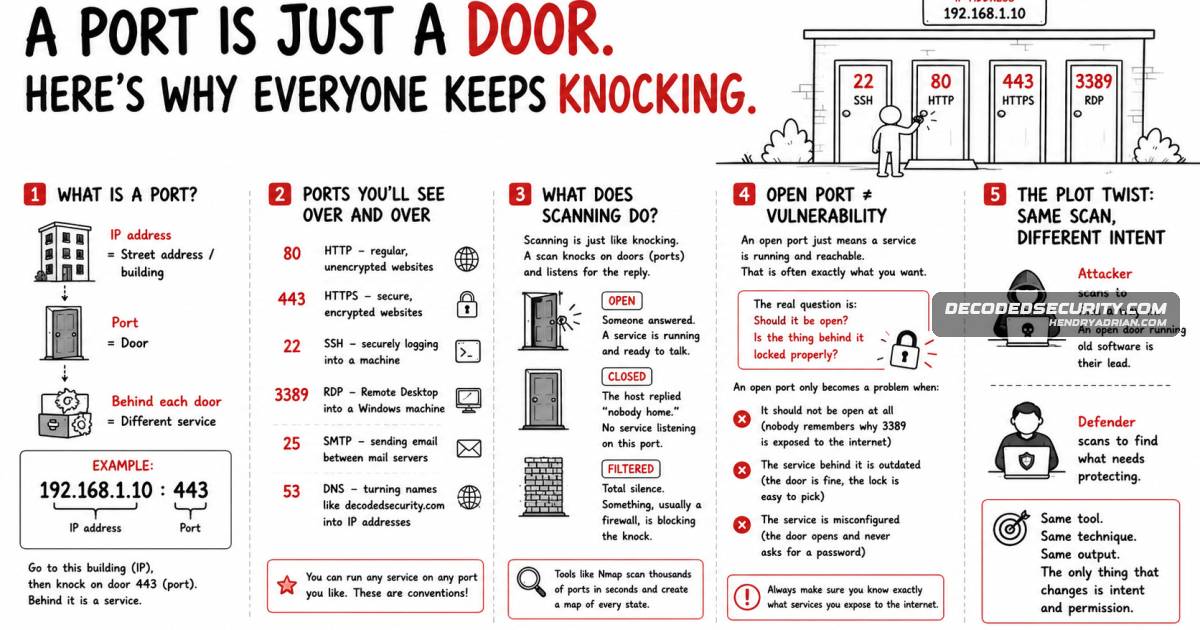
A beginner’s guide explains network ports, the open, closed, and filtered scan results, and how attackers and defenders use the same scanning techniques. An open port is not inherently dangerous; risk depends on whether the service should be exposed and how it is set up
Key points
- A port number directs network traffic to a service on a device; common examples include 80 for HTTP, 443 for HTTPS, and 22 for SSH.
- A scan reports ports as open, closed, or filtered, indicating whether a service responds, no service is listening, or a filter blocks the probe.
- Tools such as Nmap can scan many ports and provide a map of their states for security assessments.
- Attackers and defenders use similar scanning techniques, but their intent and authorization differ.
- An open port is not automatically a vulnerability; exposure, outdated software, or misconfiguration can make the service risky.
Article Details
- Topic
- Educational explanation of network ports, common port numbers, port scanning, scan states, and how defenders use scans to identify exposed services.