
Fake Copyright Notices Target Chrome Extension Publishers’ Google Accounts
Summary
A phishing page uses fake copyright notices, real extension details, and a simulated Google sign-in window to target Chrome extension publishers. Malwarebytes recommends verifying warnings in the developer dashboard and strengthening account security.
Key points
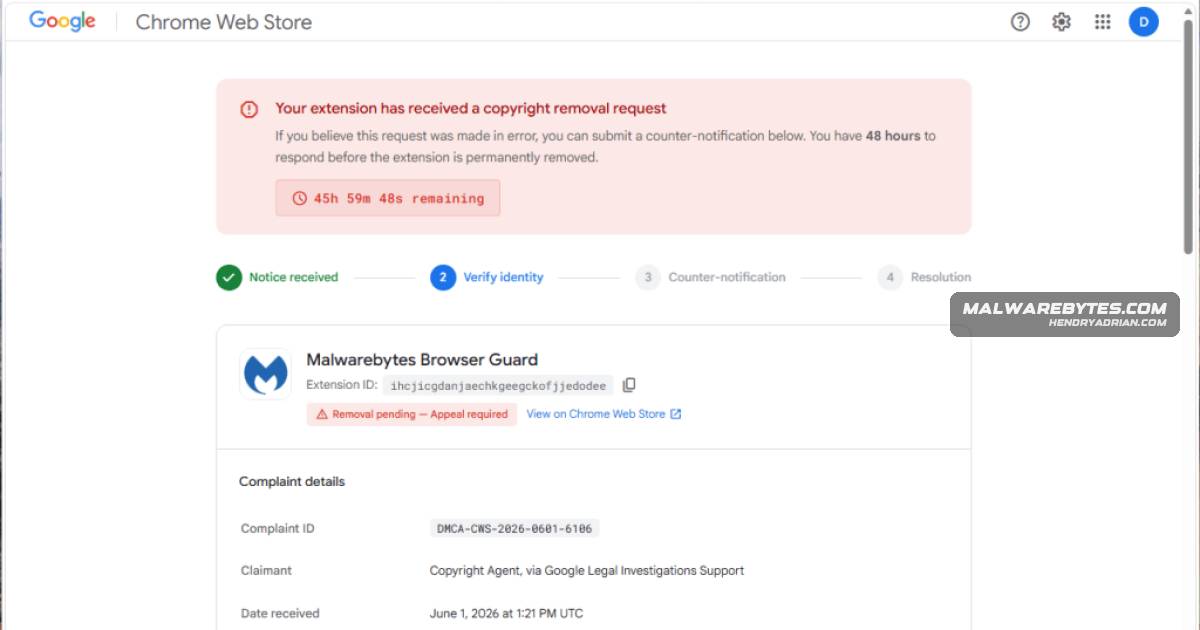
- The scam threatens Chrome extension publishers with removal within 48 hours unless they appeal a fabricated copyright complaint.
- After a publisher enters an extension ID, the page uses publicly available extension details to make the fake notice look genuine.
- The site at dmca-chrome-extensions[.]click imitates Google branding and displays a simulated sign-in window; credentials entered there go to the scammers.
- The fake sign-in window is part of the webpage, while the browser’s actual address bar remains on the scam site—not accounts[.]google[.]com.
- Compromised developer accounts could let attackers alter extensions or potentially distribute malicious updates; the article does not report confirmed account compromises.
- Verify extension warnings through the Chrome Web Store developer dashboard, use passkeys or security keys, and check listings for unauthorized changes if credentials were entered.
Article Details
- Defense Focus
- Prevent credential theft from Chrome extension publishers and detect unauthorized changes to their developer accounts or listings.
- Detection Methods
- Verify extension warnings in the Chrome Web Store developer dashboard rather than through a link in a notice.
- Check that the browser's actual address bar shows the expected sign-in domain.
- Test suspicious sign-in windows: a window confined to the webpage or disappearing when the browser is minimized may be fake.
- Review Chrome Web Store listings for unfamiliar changes, uploads, or versions.
- Data Sources
- Browser address bar and displayed website domain
- Chrome Web Store developer dashboard and extension listing history
- Google account active sessions, connected apps, and devices
- Platforms
- Chrome Web Store developer dashboard
- Malwarebytes Browser Guard
- Defensive Actions
- Navigate directly to the Chrome Web Store developer dashboard to verify notices.
- Avoid acting on countdown-driven warnings and do not enter credentials on the linked page.
- Use passkeys or hardware security keys for sign-in protection.
- If credentials were entered, change the password from a trusted device, sign out of active sessions, review connected apps and devices, enable two-step verification, and check extension listings for unauthorized changes.
Indicators of compromise
| Type | Indicator | Context |
|---|---|---|
| DOMAIN | dmca-chrome-extensions[.]click | Phishing domain used to impersonate a Chrome Web Store policy center and steal Google credentials from extension publishers. |
MITRE ATT&CK
T1036 · MasqueradingThe phishing page uses Google branding and a simulated sign-in window designed to resemble a real browser window.T1056.003 · Web Portal CaptureCredentials entered into the fake sign-in form are sent to the scammers.T1566.002 · Spearphishing LinkThe scam lures extension publishers to a deceptive website presenting a fake copyright notice and sign-in flow.
Vendors
Products
Chrome Web StoreVictims are told their extension will be removed from the Chrome Web Store within 48 hours unless they appeal.Malwarebytes Browser GuardWhen we tested the scam with Malwarebytes Browser Guard, it displayed our genuine extension name, icon, and Chrome Web Store listing alongside the fake complaint.Malwarebytes PremiumOur Browser Guard, which is also part of Malwarebytes Premium can help block malicious websites and phishing pages before you enter sensitive information.