Google Ads Deliver Fake Tech-Support Lockers Impersonating Microsoft Defender and Apple
Summary
Netskope analyzed a tech-support-scam kit promoted through Google Ads. It uses anti-analysis checks and runtime-decrypted, OS-specific browser lockers to pressure victims into calling a scam number; the campaign reached at least 619 organizations in two weeks.
Key points
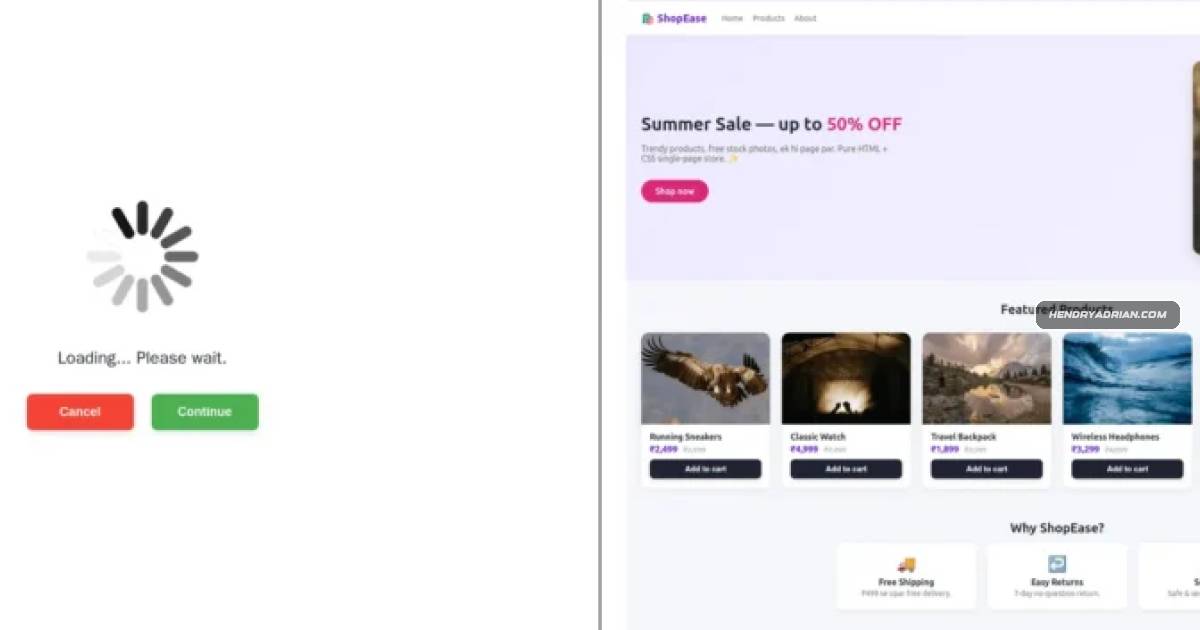
- Victims are routed from paid Google Ads through a fake loading screen to a storefront branded “ShopEase.”
- The kit waits for mouse movement to evade automated analysis, decrypts a hidden command-and-control address, and retrieves an encrypted Windows- or macOS-specific payload.
- The fake locker is assembled in browser memory rather than delivered as an inspectable file over the network.
- Windows victims see fake Microsoft Defender alerts; macOS victims see Apple-themed warnings, both urging them to call a scam support number.
- Full-screen mode, a hidden cursor, keyboard-lock behavior, browser slowdown, and a fake lockout screen are used to pressure victims. The computer itself is not actually locked.
- From August 31 to September 14, 2026, the campaign affected at least 619 organizations and used more than 250 Google Ads campaign IDs across at least 284 legitimate publisher sites.
- Netskope says its inline protection detects the kit as “Generic.Phishing Tech Support Scam Kit Detected” and advises victims not to call the number and to close or force-quit the browser.
Article Details
- Attack Vectors
- Paid Google Ads led victims to a loading page and then a fake ShopEase storefront.
- A mouse-movement gate delayed the malicious logic until a cursor event occurred, hindering automated analysis.
- The page decrypted a hidden C2 address, fetched an encrypted Windows- or macOS-specific locker payload, and assembled the fake alert in browser memory.
- The locker used fake security warnings, full-screen mode, cursor hiding, keyboard locking, and deliberate browser lag to pressure victims into calling a bogus support number.
- Defensive Notes
- Do not call the number displayed by a browser page claiming the computer is locked; close the page instead.
- If Escape does not immediately exit full-screen mode, hold it for a couple of seconds, then close the tab.
- If the page remains open, force-close the browser through the operating system and reopen it without restoring the previous session.
- Netskope Threat Protection detects the kit inline as Generic.Phishing Tech Support Scam Kit Detected.
MITRE ATT&CK
T1027 · Obfuscated Files or InformationThe kit decrypts a hidden C2 address at runtime, then decrypts the fetched locker payload before assembling it in browser memory.T1071.001 · Web ProtocolsAfter recovering its C2 address, the kit fetches the encrypted locker payload from that cloud-hosted C2 over the web.T1082 · System Information DiscoveryThe kit determines whether the victim is using Windows or macOS to select the corresponding locker payload.T1204.001 · Malicious LinkVictims click a paid Google ad that takes them to the scam page.
Malware
Vendors
GoogleThe campaign was distributed through paid Google Ads, affected at least 619 organizations, and used anti-analysis tradecraft to hide its hidden C2 and encrypted payloads.NetskopeNetskope Threat Labs tracked a cloud-hosted tech-support-scam kit that uses fake loading screens, browser full-screen tricks, and runtime decryption to display bogus Microsoft Defender or Apple alerts and push victims
Products
Google AdsThe campaign was distributed through paid Google Ads, affected at least 619 organizations, and used anti-analysis tradecraft to hide its hidden C2 and encrypted payloads.macOSIt decrypts a hidden C2 address and then fetches an encrypted payload tailored to Windows or macOS victims.Microsoft Defenderthat uses fake loading screens, browser full-screen tricks, and runtime decryption to display bogus Microsoft Defender or Apple alerts and push victims to call a scam support number.Netskope Threat ProtectionNetskope Threat Protection detects this kit inline as Generic.Phishing Tech Support Scam Kit Detected.WindowsIt decrypts a hidden C2 address and then fetches an encrypted payload tailored to Windows or macOS victims.
Countries
Australiaad clicks, the United States accounts for roughly 62% of the affected organizations, Japan for 16%, and Australia for 14%, with the remainder scattered thinly across a long tail of other countries.Japanthe geography of the ad clicks, the United States accounts for roughly 62% of the affected organizations, Japan for 16%, and Australia for 14%, with the remainder scattered thinly across a long tail of other countries.United States14, 2026) the kit hit at least 619 organizations, and by the geography of the ad clicks, the United States accounts for roughly 62% of the affected organizations, Japan for 16%, and Australia for 14%, with the