
Wazuh and OpenCTI Integration Enriches Alerts with Real-Time Threat Intelligence
Summary
A Wazuh tutorial shows how to ingest threat intelligence into OpenCTI, query it from a custom integration, and use rules to enrich alerts with IOC matches, helping prioritize detections and support incident response.
Key points
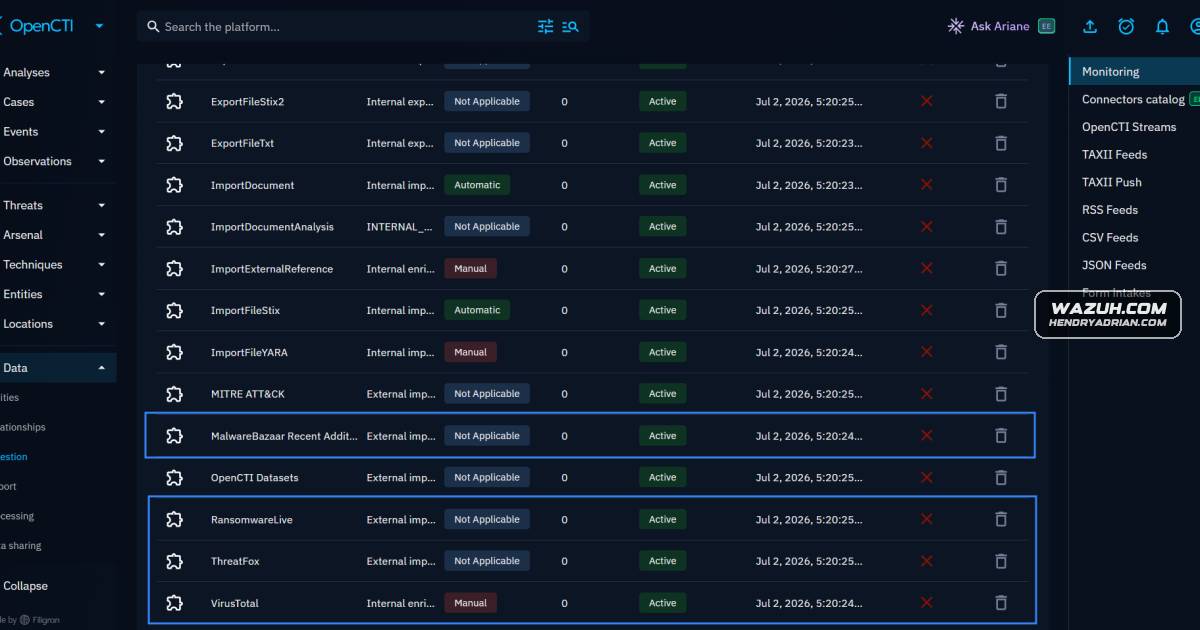
- The tutorial enables OpenCTI connectors for VirusTotal, RansomwareLive, MalwareBazaar, and ThreatFox to ingest indicators and related threat data.
- A custom Wazuh integration script queries OpenCTI for observables and indicators when configured event groups trigger it.
- Custom rules distinguish observable-only matches from indicator matches and raise alert severity for malicious matches with confidence scores of 75 or higher.
- The setup configures Windows Sysmon and File Integrity Monitoring to generate process, network, and file events for testing.
- Demonstrations test malware-file detection, suspicious DNS lookups, and SSH activity, then inspect enriched alerts in the Wazuh dashboard.
- The integration script is a proof of concept that the article says to review and validate; the article recommends HTTPS for production OpenCTI deployments.
Article Details
- Defense Focus
- Enrich Wazuh alerts in real time with OpenCTI threat intelligence so teams can distinguish contextual IOC matches from malicious matches and prioritize high-confidence detections.
- Detection Methods
- Query OpenCTI from a custom Wazuh integration script to correlate event observables with indicators.
- Use custom rules to distinguish observable-only matches, indicator-only matches, and observables linked to indicators.
- Escalate malicious matches with an OpenCTI score of 75 or higher.
- Correlate Sysmon and real-time File Integrity Monitoring events with OpenCTI IOCs.
- Monitor DNS queries and SSH authentication events for matches to tracked indicators.
- Data Sources
- Windows Sysmon Operational event-channel logs, including process, file, and DNS events.
- Real-time File Integrity Monitoring events from users' Downloads folders.
- Wazuh JSON alerts from configured event groups, including sysmon, syscheck, suricata, web, virustotal, and sshd.
- OpenCTI observables and indicators ingested through VirusTotal, RansomwareLive, MalwareBazaar, and ThreatFox connectors.
- Rule Types
- Custom Wazuh XML rules for OpenCTI enrichment events and IOC match classifications.
- PCRE2 field-matching rules for match types and confidence-score thresholds.
- Wazuh DNS-event rule for Windows Sysmon events.
- Platforms
- Windows 11 endpoint
- Ubuntu 24.04 endpoint
- Defensive Actions
- Enable and verify the relevant OpenCTI intelligence connectors, then configure Wazuh to query OpenCTI for alert enrichment.
- Review and validate the integration script, which the article identifies as a proof of concept, before operational use.
- Restrict access to the OpenCTI token file using the described root:wazuh ownership and permissions.
- Use HTTPS behind a reverse proxy for production OpenCTI deployments; the example uses HTTP for simplicity.
- Configure Sysmon event forwarding and real-time FIM monitoring, and tune the DNS rule level to manage alert noise.
Indicators of compromise
| Type | Indicator | Context |
|---|---|---|
| DOMAIN | www[.]southwire[.]com | Identified in the article as a known-suspicious domain tracked in OpenCTI and used for a DNS-query simulation. |
| IPV4 | 141[.]105[.]71[.]82 | Identified in the article as a known malicious IP used to demonstrate OpenCTI enrichment and a simulated SSH attempt. |
MITRE ATT&CK
T1071 · Application Layer ProtocolThe article's custom rules attach this ID to OpenCTI indicator-match alerts; the examples do not demonstrate application-layer communication behavior.T1105 · Ingress Tool TransferThe article's custom rules attach this ID to OpenCTI indicator-match alerts; the examples do not demonstrate a tool or file transfer.
Vendors
Products
MalwareBazaar#WazuhOpenCTIThe article explains how to integrate Wazuh with OpenCTI so alerts can be enriched in real time with threat intelligence and IOCs such as IPs, domains, and file hashes.RansomwareLive#WazuhThreatFox#WazuhVirusTotal#WazuhWazuhThe article explains how to integrate Wazuh with OpenCTI so alerts can be enriched in real time with threat intelligence and IOCs such as IPs, domains, and file hashes.