
How to Correlate Kubernetes Audit Logs with Container Runtime Data
Summary
The tutorial shows how to correlate Kubernetes audit logs with Elastic Defend for Containers telemetry to investigate suspicious service-account activity. In an EKS lab, decoded audit exec URIs exposed nsenter and chroot wrappers missing from runtime events.
Key points
- Kubernetes audit logs show API activity and changed objects, while Defend for Containers telemetry shows activity inside containers; correlating both provides a fuller investigation timeline.
- The article describes two join methods: match the audit event’s pod caller identity to the runtime pod, or map a service account’s objectRef pod names to runtime events.
- Namespace, cluster, pod name, and a shared time window help align events. Context fields such as user_agent.original and requestObject.spec add investigative detail but are not join keys.
- In an EKS lab, a compromised workload service account performed discovery, accessed secrets, requested a token, created a privileged pod, and executed commands.
- The lab’s breakout pod creation included hostPID, hostIPC, a privileged security context, and a hostPath mount to the root directory.
- Decoded Kubernetes audit request URIs revealed nsenter and chroot in exec activity; runtime telemetry showed the target command, true, rather than those wrappers. The lab commands were no-ops.
- The article cautions that unusual client user agents can be a lead for investigation, but are spoofable and do not by themselves prove compromise.
Article Details
- Defense Focus
- Correlate Kubernetes audit logs with container runtime telemetry to investigate suspicious service-account activity and attempted container escapes.
- Detection Methods
- Join audit events to runtime events by pod caller identity when the audit event includes the pod-name extra.
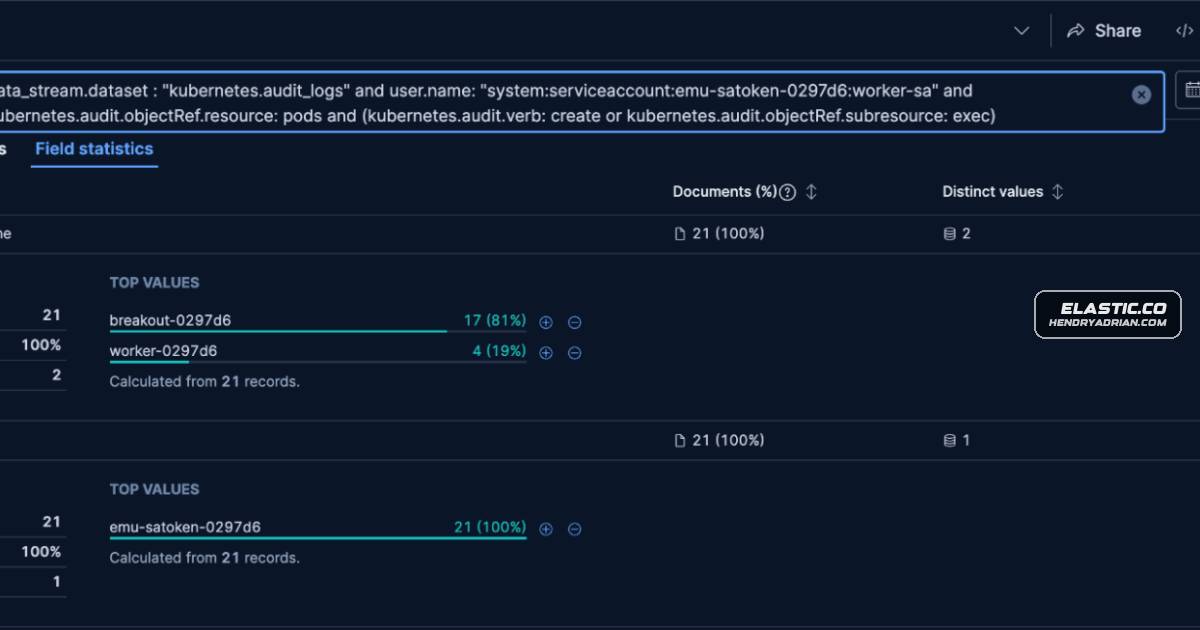
- When caller identity is absent, correlate the service account's audit timeline with pod names from objectRef and match those names and namespace to runtime events.
- Use a shared time window, namespace, cluster, and pod name to align the two data sources.
- Hunt for workload service accounts paired with unusual user agents such as curl or python-requests; treat the user agent as a lead, not proof.
- Inspect decoded Kubernetes audit requestURI values for commands issued through pods/exec, since runtime telemetry may show only the final command after wrappers such as nsenter or chroot.
- Review requestObject.spec and runtime process, file, and security-context fields to assess sensitive pod creation and activity.
- Data Sources
- Kubernetes audit logs: logs-kubernetes.audit_logs-*
- Defend for Containers process events: logs-cloud_defend.process*
- Defend for Containers file events: logs-cloud_defend.file*
- Defend for Containers alerts: logs-cloud_defend.alerts*
- Rule Types
- EQL sequence rules
- ES|QL queries
- KQL queries
- Platforms
- Kubernetes clusters
- Defensive Actions
- Timeline suspicious service-account API activity and retain the verb, object reference, user agent, authorization decision, and outcome.
- Investigate pod create and exec events, then pivot to runtime telemetry using the pod name and namespace.
- Review pod specifications for hostPID, hostIPC, privileged security contexts, and hostPath mounts to /.
- Decode audit requestURI data for exec events and compare the requested commands with runtime process.name and process.args.
- Use a 15-to-60-minute correlation window where appropriate, and account for ambiguity when multiple service accounts interact with the same pod.
- Test the correlation queries in the local environment and consider the prebuilt rules tagged for Elastic Defend for Containers and Kubernetes.
MITRE ATT&CK
T1078 · Valid AccountsA compromised workload service account was used for Kubernetes API activity, including secret access and privileged pod creation.T1098 · Account ManipulationThe service account made a TokenRequest and minted a token during the lab activity.T1528 · Steal Application Access TokenThe workload accessed its projected service-account token, and the article identifies token access as token theft or harvesting.T1610 · Deploy ContainerThe compromised service account created a privileged breakout pod with hostPID, hostIPC, and a hostPath mount to /.T1611 · Escape to HostThe breakout pod used nsenter and chroot in an attempted move into the host environment; the lab commands used true as no-op targets.
Vendors
Products
Amazon Elastic Kubernetes Service (EKS)Plus, we walk through each of those with queries and result views from our Amazon Elastic Kubernetes Service (EKS) lab.Elastic Defend for ContainersThe article explains how to correlate Kubernetes audit logs with Elastic Defend for Containers data to investigate suspicious service account activity, pod creation, and attempted container escape behavior.KubernetesThe article explains how to correlate Kubernetes audit logs with Elastic Defend for Containers data to investigate suspicious service account activity, pod creation, and attempted container escape behavior.