TrustSink Uses a Rogue Entra Authentication Provider to Steal Passwords
Summary
Varonis researchers demonstrate TrustSink, a technique that uses a rogue Entra external authentication provider to capture plaintext passwords during sign-in and return a valid token, keeping the trap active even after password resets.
Key points
- TrustSink requires an attacker to first gain a Global Administrator or Authentication Policy Administrator account and register a rogue external authentication method.
- During sign-in, a convincing copy of a Microsoft password page captures the user's password while the provider returns a signed token that lets authentication complete normally.
- In the researchers' test tenant, captured credentials included timestamps and source IP addresses; the rogue provider remained active after password resets.
- The researchers identify audit events, unfamiliar app registrations and service principals, external issuer URLs, and hardware-key claims from an unfamiliar provider as detection leads.
- Responders should remove the rogue provider and its related application, service principal, keys, and consent grants before resetting affected users' credentials.
- The article also recommends reviewing affected accounts and Conditional Access changes, using phishing-resistant authentication, and restricting standing privileged roles.
Article Details
- Attack Vectors
- The researchers demonstrated a post-compromise credential trap requiring a Global Administrator or Authentication Policy Administrator account to register a rogue external authentication provider.
- The deployment creates an application, service principal, delegated consent grant, and external authentication method configuration scoped to a target group.
- During legitimate sign-in, the external provider displays a convincing duplicate password prompt and records submitted plaintext passwords, timestamps, and source IP addresses in a local credentials file.
- The provider returns a valid signed token with hardcoded acr: "possessionorinherence" and amr: ["hwk"] claims, allowing sign-in to complete without an error despite the absence of a genuine hardware-key check.
- The registered provider persists through password resets and captures replacement passwords at subsequent sign-ins.
- The proof of concept was demonstrated in the researchers' own tenant; the article does not report exploitation against external victims.
- Defensive Notes
- Monitor unplanned externalAuthenticationMethodConfiguration additions and associated authentication-policy audit events. The test also unexpectedly appended a FIDO key to the user's SearchableDeviceKey property.
- Review unfamiliar application registrations using the external authentication callback, requesting openid and profile permissions, or lacking a clear business purpose.
- Correlate new applications, service principals, delegated permission grants, signing credentials, and unfamiliar reply URLs within the same audit window.
- Inspect sign-in logs for unfamiliar external-provider issuers carrying hwk claims and records showing MFA satisfied by the external provider.
- Closely spaced application, service-principal, and consent-grant creation events with python-requests/2.33.1 were observed in the automated demonstration. Treat the user agent as an investigative lead, not a reliable signature.
- Disable the rogue external method and remove its group assignments before resetting affected passwords.
- Remove the associated application registration, service principal, signing keys, delegated consent grant, and callback redirect URI.
- Identify users who authenticated through the provider, reset their credentials after removing it, and review subsequent account activity.
- Alert on authentication policies modified to target new groups and review policy changes following suspicious provider registration.
- Adopt phishing-resistant authentication so an unexpected password prompt during MFA is conspicuous, and restrict standing administrative roles capable of changing authentication methods.
Indicators of compromise
| Type | Indicator | Context |
|---|---|---|
| URL | hxxps[:]//trident-sip-filter[.]ngrok-free[.]dev | Public URL of the researchers' rogue authentication provider used to demonstrate plaintext password capture in their test tenant. |
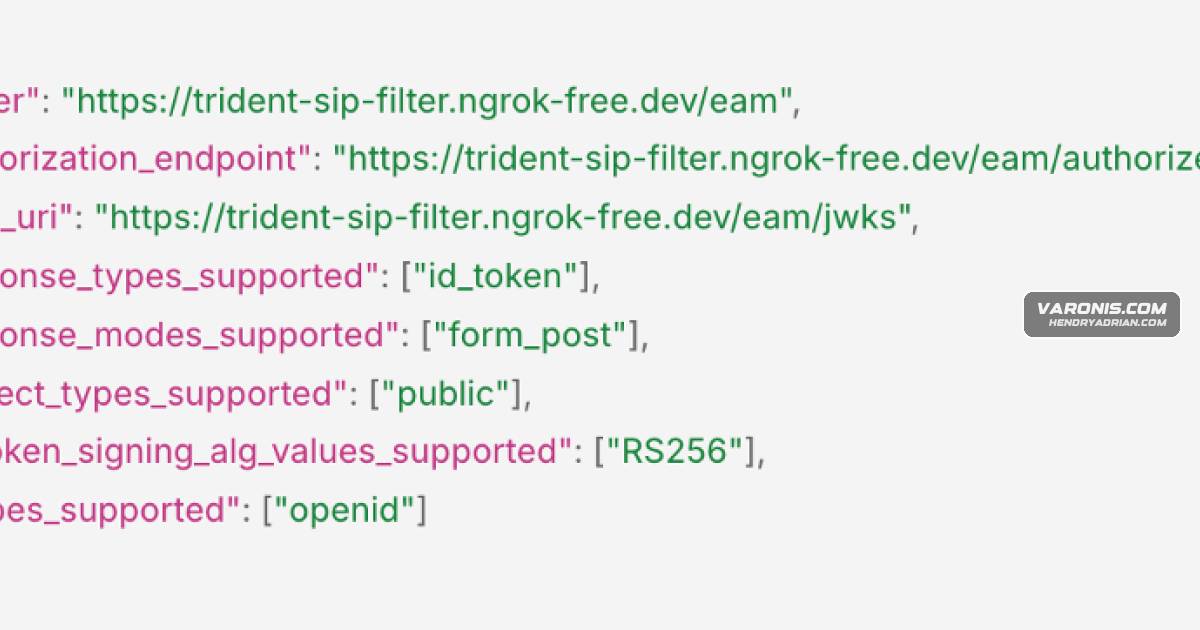
| URL | hxxps[:]//trident-sip-filter[.]ngrok-free[.]dev/eam/[.]well-known/openid-configuration | Discovery URL registered for the rogue authentication provider in the researchers' credential-capture demonstration. |
MITRE ATT&CK
T1056.003 · Web Portal CaptureThe provider presents a duplicate password page within the sign-in flow and writes submitted plaintext credentials to a local file.T1059.006 · PythonThe researchers automate application, service-principal, consent-grant, and external-provider registration through a Python deployment script.T1556.006 · Multi-Factor AuthenticationA privileged account registers a rogue external authentication method that returns signed claims asserting a successful hardware-key check without performing that check.
People
Vendors
Products
Microsoft EntraWhile the technique can work in any provider, we demonstrated TrustSink end-to-end using Microsoft Entra.Microsoft GraphAs a result, we packaged the same sequence of steps into a Python script (deploy.py) that drives it through Microsoft Graph in just one command:Windows Hello for BusinessMove users to FIDO2 or Windows Hello for Business, so a password prompt during MFA reads as suspicious
Tools
Azure CLIFor authentication, the script tries the Azure CLI first, which avoids creating a new sign-in event, and falls back to device code flow with Azure PowerShell’s client ID, which is pre-consented in most tenants.Azure PowerShellFor authentication, the script tries the Azure CLI first, which avoids creating a new sign-in event, and falls back to device code flow with Azure PowerShell’s client ID, which is pre-consented in most tenants.cleanup_eam.pyA companion script, cleanup_eam.py, reverses a full deployment in order, deleting the EAM config, removing admin consent, deleting the service principal, then the app registration, and only clears the state file oncedeploy.pyAs a result, we packaged the same sequence of steps into a Python script (deploy.py) that drives it through Microsoft Graph in just one command:NgrokIn our lab, that was ngrok, a tunneling service that exposes a local server behind a public HTTPS address.