
How EDR Products Can Counter Firewall and WFP Tampering
Summary
The article explains how attackers can use Windows Firewall rules or WFP filters to block EDR communications, and describes registry monitoring, prevention callbacks, and immediate rule removal as defenses.
Key points
- Attackers with local administrator rights can use Windows Firewall rules to block an EDR application's inbound or outbound network communications without directly accessing its process or files.
- EDRSandblast can create firewall rules through the INetFwRules COM interface; Windows Defender blocks rules against MsMpEng.exe when Windows AV is enabled, but other EDRs may remain vulnerable.
- EDRSilencer uses the Windows Filtering Platform API FwpmFilterAdd0 to create inbound and outbound filters; persistent filters remain until removed.
- Firewall rules and WFP filter data are stored in different registry locations, which can be monitored for tampering.
- A kernel registry pre-callback can block matching registry writes, but parsing rule data in kernel mode may be undesirable, particularly for WFP filters stored as binary data.
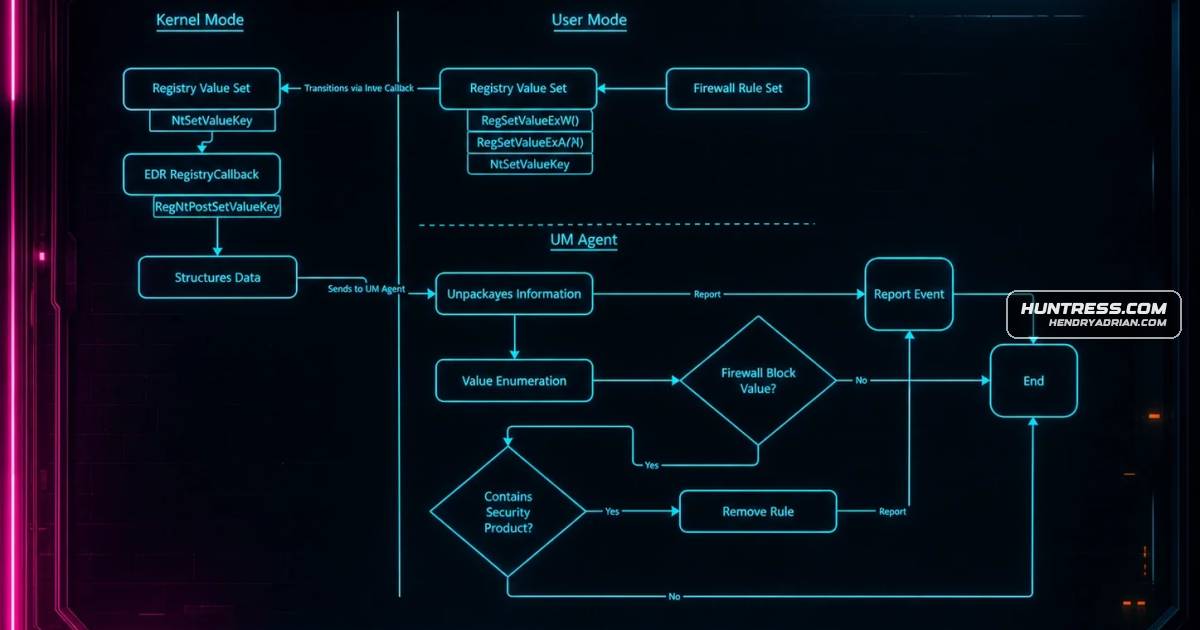
- As an alternative, a post-callback can send registry-change data to a user-mode agent, which can remove firewall rules through COM and WFP filters and providers through their respective APIs.
- The article also notes that Windows Security event 5447 can be monitored for new WFP rules.
Article Details
- Defense Focus
- Detect and prevent EDR tampering that blocks an agent’s network communications by creating Windows Firewall rules or Windows Filtering Platform filters.
- Detection Methods
- Monitor registry value-set operations for new or modified firewall rules and WFP filters or providers.
- Inspect firewall rule data for active block actions, inbound or outbound direction, and an application path targeting an EDR agent.
- Use Get-FwFilter to inspect WFP filters by FilterId or FilterKey.
- Monitor Windows Security event 5447 for newly created WFP filters.
- Data Sources
- Registry firewall-rule values at HKLM\System\CurrentControlSet\Services\SharedAccess\Parameters\FirewallPolicy\FirewallRules
- Registry data for WFP filters and providers
- Windows Security event 5447
- Rule Types
- Registry monitoring for firewall-rule and WFP filter or provider changes
- Event monitoring for WFP filter creation
- Platforms
- Windows
- Windows Filtering Platform
- Defensive Actions
- Use a RegNtPreSetValueKey callback to deny registry writes that create matching blocking rules.
- Alternatively, use a RegNtPostSetValueKey callback to send registry-change data to a user-mode agent for parsing and removal.
- Remove firewall policies through the INetFwRules Remove method so the filtering engine refreshes.
- Remove WFP filters with FwpmFilterDeleteById0 and providers with FwpmProviderDeleteByKey0.
- Respond to event 5447 by identifying and removing unauthorized WFP filters.
MITRE ATT&CK
People
Products
Tools
EDRSandblastA well-known tool that does this is EDRSandblast, which eventually leverages the Add method in the INetFwRules COM interface to create a new firewall rule against a known EDR binary.EDRSilencerMany reading this blog have likely heard of EDRSilencer.JonMonThere are many ways to do this, and this isn’t the only right way, but this is just how I did it when I created the proof-of-concept within JonMon.