
Microsoft Shares Workarounds for Missing Copilot Buttons in Classic Outlook
Summary
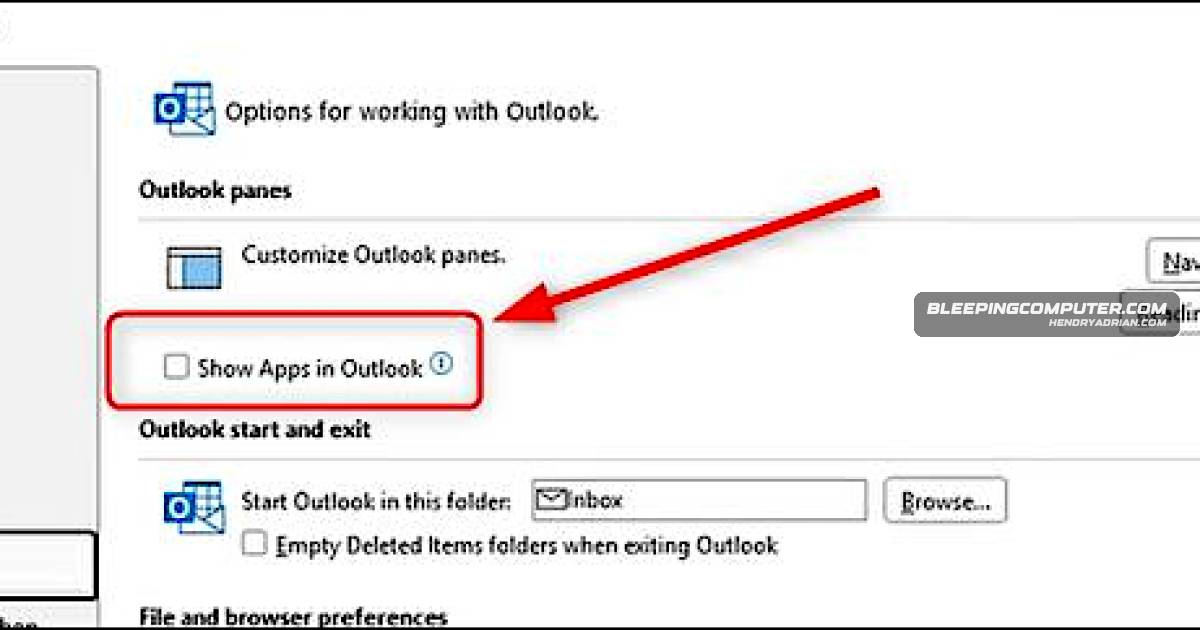
Microsoft is investigating missing Copilot buttons in Classic Outlook after upgrades to build 20026.20182 and later. Enabling “Show Apps in Outlook” may help; Microsoft also linked Outlook crashes to Kaspersky Mail Checker.
Key points
- The missing Copilot and Copilot Chat buttons affect some Classic Outlook for Windows users with Basic or Premium Copilot licenses after upgrading to build 20026.20182 or later.
- Microsoft says Outlook may be unable to locate a MAPI profile property, preventing Copilot settings from persisting.
- Enabling “Show Apps in Outlook” is a temporary workaround; users can also create a new Outlook profile or use Outlook on the web or the new Outlook client.
- Microsoft is still investigating and has not announced a permanent fix.
- A separate issue causes unexpected Outlook crashes on systems running Kaspersky Antivirus, with Event 1000 logs linked to Kaspersky Mail Checker (mcou.dll); affected customers are advised to contact Kaspersky support.
Article Details
- Event Type
- Software issue affecting Microsoft Classic Outlook for Windows, with missing Copilot buttons and a separate crash issue associated with Kaspersky Antivirus.
- Impact
- Some users on Outlook build 20026.20182 and higher cannot access Copilot entry points in Classic Outlook. Microsoft says the issue affects users with Copilot Chat (Basic) or Microsoft 365 Copilot (Premium) licenses. Separately, Outlook may crash on systems running Kaspersky Antivirus, with crashes linked to Kaspersky Mail Checker (mcou.dll).
Vendors
KasperskyMicrosoft also confirmed a separate Outlook crash bug tied to Kaspersky Antivirus, while suggesting temporary workarounds like enabling “Show Apps in Outlook” or using Outlook on the web.MicrosoftMicrosoft is still investigating a known issue in Classic Outlook for Windows that causes Copilot and Copilot Chat buttons to disappear for some users after upgrading to build 20026.20182 and higher.
Products
Classic OutlookMicrosoft is still investigating a known issue in Classic Outlook for Windows that causes Copilot and Copilot Chat buttons to disappear for some users after upgrading to build 20026.20182 and higher.CopilotMicrosoft is still investigating a known issue in Classic Outlook for Windows that causes Copilot and Copilot Chat buttons to disappear for some users after upgrading to build 20026.20182 and higher.Copilot ChatMicrosoft is still investigating a known issue in Classic Outlook for Windows that causes Copilot and Copilot Chat buttons to disappear for some users after upgrading to build 20026.20182 and higher.Kaspersky AntivirusMicrosoft also confirmed a separate Outlook crash bug tied to Kaspersky Antivirus, while suggesting temporary workarounds like enabling “Show Apps in Outlook” or using Outlook on the web.Kaspersky Mail CheckerMicrosoft also confirmed Outlook crashes linked to Kaspersky Mail Checker (mcou.dll).Microsoft 365 CopilotThe issue affects users with Copilot Chat (Basic) or Microsoft 365 Copilot (Premium) licenses.