
How Incident Responders Can Investigate Intrusions Despite Missing Telemetry
Summary
Huntress responders share ways to investigate with incomplete Windows, VPN and cloud logs, using available evidence as pivots, explaining uncertainty, and improving logging and retention.
Key points
- In one case, a suspicious user creation by SYSTEM suggested possible lateral access, but missing Windows Security 4624 events and limited 4776 data prevented responders from identifying the source.
- The partner found that the endpoint exposed a service that should not have been internet-facing and that might have enabled command execution as SYSTEM; the article does not establish that this was the confirmed intrusion path.
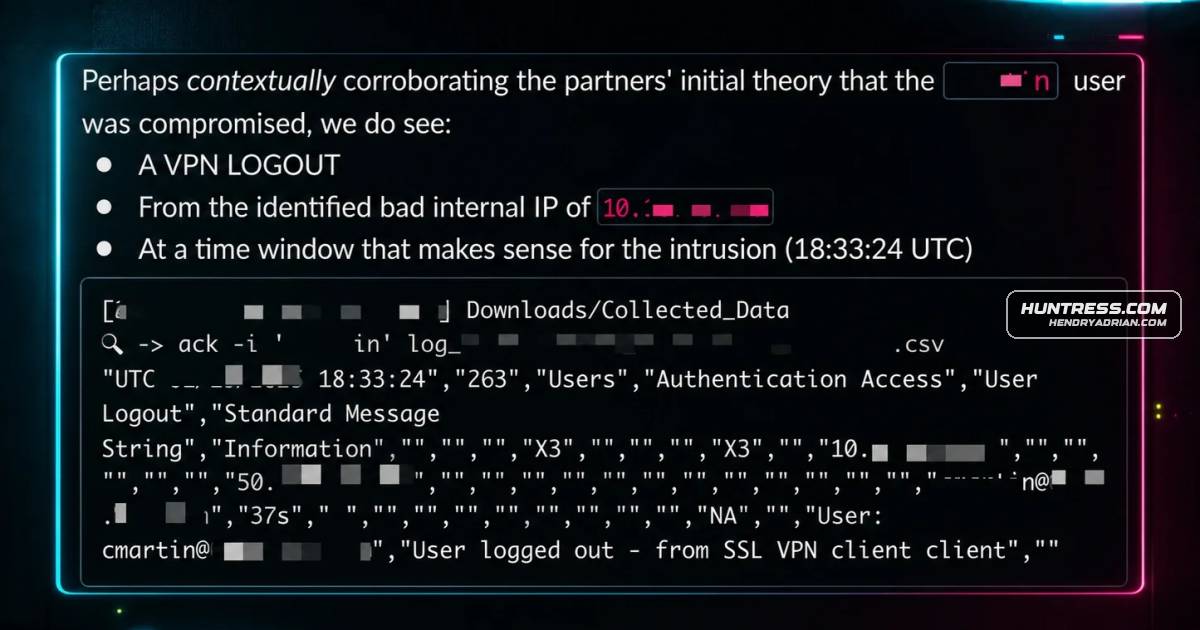
- When logs roll over, responders can use remaining clues such as failed-login IP addresses, workstation names, VPN logout events and assigned IPs, then check other hosts and log channels.
- For cloud investigations, missing diagnostic settings across services can leave gaps in the activity timeline; the article recommends checking which logs are enabled and whether they reach a SIEM.
- The guidance emphasizes stating what is known and unknown, using broader context, and explaining the impact of telemetry gaps without blame.
- Recommended measures include reviewing endpoint audit policies, increasing critical log sizes, inventorying cloud services and enabling relevant logging, and forwarding Windows and VPN logs to a SIEM.
Article Details
- Defense Focus
- Investigating intrusions despite missing, degraded, or rolled-over telemetry, and improving logging coverage to support incident response.
- Detection Methods
- Review Windows Security event 4624 activity and chart event volume over time to identify gaps and the last recorded authentication event.
- Use Windows Security event 4776 credential-validation events as an alternative source when 4624 events are unavailable.
- Examine DNS cache, active connections, and other endpoint artifacts; pivot from observed IP addresses, workstation names, and time windows to other hosts.
- Review Application and System event channels for threat activity, including application installations, when Security logs have rolled over.
- Correlate VPN logout events, assigned IP addresses, Windows event data, and timing to investigate possible initial access when login events are missing.
- Inventory cloud-service telemetry and review relevant Microsoft Entra, Azure, and Office 365 log types; SignInLogs may help identify anomalous authentication.
- Data Sources
- Windows Security event logs: 4624, 4776, and 4625
- Windows Application and System event channels
- DNS cache and active endpoint connections
- VPN appliance login/logout events and IP assignments
- Microsoft Entra and Microsoft 365 service logs, including SignInLogs, AuditLogs, and MicrosoftGraphActivityLogs
- SIEM-collected Windows Events and VPN logs
- Platforms
- Windows
- Microsoft Entra
- Microsoft 365
- SIEM
- Defensive Actions
- Verify Group Policy Objects apply the preferred audit policy across all endpoints.
- Inventory cloud services and enable relevant diagnostic and audit telemetry; send it to a SIEM.
- Increase log-channel capacity, especially the Windows Security channel, to at least a few GBs; configure sizes through GPOs.
- Deploy the Huntress agent across all assets, not only servers or domain controllers.
- Consider using Huntress Managed SIEM to retain Windows Events and VPN logs beyond on-device rollover or clearing.
- Communicate telemetry gaps, investigation limits, and findings clearly and without blame; explain why missing telemetry matters and how to enable and route it.
- Practice investigations in lab environments with limited or degraded telemetry.
Vendors
Products
Managed SIEMConsider utilizing our Managed SIEM—shipping Windows Events and VPN logs in particular to a SIEM helps protect you from logs rolling over or logs being cleared by a threat actorMicrosoft 365 Apps for EnterpriseIf we zoom out a little bit and look at the broader Microsoft 365 ecosystem, there are approximately 150+ different log types for Azure services spanning storage, network, and various application services.Microsoft EntraMicrosoft Entra alone has about 18 distinct log types available, spanning AuditLogs, SignInLogs, all the way to more advanced and newer log types like MicrosoftGraphActivityLogs.