How Active Directory Transforms LDAP OIDs—and How to Build Detections That Work
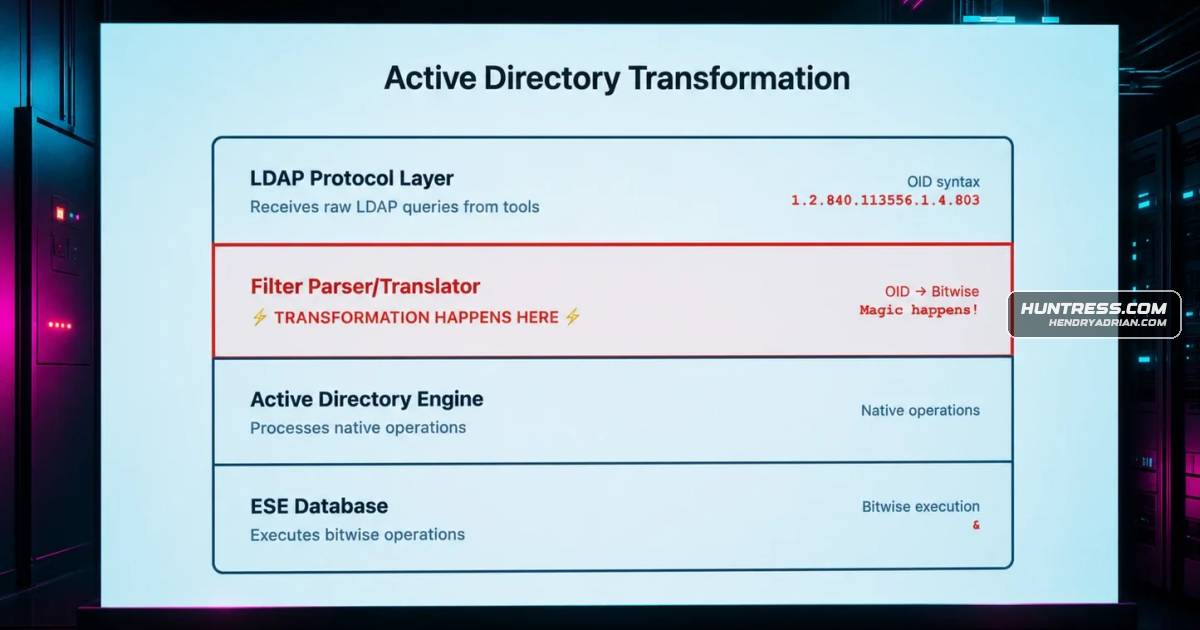
Summary
Huntress explains that Active Directory Event 1644 logs LDAP bitwise matching rules as operators rather than OIDs, causing rules that search for OIDs to miss them. It outlines enabling logs, correlating client Event 30, and validating Sigma detections.
Key points
- Event 1644 on Domain Controllers records LDAP bitwise matching rules in transformed syntax, such as userAccountControl&524288, rather than the original OID filter.
- Event 1644 is disabled by default; enabling it requires setting the “15 Field Engineering” Diagnostics registry value to 5.
- Client-side Event 30 can capture raw LDAP queries and help attribute activity, but only for tools using Windows' wldap32.dll; Impacket uses its own LDAP implementation.
- The recommended workflow is to inspect tool source code, generate telemetry in a lab, analyze actual logs, write rules for observed formats, and validate against known activity and normal traffic.
- The article provides example Sigma detection logic for Impacket LDAP reconnaissance tools, including GetADUsers.py, GetNPUsers.py, GetUserSPNs.py, findDelegation.py, and secretsdump.py.
- The author notes that Microsoft does not document exactly where the transformation occurs and labels the proposed internal processing explanation as speculation.
Article Details
- Defense Focus
- Detect LDAP reconnaissance against Active Directory by matching the transformed filters recorded in Event ID 1644, then correlate with client-side Event ID 30 where available for attribution.
- Detection Methods
- Analyze tool source code to identify LDAP filters and requested-attribute combinations.
- Run the tools in a controlled lab and compare their LDAP queries with generated telemetry.
- In Event ID 1644, match the logged bitwise syntax, such as userAccountControl&524288, rather than the OID syntax sent by the client.
- Detect tool-specific LDAP filter and attribute patterns, including user enumeration, computer enumeration, delegation reconnaissance, and service-principal-name queries.
- Correlate Event IDs 1644 and 30 by timestamp and client IP for tools using wldap32.dll; Event ID 30 is not generated by Impacket's custom LDAP implementation.
- Validate rules against known-good lab replays and normal business-day traffic, then tune to reduce false positives.
- Data Sources
- Domain Controller Directory Service Event ID 1644 logs
- Endpoint Microsoft-Windows-LDAP-Client/Debug Event ID 30 logs
- LDAP network traffic captures
- LDAP filter and requested-attribute fields in event data
- Rule Types
- Sigma detection rules using LDAP filter and requested-attribute matching
- LDAP search-filter pattern matching
- Regex matching for remote IP:port source fields
- Platforms
- Domain Controllers
- Source endpoints
- SIEM
- Defensive Actions
- Enable Event ID 1644 logging on Domain Controllers by setting the '15 Field Engineering' diagnostic value to 5.
- Enable the LDAP Client Debug log on endpoints that require client-side query attribution; account for its potentially significant volume.
- Use LDAPMon as a complementary endpoint-side monitoring option.
- Base Event ID 1644 rules on observed post-transformation filters, not OIDs that do not appear in those logs.
- Test detection logic against real telemetry and tune for legitimate administration and inventory activity.
MITRE ATT&CK
T1018 · Remote System DiscoveryGetADComputers.py requests computer and operating-system attributes through LDAP, providing a detectable pattern for computer enumeration.T1069.002 · Domain GroupsThe article describes LDAP reconnaissance that maps Active Directory groups and permissions, with queries leaving detectable Event ID 1644 patterns.T1087.002 · Domain AccountImpacket LDAP tools such as GetADUsers.py query Active Directory for user accounts and related attributes; the article describes detecting these enumeration patterns.T1558.003 · KerberoastingGetUserSPNs.py searches for servicePrincipalName=* as Kerberoasting preparation, a filter pattern the article demonstrates detecting.T1558.004 · AS-REP RoastingGetNPUsers.py uses LDAP filters associated in the article with AS-REP roasting; the described rules detect the filter pattern.
People
Vendors
Products
Tools
ImpacketThis post walks through a systematic approach to bridge that gap, using Impacket's LDAP reconnaissance tools as our test case.LDAPMonOr you can use LDAPMon by Jonathan Johnson, which is my preferred tool, complementary to the event logs.RubeusAttribution through correlation: For tools that use wldap32.dll (like Rubeus and PowerShell's AD module), Event 30 captures OID syntax while Event 1644 captures bitwise syntax.WiresharkIf you were doing a packet capture with Wireshark, you'd see the exact OID string in the LDAP packet.