
Wazuh Shows How Endpoint Inventory Can Reveal Shadow IT Gaps
Summary
A sponsored Wazuh article explains how endpoint inventory, agentless monitoring, and enrollment status can help security teams find unmanaged devices, unauthorized software, and gaps that network scans may miss.
Key points
- Network discovery shows which devices respond during a scan, but may miss powered-off devices, isolated systems, and software that exposes no listening port.
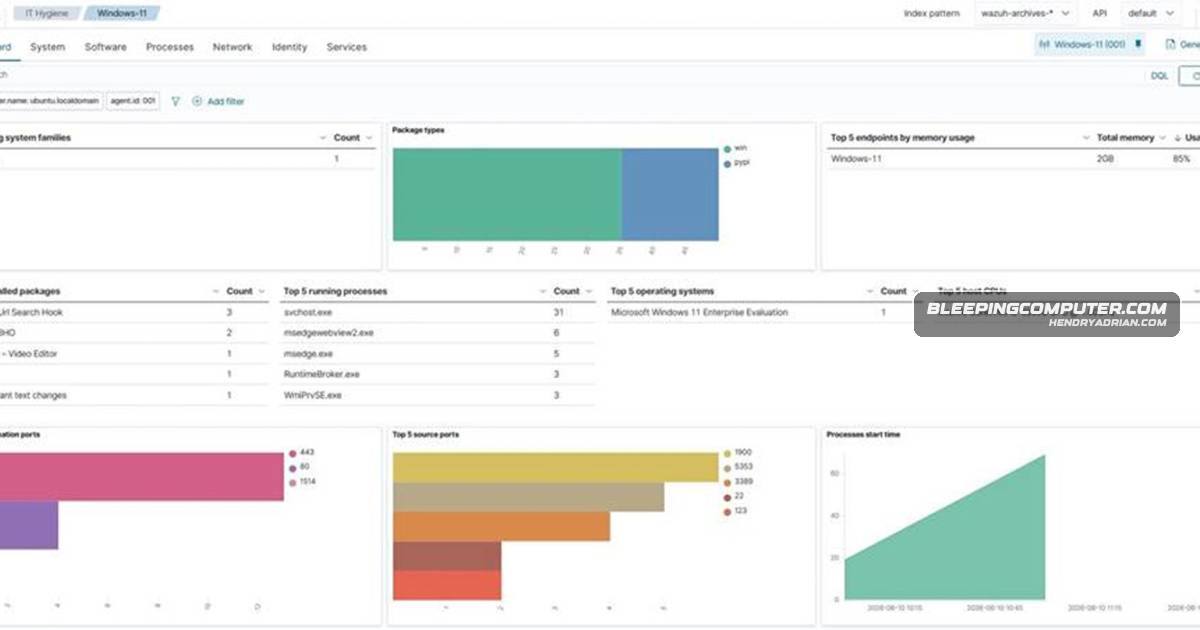
- Wazuh agents collect endpoint inventory—including installed software, processes, services, browser extensions, and network interfaces—for centralized review.
- Wazuh 4.14.0 and later collect browser extension, service, user, and group inventory across Windows, macOS, and Linux.
- Agentless SSH monitoring and syslog ingestion can extend visibility to some devices that cannot run a Wazuh agent; visibility depends on the data those sources expose.
- Agent enrollment states help identify registered endpoints that never connected or stopped reporting, but do not reveal unknown endpoints that were never enrolled.
- Inventory can be correlated with vulnerability and policy data, and custom rules and Active Response scripts can be configured to detect and remove selected unauthorized applications.
Article Details
- Defense Focus
- Reduce shadow IT visibility gaps by collecting and centrally analyzing endpoint inventory, extending monitoring to devices that cannot run an agent, and checking agent enrollment coverage.
- Detection Methods
- Compare network discovery results with inventory reported by monitored endpoints to identify unmanaged endpoints and monitoring gaps.
- Query centralized inventory for installed software, browser extensions, services, users, groups, processes, listening ports, and network interfaces.
- Review agent enrollment states—never connected, pending, active, or disconnected—to find incomplete deployments and endpoints that have stopped reporting.
- Correlate reported software inventory with Wazuh vulnerability content and compare it with external lifecycle data to identify vulnerable or end-of-life software.
- Use custom rules and CDB lists of unauthorized software and ports to hunt across indexed inventory.
- Receive device visibility through SSH-based agentless monitoring or syslog from supported equipment.
- Data Sources
- Wazuh agent system inventory from monitored endpoints
- Wazuh agent enrollment and keep-alive status
- Network discovery scan results
- SSH command and file data from configured agentless devices
- Syslog from network appliances and other equipment
- Wazuh Cyber Threat Intelligence (CTI) vulnerability content
- External software lifecycle data
- Rule Types
- Custom Wazuh detection rules
- CDB lists of unauthorized software and ports
- Queries against indexed endpoint inventory
- Platforms
- Wazuh dashboard IT Hygiene
- Defensive Actions
- Review the inventory of monitored endpoints and compare it with network discovery findings; do not treat scan reachability as proof of monitoring coverage.
- Investigate endpoints that are never connected, pending, or disconnected, and complete or restore their monitoring enrollment.
- Configure SSH or syslog collection for supported devices that cannot run a Wazuh agent, recognizing that visibility is limited to configured commands, files, and logs.
- Use custom rules to detect selected unauthorized applications and, when appropriate, configure a tested Active Response script to remove them from monitored endpoints.
- Use inventory and lifecycle data to identify vulnerable or end-of-life software and take remediation action.