
TrustSink Attack Abuses Entra External MFA Providers to Steal Passwords
Summary
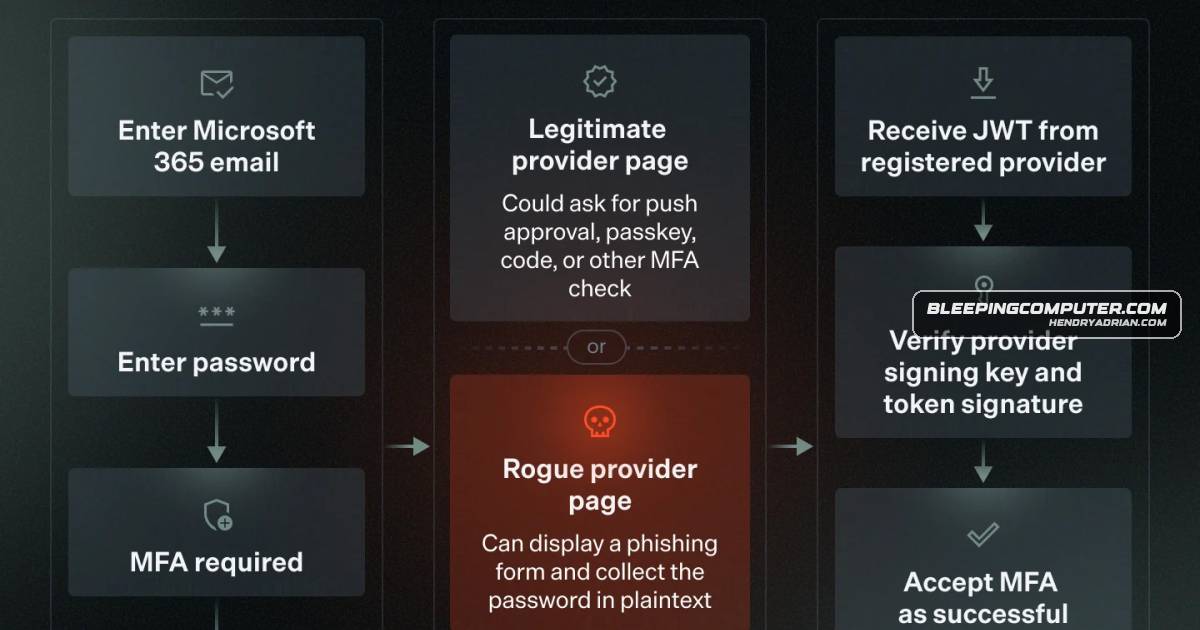
Varonis demonstrated TrustSink, which lets an attacker with a highly privileged Entra account register a rogue external MFA provider to capture passwords during sign-in. Remove the provider before resetting affected users’ passwords.
Key points
- TrustSink requires prior compromise of a highly privileged Entra account; it is not an initial-access attack.
- The attacker registers a rogue external MFA provider by changing the Authentication Methods Policy and creating an application, service principal, and consent grant.
- During sign-in, the provider displays a fake Microsoft password prompt and captures credentials entered by the user.
- The provider returns a valid signed token, allowing the sign-in to complete without an apparent error.
- Password resets alone do not remove the rogue provider, which may capture replacement passwords on later sign-ins.
- Varonis recommends removing suspicious providers and associated applications, keys, and redirect URIs before rotating affected passwords; it also advises monitoring policy changes and limiting standing administrator privileges.
Article Details
- Event Type
- Credential theft technique abusing Microsoft Entra's external MFA provider model
- Impact
- TrustSink uses a rogue external MFA provider to display a fake Microsoft password prompt and capture users' passwords in plaintext during sign-in. It requires prior compromise of a highly privileged Entra account and can persist across password resets until the rogue provider and associated components are removed.
MITRE ATT&CK
People
Vendors
Products
FIDO2Authentication Policy Administrator privileges, and use phishing-resistant authentication methods such as FIDO2 or Windows Hello for Business.Microsoft EntraVaronis Threat Labs developed TrustSink, an attack that abuses Microsoft Entra’s external MFA provider model to steal passwords during a normal sign-in flow.Windows Hello for BusinessAdministrator privileges, and use phishing-resistant authentication methods such as FIDO2 or Windows Hello for Business.