AI-Assisted PowerShell Script Enumerated Active Directory in June Incident
Summary
Huntress analyzed a threat actor’s bespoke PowerShell script used to enumerate Active Directory after RDP access to a domain-joined server, detailing its behavior, signs of AI generation, and implications for behavior-based detection.
Key points
- In an incident on June 3, the actor used pre-compromised credentials to access a domain-joined Windows Server via RDP; context suggested initial access through a VPN.
- The actor ran a custom PowerShell script that located a domain controller and collected Active Directory users, computers, groups, OUs, trusts, and subnet data.
- The script saved CSV and text files, generated an HTML report, and zipped the output in an AD_Reports directory.
- The attackers later deployed s5cmd, which can be abused for data exfiltration, and SharpShares to search for accessible data repositories; the article does not confirm what data was exfiltrated.
- Huntress cited a prompt-iteration title, an unedited placeholder, repetitive fallback logic, and decorative console output as signs the script was AI-generated.
- The article argues that bespoke scripts weaken reliance on file hashes and static signatures, while underlying enumeration behavior remains detectable.
Article Details
- Attack Vectors
- The attacker established RDP access to a domain-joined Windows Server using pre-compromised credentials; the article says VPN access was suggested by the context.
- The attacker ran a bespoke AI-generated PowerShell script to discover the domain controller and enumerate Active Directory users, computers, groups, organizational units, subnets, and trusts.
- The attacker staged tools in C:\ProgramData\ and later deployed s5cmd.exe and SharpShares.exe; SharpShares was used to search for user-accessible data repositories while filtering out common administrative shares.
- The enumeration script saved collected data to CSV and text files, created an HTML report, and zipped the output in a local staging directory.
- Defensive Notes
- Prioritize behavioral detection of Active Directory enumeration and operating-system interactions rather than relying only on file hashes or static signatures.
- The article identifies PowerShell Event ID 4104 in Microsoft-Windows-PowerShell/Operational as telemetry used to recover the script.
- Monitor for unusual RDP access, tool staging in C:\ProgramData\, Active Directory collection activity, and creation of AD_Reports directories and archives.
MITRE ATT&CK
T1021.001 · Remote Desktop ProtocolThe attacker established interactive access to a domain-joined Windows Server over RDP.T1059.001 · PowerShellThe attacker executed the bespoke enumeration script using PowerShell.T1069.002 · Domain GroupsThe script collected Active Directory group information.T1074.001 · Local Data StagingThe script staged collected Active Directory output in a local directory and zipped the directory.T1087.002 · Domain AccountThe script collected Active Directory user information.T1135 · Network Share DiscoverySharpShares was deployed to search for user-accessible data repositories on network shares.T1482 · Domain Trust DiscoveryThe script enumerated Active Directory trusts.
People
Products
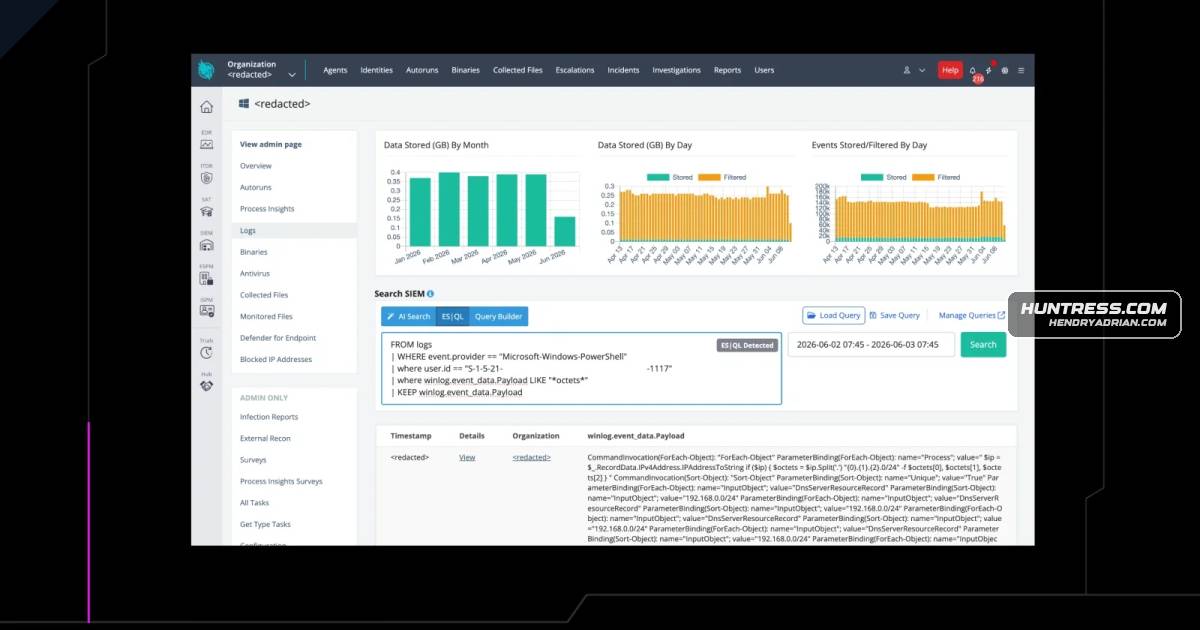
Active DirectoryWe recently came across an incident in early June where a threat actor used a vibe-coded PowerShell script for Active Directory (AD) enumeration.Amazon S3s5cmd is a legitimate, high-speed command-line tool for Amazon S3 operations, which we have seen being abused frequently for data exfiltration.Huntress SIEMWhile investigating the incident, we identified and fully recreated Untitled1.ps1 using Huntress SIEM telemetry—Event ID 4104 in the Microsoft-Windows-PowerShell/Operational, which contains blocks of PowerShellPowerShellWe recently came across an incident in early June where a threat actor used a vibe-coded PowerShell script for Active Directory (AD) enumeration.Windows ServerThe RDP Pivot: The attack kicked off when the threat actor established RDP access (context suggested initial access via the VPN) onto a domain-joined Windows Server with a set of pre-compromised credentials.
Tools
BloodHoundhave relied on identifying the signatures and behaviors of off-the-shelf offensive tooling, like BloodHound, PowerSploit, or Cobalt Strike. But a new trend is emerging—"vibe coded" malware—and this is shiftingCobalt Strikethe signatures and behaviors of off-the-shelf offensive tooling, like BloodHound, PowerSploit, or Cobalt Strike. But a new trend is emerging—"vibe coded" malware—and this is shifting how the attacker and detectionPowerSploiton identifying the signatures and behaviors of off-the-shelf offensive tooling, like BloodHound, PowerSploit, or Cobalt Strike. But a new trend is emerging—"vibe coded" malware—and this is shifting how thes5cmdThe Smash-and-Grab: Roughly half an hour later, they deployed C:\ProgramData\s5cmd.exe.SharpHoundand EDR platforms have relied heavily on file hashes and static string signatures. If an attacker drops SharpHound, security tools instantly recognize the binary. However, vibe-coded scripts are inherently unique.SharpSharesThey deployed SharpShares.exe, a known enumeration tool, deliberately filtering out common administrative shares to hunt for further user-accessible data repositories.