Phishing Lures Deploy Rogue ScreenConnect Clients for Persistent Access
Summary
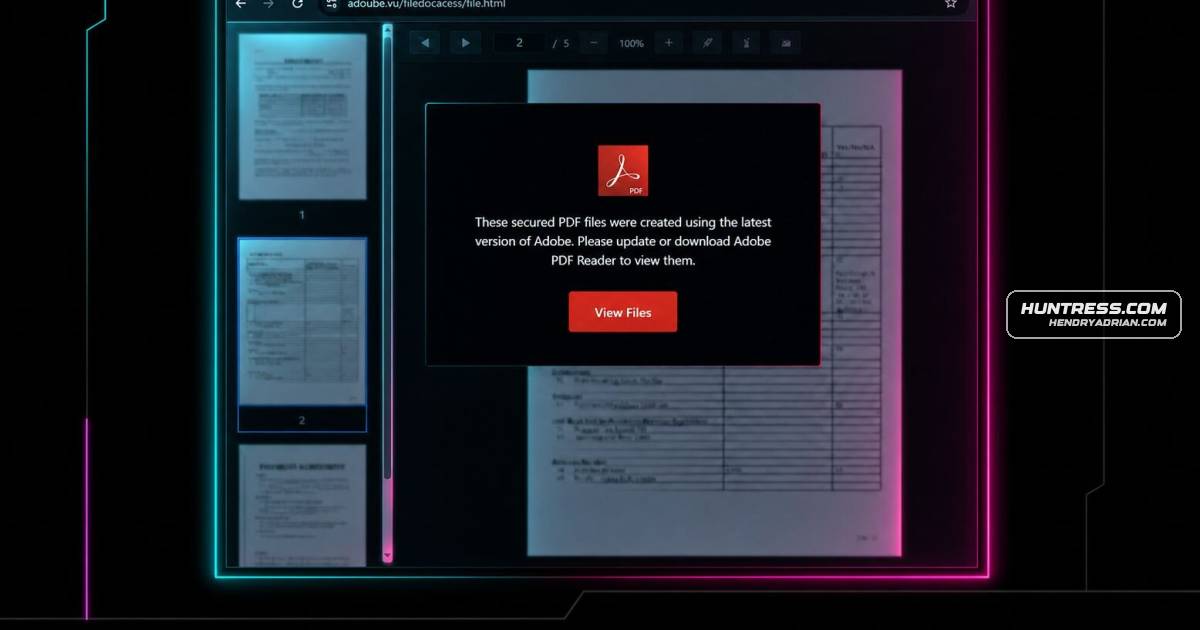
Huntress analyzed two phishing attacks using fake Adobe Browser-in-the-Browser pages to trick users into installing rogue ScreenConnect clients. The clients established persistent remote access and deployed cursor-hiding tools before Huntress stopped the attacks.
Key points
- Both attacks began with phishing messages and fake Adobe Reader prompts delivered through Browser-in-the-Browser pages.
- Victims were tricked into downloading ScreenConnect installers disguised as Adobe software.
- Each attack installed multiple rogue ScreenConnect clients as Windows services, creating persistent and redundant remote-access paths.
- Attackers used HideCursor.exe or HideUL.exe to conceal on-screen activity.
- In the second incident, Microsoft Defender flagged and remediated a threat but did not prevent the second ScreenConnect client from completing setup.
- Huntress shut down both attacks; recommended defenses include restricting RMM installations, monitoring unapproved ScreenConnect clients and relay connections, and investigating suspicious downloads.
Article Details
- Attack Vectors
- Phishing messages delivered malicious links that redirected recipients to attacker-controlled landing pages.
- Browser-in-the-browser pages impersonated Adobe and prompted victims to download installers disguised as Adobe Reader updates.
- Victims were induced to execute rogue ScreenConnect installers, which installed multiple clients for persistent remote access.
- Rogue ScreenConnect clients used cmd.exe and curl to retrieve additional installers and payloads.
- Defensive Notes
- Train employees to treat unexpected software-update prompts and file-viewing pages with caution, and verify downloads through trusted channels.
- Restrict installation of remote-management tools, maintain an approved RMM inventory, and alert on unapproved ScreenConnect clients, unusual relay connections, and executables launched from user Downloads folders.
- Monitor the listed indicators, including HideCursor.exe and HideUL.exe, and investigate suspicious activity tied to phishing links.
Indicators of compromise
| Type | Indicator | Context |
|---|---|---|
| DOMAIN | instance-uxh86b-relay[.]screenconnect[.]com | ScreenConnect trial relay associated with the initial rogue client. |
| DOMAIN | relay[.]goldenmelon[.]us | Infrastructure associated with the initial rogue ScreenConnect client in Incident 2. |
| DOMAIN | relay[.]illuminantgroup[.]net | Relay configured for the second rogue ScreenConnect client in Incident 2. |
| DOMAIN | scx[.]illuminantgroup[.]net | Payload-hosting infrastructure associated with the second rogue ScreenConnect client. |
| IPV4 | 144[.]172[.]115[.]59 | Attacker-controlled IP associated with the second rogue ScreenConnect client. |
| SHA256 | 41d2097e8ac636a478aa011e12128c03b3b9bb3c8efca43d3c4f214ac8b1f07b | Hash of the rogue ScreenConnect installer used as the initial payload in Incident 1. |
| SHA256 | 9f5910d69a4fbc56ff1854e7e0df3199fbfddd7fe6b374f7d816fa6ae70ef991 | Hash of the initial rogue ScreenConnect client in Incident 1. |
| SHA256 | f048400c23add8c75abe189393d33c873c02c74eeaf43d47b950c8d643763b35 | Hash of the secondary rogue ScreenConnect client in Incident 1. |
| SHA256 | fc96a04c615847f0fb1391f04d9d1aac7f78ddfb7d459168df0a4172b98354e2 | Hash of HideCursor.exe, identified as a defense-evasion binary. |
MITRE ATT&CK
T1059.003 · Windows Command ShellThe clients used the native Windows command shell, cmd.exe, during the retrieval and installation of additional clients.T1105 · Ingress Tool TransferRogue ScreenConnect clients used curl to retrieve additional ScreenConnect installers and payloads.T1204.002 · Malicious FileVictims were instructed to open downloaded ScreenConnect installers disguised as Adobe Reader updates.T1219 · Remote Access ToolsThe attackers deployed rogue ScreenConnect remote-management clients to obtain persistent remote access to victim endpoints.T1543.003 · Windows ServiceThe rogue ScreenConnect clients were registered as Windows services to maintain persistence.T1566.002 · Spearphishing LinkBoth incidents began with phishing messages containing links that led recipients to malicious pages.
Products
Adobe Acrobatwere then redirected to an attacker-controlled landing page, where they were asked to view files via Adobe Acrobat (Adobe's PDF reader). After clicking a prompt to "View Files," targets were presented with a BitB pageAdobe Reader(BiTB) page (both using the same template and lure) that prompted them to download an "updated Adobe Reader" version to view files.AT&T Office@Handinstances being installed. During this attack, the target interacted with a phishing email via AT&T Office@Hand (RingCentral), AT&T's legitimate cloud-based unified communications platform for businesses. GmailUpon further investigation, SOC analysts found that the target had interacted with a phishing email in Gmail. The target was convinced to click on an embedded link in the email, which took them to a fake CAPTCHA lureMicrosoft DefenderAt this point, Microsoft Defender detected and flagged a command line associated with patch.msi (flagged as Trojan:Win32/Commando.A!ml). While Microsoft Defender remediated this particular threat, it ultimately failedScreenConnectIn both incidents, the attack chain included the download of multiple rogue ScreenConnect instances for persistence.
Tools
cmd.exeThis initial malicious ScreenConnect Client (9c1aea531ba4c511) used the native Windows command shell (cmd.exe) and curl to retrieve and install a second malicious ScreenConnect Client (7c1d255d0efefde6) configured tocurlmalicious ScreenConnect Client (9c1aea531ba4c511) used the native Windows command shell (cmd.exe) and curl to retrieve and install a second malicious ScreenConnect Client (7c1d255d0efefde6) configured to