
Huntress Details Microsoft Teams Booking Lure Used in Device-Code Phishing Attack
Summary
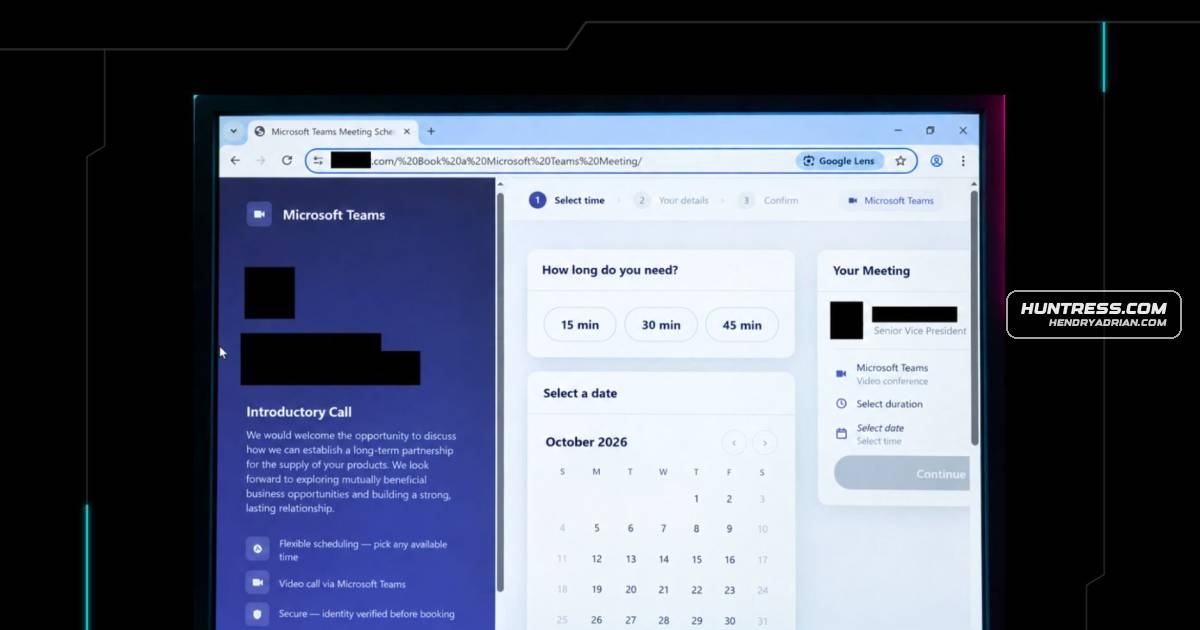
Huntress describes a targeted phishing attack that disguised Microsoft device-code authorization as a Teams meeting booking. The victim entered a code on Microsoft's real sign-in page, allowing the attacker to obtain a session token before Huntress contained the attack.
Key points
- In mid-October, Huntress observed a spear-phishing email targeting an employee at a construction-sector company and impersonating an executive from another company.
- A link led through redirects to a fake Teams meeting-booking flow that generated a Microsoft device code and presented it as a booking reference.
- Clicking the lure copied the code to the clipboard and opened Microsoft's real device sign-in page; entering the code authorized the attacker's session.
- Huntress reports the attacker obtained a session token, and its SOC contained the incident before it escalated.
- The phishing kit was stored as AES-256-GCM ciphertext and decrypted in the browser; its fallbacks attempted to keep victims engaged when additional verification was needed.
- Huntress observed the device-code login routed through a residential callback proxy.
- Recommended defenses include scrutinizing unexpected device-code prompts, monitoring device and OAuth sign-ins, and using conditional access and phishing-resistant MFA.
Article Details
- Attack Vectors
- A spear-phishing email impersonated a senior vice president at a construction-sector company and used a typosquatted email domain.
- The email link passed through a multi-stage redirect chain before reaching a Microsoft Teams-themed booking lure.
- The booking flow initiated a Microsoft device-code sign-in. Clicking the confirmation prompt copied the device code to the victim's clipboard and opened Microsoft's legitimate device-login page.
- The phishing kit was delivered as AES-256-GCM ciphertext and decrypted in the browser; its backend used a residential callback proxy.
- The kit included fallback prompts that could restart the device-code flow when Microsoft returned AADSTS50076 or interaction_required.
- Defensive Notes
- Treat unexpected device-code prompts as suspicious, and verify booking or code requests through known contacts before entering or approving a code.
- Restrict or monitor device-code authentication where it is not required; use complex conditional access policies and phishing-resistant MFA.
- Investigate unfamiliar OAuth and device sign-ins, especially those involving unmanaged devices, new regions, or residential proxy infrastructure.
- After a confirmed compromise, check for rogue MFA methods, unrecognized registered devices, unauthorized app consents, suspicious mailbox rules, and suspicious outbound mail.
Indicators of compromise
| Type | Indicator | Context |
|---|---|---|
| DOMAIN | gpimmlgration[.]com | The article identifies this as the attacker-controlled backend and phishing infrastructure. |
| URL | hxxps[:]//gpimmlgration[.]com/static-export/api/device/start | Attacker-controlled device-code phishing endpoint used to start the backend authentication flow. |
MITRE ATT&CK
T1027.013 · Encrypted/Encoded FileThe phishing kit was stored as AES-256-GCM ciphertext and decrypted in the victim's browser.T1078.004 · Cloud AccountsThe article's ATT&CK mapping reports use of a compromised Microsoft 365 account from a non-compliant, unmanaged device.T1090 · ProxyThe actor routed the captured session through residential callback proxy infrastructure to make traffic appear consumer-originated.T1204.001 · Malicious LinkThe victim clicked the lure link and completed the booking flow, copying and entering the device code.T1528 · Steal Application Access TokenEntering the device code authorized the attacker's session and enabled the attacker to obtain access tokens.T1539 · Steal Web Session CookieThe article reports that the session token was captured through the relayed device-code authentication flow.T1550.004 · Web Session CookieThe captured session was replayed from attacker infrastructure, with the ASN and region changing within the same session ID.T1557 · Adversary-in-the-MiddleThe article describes a callback proxy relaying the victim's authentication and the post-MFA session handoff.T1566.002 · Spearphishing LinkA targeted email delivered a link through redirects to the Microsoft Teams-themed phishing lure.T1583.001 · DomainsThe article reports that the threat actor registered the malicious typosquatted domain eight days before the incident.T1608.005 · Link TargetThe actor staged Microsoft Teams-themed lure directories on the typosquatted domain as phishing landing pages.T1684.001 · ImpersonationThe lure impersonated a real senior vice president and used Microsoft Teams and Microsoft sign-in branding.
People
Vendors
Products
Microsoft 365 Apps for EnterpriseOver the past year, Huntress has tracked several significant device code phishing campaigns, including the widespread Railway-based Microsoft 365 token replay campaign we reported in March. Microsoft Authentication Brokersteps and the attacker obtained the session token, it kicked off the Cmsi:Cmsi login to Microsoft Authentication Broker, indicating successful device code authentication. At this point, Huntress quickly identifiedMicrosoft TeamsHomeBlogCrafty Microsoft Teams Booking Flow Disguises Device Code Phishing