
Fake Google Security Check Uses PWA to Spy on Users and Deliver Android Implant
Summary
Malwarebytes analyzed a fake Google security-check site that abuses PWA and service-worker features to collect data and proxy traffic; an optional Android APK adds keylogging and device monitoring. The article also provides removal guidance.
Key points
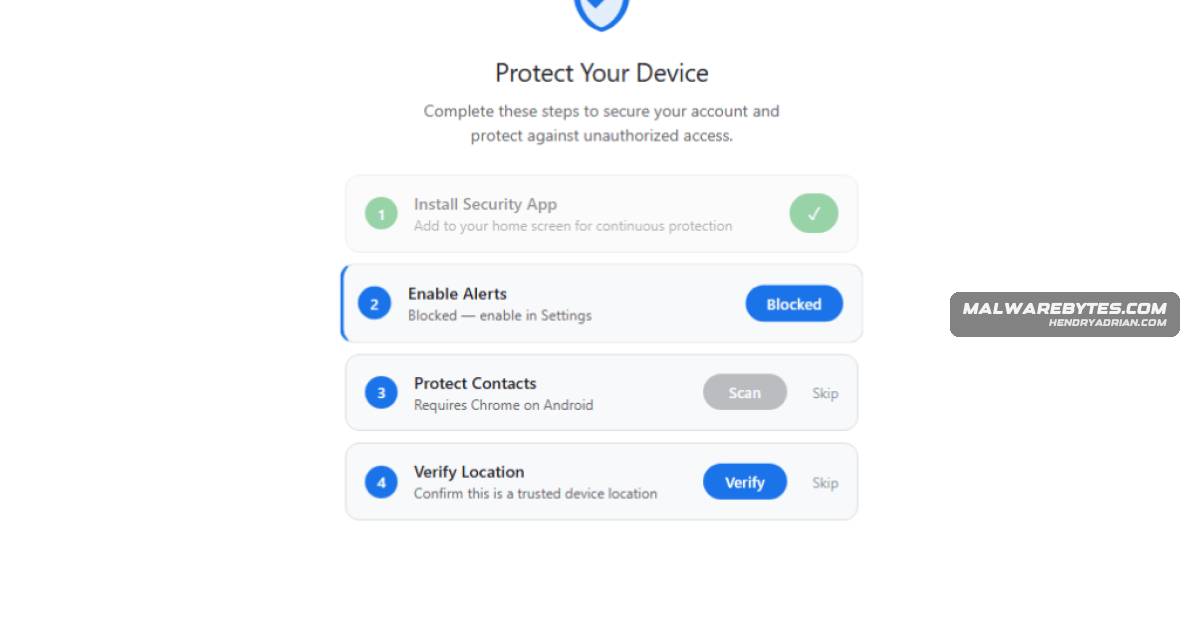
- The fake Google security-check site uses a PWA to hide the browser address bar and socially engineer users into granting permissions.
- The web layer can collect selected contacts, GPS location and clipboard contents, and attempt to intercept SMS verification codes through WebOTP.
- A service worker can receive push-triggered tasks and queue captured data offline for later upload; closing the tab stops page scripts but does not unregister the worker.
- A WebSocket relay can route attacker-specified requests through the browser, and the toolkit includes a browser-based scanner for local network hosts and ports.
- Users who follow all prompts may be offered an Android APK identified as com.device.sync; the article describes a custom keyboard, notification access, accessibility monitoring and persistence mechanisms.
- The article provides removal steps for the PWA, service worker and permissions, and advises checking for the Android app and device-admin privileges.
Article Details
- Attack Vectors
- A phishing site impersonates a Google Account security check and socially engineers users into installing it as a PWA and granting notification, contact, and location permissions.
- The PWA and its service worker collect clipboard contents, contacts, GPS data, and OTPs; use push notifications and background sync for communication and queued data uploads; scan local network hosts and ports; and proxy attacker-specified requests through the victim’s browser.
- Users who follow all prompts are offered an Android APK disguised as a critical security update. The APK adds keystroke capture, notification and accessibility-based screen monitoring, autofill interception, and device-admin and boot persistence.
- Defensive Notes
- Do not install software or grant permissions in response to an unsolicited security alert; access account security tools directly through the legitimate account site.
- Remove the “Security Check” PWA, unregister the malicious site’s service worker, clear its site data, and revoke its notification permissions.
- On Android, check for the “System Service” app with package name com.device.sync, revoke device-admin privileges before uninstalling, and remove any unknown autofill service.
- Change passwords for accounts whose credentials or SMS-based two-factor codes may have been exposed. Consider a factory reset if the APK was installed and cannot be fully removed.
Indicators of compromise
| Type | Indicator | Context |
|---|---|---|
| DOMAIN | google-prism[.]com | Attacker-controlled command-and-control and distribution domain used by the phishing site and toolkit. |
| SHA256 | 1fe2be4582c4cbce8013c3506bc8b46f850c23937a564d17e5e170d6f60d8c08 | SHA-256 hash of the Android APK identified as the native implant (sync.apk). |
MITRE ATT&CK
T1041 · Exfiltration Over C2 ChannelCaptured data is queued in the browser Cache API and uploaded to the server through background sync or push-triggered uploads.T1046 · Network Service DiscoveryA browser-based port scanner sweeps local subnet addresses and ports 80, 443, and 8080 to identify live hosts.T1056.001 · KeyloggingThe Android APK installs a custom keyboard capable of capturing keystrokes.T1059.007 · JavaScriptThe attacker can send a remote eval command to execute arbitrary JavaScript in the victim’s browser.T1071 · Application Layer ProtocolThe toolkit uses a WebSocket relay for command-and-control and to carry attacker-specified requests through the victim’s browser.T1090 · ProxyThe attacker can proxy arbitrary web requests through the victim’s browser and network.T1105 · Ingress Tool TransferThe phishing site delivers an Android APK disguised as a critical security update.T1111 · Multi-Factor Authentication InterceptionThe page attempts to intercept SMS verification codes via WebOTP, and the APK’s notification listener can read notifications containing potential two-factor codes.T1115 · Clipboard DataThe page script attempts to read clipboard contents, including OTPs and wallet addresses.T1547 · Boot or Logon Autostart ExecutionThe APK registers a boot receiver and schedules alarms intended to restart components, providing persistence across startup or termination.
Products
AndroidIf a victim follows all prompts the site also delivers an Android APK (sync.apk / com.device.sync) that installs a keylogging keyboard, notification and accessibility-based screen monitoring, and device-adminGoogle AccountA phishing site impersonating a Google Account security page uses a Progressive Web App (PWA) and service worker to harvest contacts, push notifications, GPS, clipboard contents, intercept OTPs, scan local networks, and