
Microsoft Details Tycoon2FA AiTM Phishing Kit’s Evasion and Credential Theft
Summary
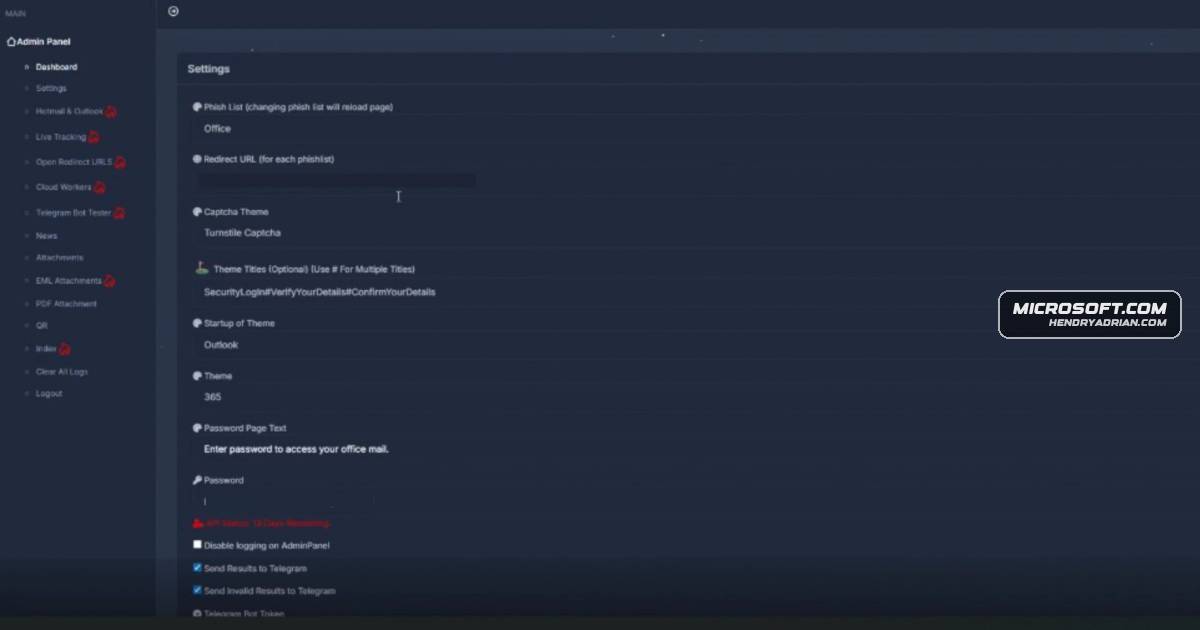
Microsoft details how Tycoon2FA scales AiTM phishing through rotating domains, layered redirects and evasion tactics, then relays credentials and captures session tokens. The article also provides detection and mitigation guidance.
Key points
- Tycoon2FA is a phishing-as-a-service platform with configurable templates, attachment generation, redirect routing and victim tracking.
- Observed lures included QR-code attachments, SVG and HTML files, and links impersonating business services.
- Campaigns used short-lived domains, often hosted on Cloudflare, and layered redirects through intermediary services.
- Custom CAPTCHAs, obfuscated scripts, browser fingerprinting, geofencing and decoy pages hindered automated detection and analysis.
- The kit relayed credentials to legitimate services and captured session cookies after users completed MFA; captured information could be forwarded through Telegram bots.
- Microsoft recommends phishing-resistant authentication and provides Defender detection guidance and steps for responding to potentially compromised accounts.
Article Details
- Attack Vectors
- Phishing emails used links or attachments, including PDF or DOC/DOCX files with QR codes, SVG files with redirect logic, and HTML attachments.
- Tycoon2FA landing pages impersonated business services and relayed submitted credentials to the real service, prompting its genuine MFA challenge.
- After users completed MFA, the kit captured session cookies and tokens for attackers to access targeted accounts.
- Operators used layered redirects, intermediary pages, and short-lived campaign FQDNs; some redirect paths used encoded URI strings.
- Custom CAPTCHAs, browser fingerprinting, automation detection, geolocation restrictions, and obfuscated or dynamically generated JavaScript and HTML hindered analysis and detection.
- Attackers could use compromised accounts to modify mailbox rules, register authenticator apps, or send follow-on phishing campaigns.
- Defensive Notes
- Use phishing-resistant authentication, such as FIDO2 security keys, Windows Hello for Business, or Microsoft Authenticator passkeys; enforce it for privileged roles and critical applications.
- Enable Safe Links and Safe Attachments, URL rechecking, and Zero-hour auto purge in Microsoft Defender for Office 365.
- Enable network protection and cloud-delivered protection, and configure automatic attack disruption in Microsoft Defender XDR.
- For compromised identities, reset credentials, revoke active sessions and tokens, review or remove recently added MFA devices and suspicious inbox rules, and verify secure MFA reconfiguration.
- Review suspicious sign-ins and URL clicks, including activity associated with AiTM phishing and session-cookie use.
Indicators of compromise
| Type | Indicator | Context |
|---|---|---|
| DOMAIN | astro[.]thorousha[.]ru | Tycoon2FA campaign phishing domain shown in a December 2025 URL example. |
| DOMAIN | backend[.]vmfuiojitnlb[.]es | Tycoon2FA campaign phishing domain shown in a December 2025 URL example. |
| DOMAIN | branch[.]cricomai[.]sa[.]com | Tycoon2FA campaign phishing domain shown in a December 2025 URL example. |
| DOMAIN | immutable[.]nathacha[.]digital | Tycoon2FA campaign phishing domain shown in a December 2025 URL example. |
| DOMAIN | kzagniw[.]es | Tycoon2FA campaign phishing domain shown in a July 2025 URL example. |
| DOMAIN | mock[.]zuyistoo[.]today | Tycoon2FA campaign phishing domain shown in a December 2025 URL example. |
| DOMAIN | mysql[.]vecedoo[.]online | Tycoon2FA campaign phishing domain shown in a December 2025 URL example. |
| DOMAIN | piwf[.]ariitdc[.]es | Tycoon2FA campaign phishing domain shown in a July 2025 URL example. |
| DOMAIN | q9y3[.]efwzxgd[.]es | Tycoon2FA campaign phishing domain shown in a July 2025 URL example. |
| DOMAIN | qonnfp[.]wnrathttb[.]ru | Tycoon2FA campaign phishing domain shown in a July 2025 URL example. |
MITRE ATT&CK
T1027 · Obfuscated Files or InformationPhishing pages used obfuscated and randomized JavaScript and HTML, layered encoding, and dynamic code generation.T1041 · Exfiltration Over C2 ChannelCaptured credentials and session information were forwarded through Telegram bots.T1078 · Valid AccountsAttackers used stolen credentials or session tokens to access compromised accounts.T1111 · Multi-Factor Authentication InterceptionThe kit relayed genuine MFA challenges and captured the resulting authentication artifacts.T1539 · Steal Web Session CookieAfter MFA completion, the kit captured session cookies for real-time account access.T1557 · Adversary-in-the-MiddleThe AiTM kit relayed credentials and authentication flows between users and real services.T1566.001 · Spearphishing AttachmentPhishing lures used PDF or DOC/DOCX attachments with QR codes, as well as SVG and HTML attachments.T1566.002 · Spearphishing LinkPhishing emails used redirect links that appeared to come from trusted services.
Vendors
Products
Microsoft 365 Apps for EnterpriseOperators deploy varied lures (PDF/DOCX with QR codes, SVG redirects, HTML attachments, and spoofed links) impersonating services like Microsoft 365, Outlook, SharePoint, OneDrive, and Google.Microsoft Authenticatorphishing-resistant MFA methods such as FIDO2 security keys, Windows Hello for Business, and Microsoft Authenticator passkeys.Microsoft Defender for Office 365Review our recommended settings for Exchange Online Protection and Microsoft Defender for Office 365.Microsoft Defender SmartScreenEncourage users to use Microsoft Edge and other web browsers that support Microsoft Defender SmartScreen, which identifies and blocks malicious websites, including phishing sites, scam sites, and sites that host malware.Microsoft Defender XDRConfigure automatic attack disruption in Microsoft Defender XDR.Microsoft Entra IDMicrosoft Threat Intelligence recommends enforcing phishing-resistant MFA for privileged roles in Microsoft Entra ID to significantly reduce the risk of account compromise.Microsoft OneDriveOperators deploy varied lures (PDF/DOCX with QR codes, SVG redirects, HTML attachments, and spoofed links) impersonating services like Microsoft 365, Outlook, SharePoint, OneDrive, and Google.Microsoft SharePointOperators deploy varied lures (PDF/DOCX with QR codes, SVG redirects, HTML attachments, and spoofed links) impersonating services like Microsoft 365, Outlook, SharePoint, OneDrive, and Google.OutlookOperators deploy varied lures (PDF/DOCX with QR codes, SVG redirects, HTML attachments, and spoofed links) impersonating services like Microsoft 365, Outlook, SharePoint, OneDrive, and Google.Windows Hello for Businessand adopting passwordless, phishing-resistant MFA methods such as FIDO2 security keys, Windows Hello for Business, and Microsoft Authenticator passkeys.