Researchers Demonstrate Browser-Only Ransomware Using Chrome’s File Access API
Summary
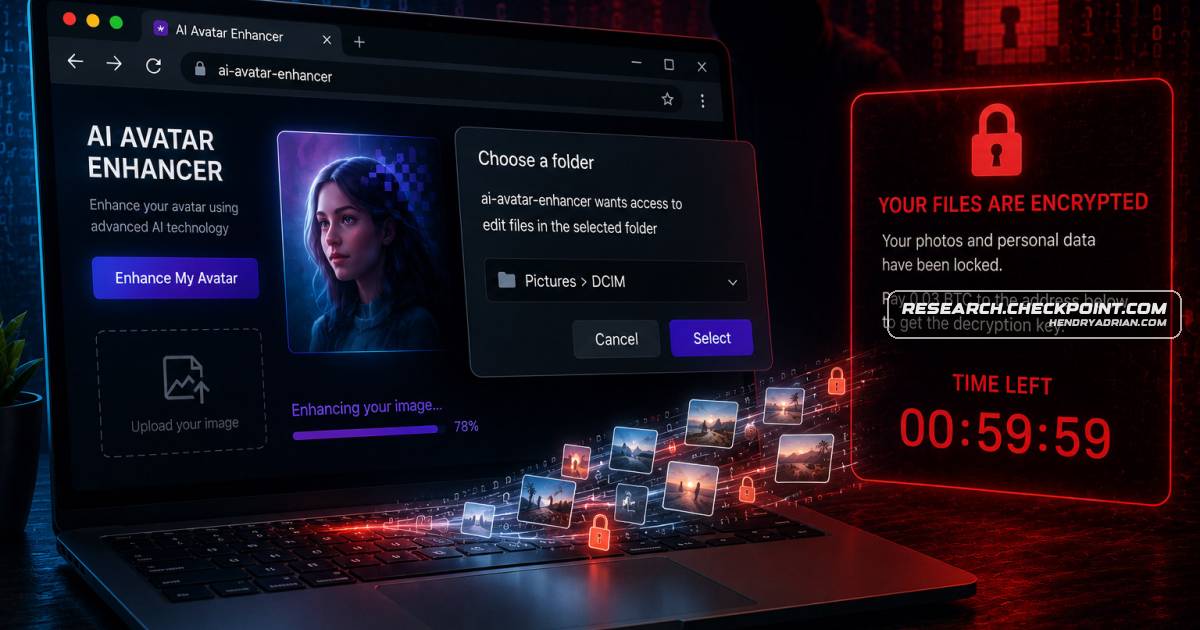
Check Point researchers found that an AI-generated malware sample pointed to a practical browser-only attack: a deceptive site can use Chrome’s File System Access API to access, exfiltrate, or encrypt files after a user grants folder access.
Key points
- The analyzed DeepSeek-attributed sample was incomplete, but its file-access workflow exposed a plausible browser-based ransomware technique.
- The attack relies on a phishing-style lure and the user approving a folder-access prompt; it requires no native payload, browser exploit, app installation, or root access.
- The File System Access API can let a site enumerate and read files, and request permission to modify them. The research tested access to Pictures and DCIM directories on Android and Windows.
- The researchers built a working proof of concept disguised as an AI image-upscaling tool; on Android, the selected photo directory could be encrypted during a fake processing step.
- The technique primarily affects Chromium-based browsers that expose the picker API. The article reports no evidence of this pattern being used in real-world campaigns at the time of analysis.
- The researchers recommend scrutinizing folder-access prompts, avoiding access to sensitive directories, keeping backups, and treating unfamiliar AI-branded tools cautiously.
Article Details
- Attack Vectors
- A fake AI image-upscaler or photo-enhancement page uses social engineering to persuade a user to grant folder access through the browser's File System Access API. In the controlled proof of concept, the page then encrypts images in the selected folder; the article also describes file reading and exfiltration as capabilities of the workflow.
- The DeepSeek-attributed sample contained an incomplete browser-based file-access workflow. The researchers report that a separately developed proof of concept demonstrated a working version on Android and Windows, without a native payload, browser exploit, APK installation, or root access.
- Defensive Notes
- Treat browser folder-access prompts as security decisions: verify which site is requesting access, which folder is selected, and whether file modification is necessary.
- Avoid granting unfamiliar websites access to sensitive or irreplaceable folders; use a temporary or empty folder for experimental web tools.
- Use reputable applications for sensitive file processing, maintain offline and cloud backups, and keep browsers and mobile operating systems updated.
- Be skeptical of AI-branded utilities that request broad access to local files.
Indicators of compromise
| Type | Indicator | Context |
|---|---|---|
| SHA256 | 07c39f79ab92fb21557b82283472dce1c112f577d796111fb752c3c6d84c86b5 | SHA-256 of the DeepSeek-attributed sample analyzed in the article. |
MITRE ATT&CK
People
Malware
Vendors
Anthropicdescribes additional safeguards for models classified as having High Cybersecurity Capability, while Anthropic has published reports on detecting and countering cyber misuse of Claude.DeepSeekIn this research, DeepSeek connected unrealistic browser-malware concepts with a real browser capability, turning an AI-generated malware hallucination into a plausible browser-native ransomware technique.OpenAIOpenAI’s cyber-safety documentation, for example, describes additional safeguards for models classified as having High Cybersecurity Capability, while Anthropic has published reports on detecting and countering cyber
Products
AndroidThe Android scenario is especially concerning because photo directories are high value personal data stores and, unlike iOS, modern Android Chrome versions expose a browser API that allows web pages to read and modifyChatGPTshowing that AI systems could generate offensive components, to cases of cybercriminals using ChatGPT to create malicious tools, and later to advanced AI-authored malware frameworks such as VoidLink.ClaudeCapability, while Anthropic has published reports on detecting and countering cyber misuse of Claude.DeepSeek V4Figure 3 – DeepSeek V4 refuses to generate ransomware when prompted directly.Google ChromeIt relies on social engineering and a legitimate permission prompt exposed by the File System Access API in Google Chrome.