
Microsoft Details Multi-Stage AiTM Phishing Campaign Targeting 35,000 Users
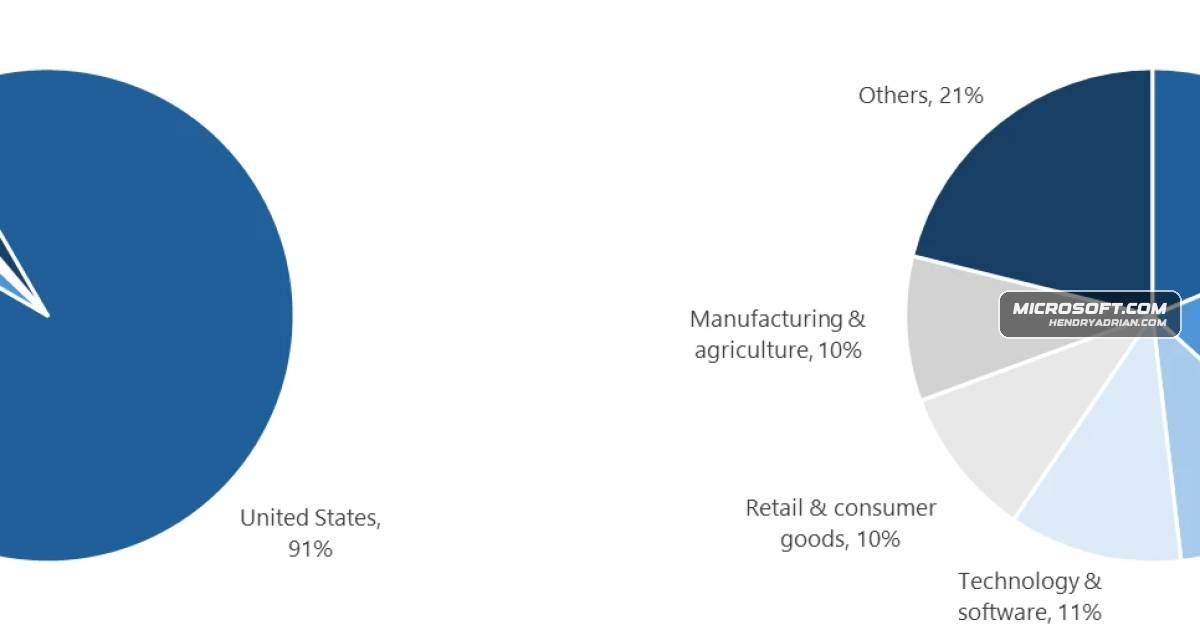
Summary
Microsoft analyzed an April 2026 phishing campaign that targeted more than 35,000 users with compliance-themed emails and PDF lures, leading to an AiTM flow designed to capture authentication tokens. Microsoft recommends email, browser, and phishing-resistant MFA mitig
Key points
- Microsoft observed campaign waves from April 14–16, 2026, targeting more than 35,000 users across 13,000+ organizations in 26 countries.
- Emails impersonated internal compliance communications and used PDF attachments to direct recipients through staged, CAPTCHA-gated pages.
- The final “Sign in with Microsoft” step initiated an AiTM session-hijacking flow designed to capture authentication tokens and enable account access.
- Microsoft confirmed the AiTM portion of the attack chain, but said it could not confirm the device-code-phishing stage suggested by some characteristics.
- The final destination varied between mobile and desktop users; CAPTCHAs likely impeded automated analysis and sandboxing.
- Recommended defenses include Safe Links and Safe Attachments, Zero-hour Auto Purge, network protection, SmartScreen, and phishing-resistant or passwordless authentication.
Article Details
- Attack Vectors
- Phishing emails impersonated internal compliance or regulatory communications and attached PDFs containing a “Review Case Materials” link.
- The PDF link sent recipients to attacker-controlled domains with CAPTCHA-gated landing pages, followed by intermediate and final pages that varied their destination based on whether the user was on mobile or desktop.
- Selecting “Sign in with Microsoft” initiated an adversary-in-the-middle authentication flow that proxied the session and captured authentication tokens.
- Microsoft reported that attackers signed in with stolen valid entities; the article notes that the confirmed attack chain included AiTM, while the intermediate stage had hallmarks of device-code phishing.
- Defensive Notes
- Enable Zero-hour auto purge (ZAP), Safe Links, and Safe Attachments in Microsoft Defender for Office 365; use Threat Explorer to investigate and remove delivered phishing messages.
- Enable network protection in Microsoft Defender for Endpoint and use browsers that support Microsoft Defender SmartScreen.
- Prefer password-less or phishing-resistant authentication, such as Windows Hello, FIDO keys, or Microsoft Authenticator.
- Configure automatic attack disruption in Microsoft Defender XDR and use Microsoft Defender detections and advanced hunting to investigate related activity.
- Provide user awareness training and phishing simulations.
Indicators of compromise
| Type | Indicator | Context |
|---|---|---|
| DOMAIN | acceptable-use-policy-calendly[.]de | Attacker-controlled landing domain hosting malicious campaign content. |
| DOMAIN | cocinternal[.]com | Domain identified as hosting sender addresses used for campaign emails; the article assesses the sending domains as likely attacker-controlled. |
| DOMAIN | compliance-protectionoutlook[.]de | Attacker-controlled landing domain hosting malicious campaign content. |
| DOMAIN | gadellinet[.]com | Domain identified as hosting sender addresses used for campaign emails; the article assesses the sending domains as likely attacker-controlled. |
| DOMAIN | harteprn[.]com | Domain identified as hosting sender addresses used for campaign emails; the article assesses the sending domains as likely attacker-controlled. |
| SHA256 | 11420d6d693bf8b19195e6b98fedd03b9bcbc770b6988bc64cb788bfabe1a49d | SHA-256 hash of a campaign PDF attachment containing a phishing link. |
| SHA256 | 5db1ecbbb2c90c51d81bda138d4300b90ea5eb2885cce1bd921d692214aecbc6 | SHA-256 hash of a campaign PDF attachment containing a phishing link. |
| SHA256 | b5a3346082ac566b4494e6175f1cd9873b64abe6c902db49bd4e8088876c9ead | SHA-256 hash of a campaign PDF attachment containing a phishing link. |
MITRE ATT&CK
T1078 · Valid AccountsThe article's detection table describes threat actors signing in with stolen valid entities.T1204 · User ExecutionRecipients had to open the PDF and click its “Review Case Materials” link to initiate the phishing flow.T1497 · Virtualization/Sandbox EvasionCloudflare CAPTCHAs gated landing pages; Microsoft assesses that this likely impeded automated analysis and sandbox detonation.T1557 · Adversary-in-the-MiddleThe AiTM flow proxied authentication sessions and captured tokens, enabling account access.T1566 · PhishingAttackers distributed phishing emails with PDF attachments that directed recipients to credential-harvesting pages.
Vendors
Products
Microsoft AuthenticatorEnable password-less authentication methods (for example, Windows Hello, FIDO keys, or Microsoft Authenticator) for accounts that support password-less.Microsoft Defender for EndpointEnable network protection in Microsoft Defender for Endpoint.Microsoft Defender for Office 365by educating users about phishing lures, investing in advanced anti-phishing solutions like Microsoft Defender for Office 365 and configuring essential email security settings, and encouraging users to employ webMicrosoft Defender SmartScreenEncourage users to use Microsoft Edge and other web browsers that support Microsoft Defender SmartScreen, which identifies and blocks malicious websites, including phishing sites, scam sites, and sites that host malware.Microsoft Defender XDRConfigure automatic attack disruption in Microsoft Defender XDR.Microsoft EdgeEncourage users to use Microsoft Edge and other web browsers that support Microsoft Defender SmartScreen, which identifies and blocks malicious websites, including phishing sites, scam sites, and sites that host malware.Microsoft Security CopilotMicrosoft Defender provides detections and hunting queries (email sender filtering, Threat Explorer, advanced hunting) and integrates with Microsoft Security Copilot and Defender XDR for response and investigation.Windows HelloEnable password-less authentication methods (for example, Windows Hello, FIDO keys, or Microsoft Authenticator) for accounts that support password-less.
Countries
Industries
Financial Servicesbut instead impacted a broad range of industries, most notably Healthcare & life sciences (19%), Financial services (18%), Professional services (11%), and Technology & software (11%).Healthcare & Life Sciencesnot focus on a single vertical but instead impacted a broad range of industries, most notably Healthcare & life sciences (19%), Financial services (18%), Professional services (11%), and Technology & software (11%).Professional Servicesrange of industries, most notably Healthcare & life sciences (19%), Financial services (18%), Professional services (11%), and Technology & software (11%).Technology & SoftwareHealthcare & life sciences (19%), Financial services (18%), Professional services (11%), and Technology & software (11%).