
Linux Fundamentals for Beginners Entering Cybersecurity
Summary
A beginner’s guide to Linux concepts useful in cybersecurity, including the filesystem, permissions and distributions, with practice suggestions using Docker, dual booting and hands-on learning platforms.
Key points
- The article recommends learning Linux fundamentals and using manuals rather than trying to memorize every command.
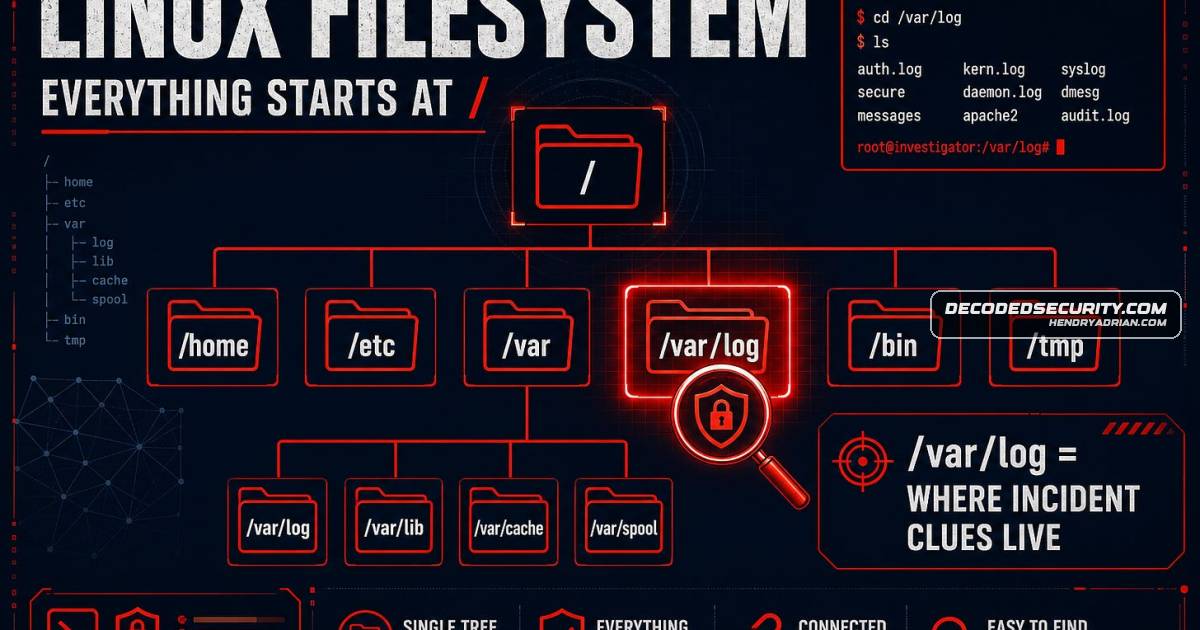
- It explains the filesystem as a tree rooted at / and identifies /var/log as a place to find system logs.
- It describes read, write and execute permissions and how permission strings indicate what users can do.
- Ubuntu is recommended for beginners; Kali Linux is presented as a distribution for security testing.
- Docker provides a way to practice in an Ubuntu container; dual booting offers a native Linux environment but requires more setup.
- TryHackMe, OverTheWire: Bandit and Hack The Box are suggested for hands-on practice at different experience levels.
Article Details
- Topic
- Linux fundamentals and beginner-friendly practice for cybersecurity
Products
CentOSCentOS / Rocky Linux – common in enterprise environmentsDebian LinuxDebian – stable and widely used in serversDockerThe article explains why Linux is powerful for security work and recommends beginner-friendly ways to practice, especially through Docker and hands-on labs.Docker DesktopInstall Docker Desktop on your computer (free)HackTheBox#LinuxKali LinuxUbuntu is recommended for beginners, while Kali Linux is useful for security testing.LinuxLearning Linux is essential for breaking into cybersecurity, but you only need the core concepts that matter most: filesystem structure, permissions, and how to read the manual.OverTheWire: BanditOverTheWire: Bandit – a free wargame that teaches Linux commands by making you solve puzzles.Rocky LinuxCentOS / Rocky Linux – common in enterprise environmentsTryHackMe#LinuxUbuntu#Linux