
Resume-themed LNK files deliver Xctdoor through DLL side-loading
Summary
AhnLab analyzed resume-disguised LNK files that launch decoy documents while creating scripts, scheduling persistence, and downloading payloads. DLL side-loading then loads Xctdoor, which attempts to contact an external C2 server.
Key points
- The LNK files use company names and job titles to resemble resumes, opening a decoy document while malicious activity runs in the background.
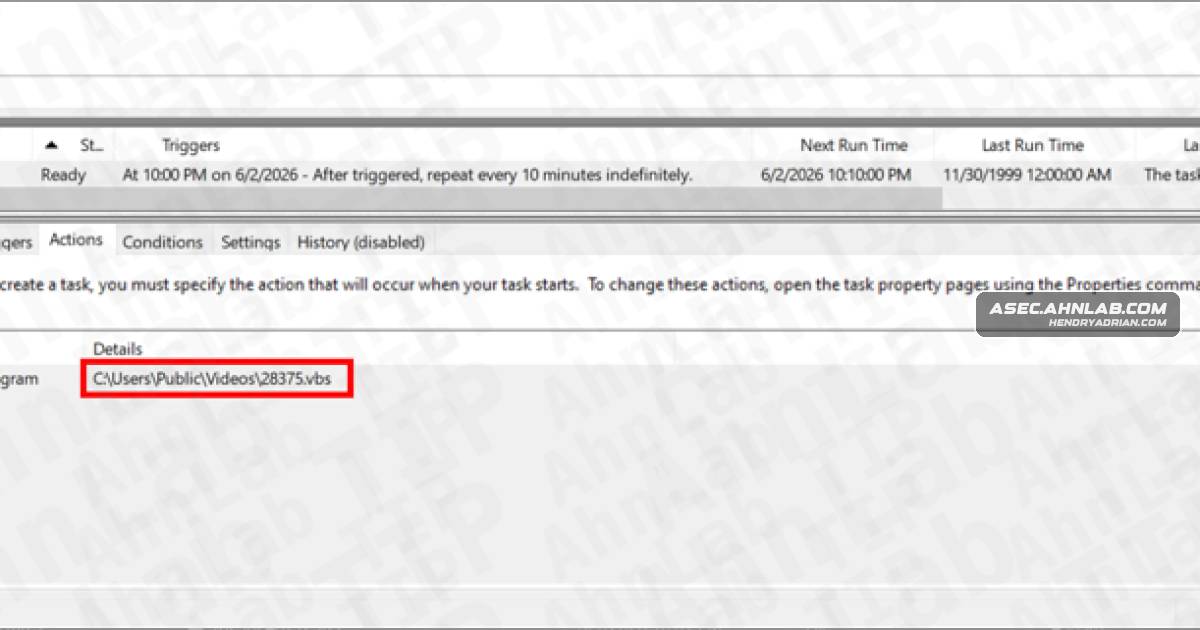
- The LNK creates batch, PowerShell, and VBScript files in C:UsersPublicVideos; a scheduled task named office365 runs a VBScript every 10 minutes.
- A batch file uses curl to download additional files. Decoded components include ProximityUxHost.exe, ProximityCommon.DLL, settings.dat, and MicrosoftBing.LNK.
- MicrosoftBing.LNK launches ProximityUxHost.exe, which loads ProximityCommon.DLL; the Xctdoor backdoor in settings.dat is injected into a legitimate process.
- The analyzed malware attempts to communicate with an external C2 server; the article does not disclose the download URLs or C2 address.
- The article recommends reviewing suspicious scheduled tasks and files under the specified Microsoft.BingSearch365 package path, and checking resume attachments’ actual file extensions before opening them.
Article Details
- Attack Vectors
- Malicious LNK files disguised as resume documents use company names and job titles in their filenames and open a legitimate decoy document when executed.
- The LNK files create batch, PowerShell, and VBScript files, which continue the execution chain.
- A scheduled task named "office365" runs a VBScript every 10 minutes.
- A batch file uses curl to download additional files; some are Base64-encoded and decoded before use.
- A shortcut in the Startup folder and DLL side-loading of Xctdoor through ProximityUxHost.exe are used to maintain execution and persistence.
- Xctdoor attempts to communicate with an external C2 server.
- Defensive Notes
- Verify the actual file extension and source before opening resume files or document attachments from unknown sources.
- Inspect Task Scheduler for suspicious tasks, including one named "office365" that runs a script periodically, and delete confirmed malicious tasks.
- Check the user profile path C:Users{User}AppDataLocalPackagesMicrosoft.BingSearch365_8wekyb3d8bbweAppData for suspicious files and remove confirmed malicious files.
- Inspect the Startup folder for unexpected shortcuts and investigate suspicious script and payload files associated with this activity.
MITRE ATT&CK
T1027 · Obfuscated Files or InformationSome downloaded files are Base64-encoded and decoded before being used.T1036 · MasqueradingThe LNK filenames resemble resumes, and the scheduled task is named "office365" to appear legitimate.T1053.005 · Scheduled TaskA PowerShell script registers the "office365" scheduled task to run a VBScript every 10 minutes.T1055 · Process InjectionThe article reports that Xctdoor from settings.dat was injected into a legitimate process.T1059.001 · PowerShellThe LNK creates and executes PowerShell scripts, including p2.ps1.T1059.003 · Windows Command ShellBatch files are created and executed as part of the script chain.T1059.005 · Visual BasicA VBScript runs a batch file and is also configured to run periodically by the scheduled task.T1105 · Ingress Tool TransferA batch file uses curl to download additional files from an external server.T1204.002 · Malicious FileThe infection begins when a user opens an LNK file disguised as a resume.T1547.001 · Registry Run Keys / Startup FolderThe p2.ps1 script creates a shortcut in the Startup folder.T1574.002 · DLL Side-LoadingMicrosoftBing.LNK launches ProximityUxHost.exe, which loads ProximityCommon.DLL to execute Xctdoor.