
How to Detect Azure and Entra ID Attack Techniques with Wazuh
Summary
A Wazuh walkthrough configures Azure Activity, Entra ID and Storage logs through Log Analytics, then uses Stratus Red Team to emulate eight cloud attack scenarios and validate custom rules for persistence, privilege escalation, exfiltration and resource-lock deletion.
Key points
- The walkthrough configures Wazuh to collect Azure Activity, Entra ID Audit and Sign-in, and Azure Storage diagnostic logs through a Log Analytics workspace.
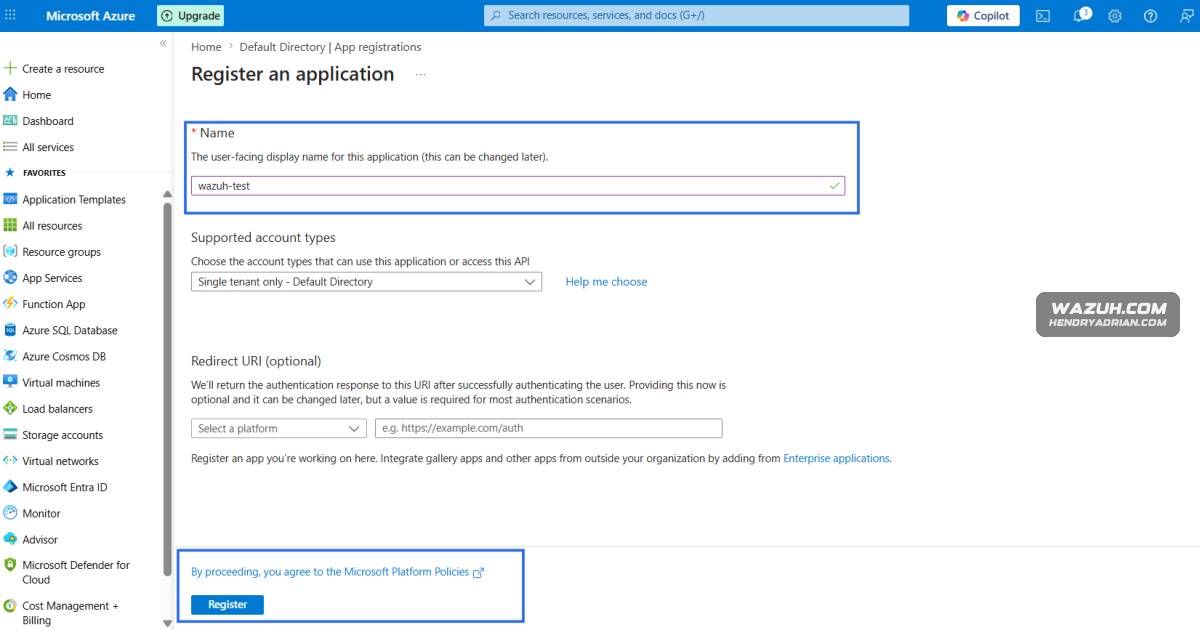
- A service principal is configured with Log Analytics API read permission and assigned the Log Analytics Reader role for telemetry access.
- Custom Wazuh rules target suspicious application and managed-identity credentials, federated identity credentials, elevated Azure access, managed-disk SAS access, storage key retrieval, and resource-lock deletion.
- Stratus Red Team is run from an Ubuntu endpoint to emulate eight Azure and Entra ID scenarios and check that the corresponding Wazuh rules trigger.
- The article recommends using a dedicated test subscription and cleaning up resources after the emulation exercises.
Article Details
- Defense Focus
- Detect suspicious Azure and Microsoft Entra ID activity by collecting cloud audit, sign-in, and storage telemetry in Wazuh and alerting on simulated persistence, privilege escalation, data access, and destructive actions.
- Detection Methods
- Alert on successful creation of service principal or application credentials and federated identity credentials.
- Detect managed disk access associated with SAS URL generation and Azure Storage account key retrieval.
- Alert on successful deletion of Azure resource locks and elevation to User Access Administrator at root scope.
- Use Stratus Red Team scenarios in a controlled environment to validate that detections trigger.
- Data Sources
- Azure Activity logs, including Administrative, Policy, Security, ServiceHealth, Alert, and Recommendation categories.
- Microsoft Entra ID AuditLogs, SignInLogs, ServicePrincipalSignInLogs, and ManagedIdentitySignInLogs.
- Azure Storage diagnostic logs, including StorageRead, StorageWrite, and StorageDelete; blob activity is collected through StorageBlobLogs.
- Rule Types
- Custom Wazuh XML rules matching event fields, operation names, categories, and success status.
- PCRE2 field-matching conditions in custom rules.
- Custom rules tagged with MITRE ATT&CK IDs.
- Defensive Actions
- Forward Azure Activity, Entra ID, and Azure Storage diagnostic logs to a Log Analytics workspace.
- Use a service principal with the required Log Analytics API Data.Read permission and Log Analytics Reader role for Wazuh log collection.
- Configure Wazuh's azure-logs module to collect the relevant workspace queries and apply custom detection rules.
- Test detections in a dedicated subscription that does not manage production workloads, then remove resources created during emulation.
MITRE ATT&CK
T1005 · Data from Local SystemThe article maps the simulated Azure managed disk export through SAS URL generation to this ID.T1098 · Account ManipulationThe article maps detections for application or managed-identity credential and federated identity credential creation, and root-scope access elevation, to this ID.T1485 · Data DestructionThe article maps successful deletion of an Azure resource lock, potentially removing protections before destructive changes, to this ID.T1537 · Transfer Data to Cloud AccountThe article maps retrieval of Azure Storage account keys, which may precede SAS access or data exfiltration, to this ID.T1567 · Exfiltration Over Web ServiceThe article maps managed disk export and Azure Storage exfiltration activity involving SAS access to this ID.T1651 · Cloud Administration CommandThe article maps its detection for successful Entra ID service principal credential creation to this ID as a potential persistence mechanism.
Vendors
MicrosoftThe article explains how to integrate Wazuh with Microsoft Azure and Microsoft Entra ID to collect telemetry from Azure Activity, Entra ID, and Azure Storage logs for detecting suspicious cloud behavior.WazuhThe article explains how to integrate Wazuh with Microsoft Azure and Microsoft Entra ID to collect telemetry from Azure Activity, Entra ID, and Azure Storage logs for detecting suspicious cloud behavior.
Products
Log AnalyticsWazuh is configured to ingest Azure Activity logs, Entra ID logs, and Azure Storage diagnostic logs from a Log Analytics workspace.Microsoft AzureThe article explains how to integrate Wazuh with Microsoft Azure and Microsoft Entra ID to collect telemetry from Azure Activity, Entra ID, and Azure Storage logs for detecting suspicious cloud behavior.Microsoft Entra IDThe article explains how to integrate Wazuh with Microsoft Azure and Microsoft Entra ID to collect telemetry from Azure Activity, Entra ID, and Azure Storage logs for detecting suspicious cloud behavior.WazuhThe article explains how to integrate Wazuh with Microsoft Azure and Microsoft Entra ID to collect telemetry from Azure Activity, Entra ID, and Azure Storage logs for detecting suspicious cloud behavior.
Tools
Azure CLI[URLs/Domains ] Azure CLI and Stratus Red Team acquisition sources – https://aka.ms/InstallAzureCLIDeb, github.com/DataDog/stratus-red-team/releases/download/v2.31.1/stratus-red-team_Linux_x86_64.tar.gzStratus Red TeamIt also shows how Stratus Red Team can emulate Azure and Entra ID attack techniques such as application backdoors, SAS-based exfiltration, resource lock deletion, and privilege escalation to validate custom Wazuh rules.